Scraplift Process from Inspiration to Layout
Hi scrappy friends!!!
When I was a new digi-scrapper, I relied heavily on templates. I loved using them for page composition and as a jumping-off point for beginning a layout. I hardly ever scrapped a layout without a template and when I did, I usually wasn’t as happy with it.
These days, I’ve moved away from using templates for all of my layouts and I find myself doing more scraplifting of layouts that I’ve been inspired by. Today I’m going to walk you through my process for doing that.
I follow lots of paper scrapbookers on Instagram and get most of my inspiration for scraplifting from there. I’ve detailed here before my process for Using Instagram Collections for Scrapbook Inspiration. I typically go into my saved folder on Instagram when I’m looking for inspiration to begin a new layout, especially if I’m scrapping without a template.
Here’s a layout from wilderstories that I recently used for inspiration:
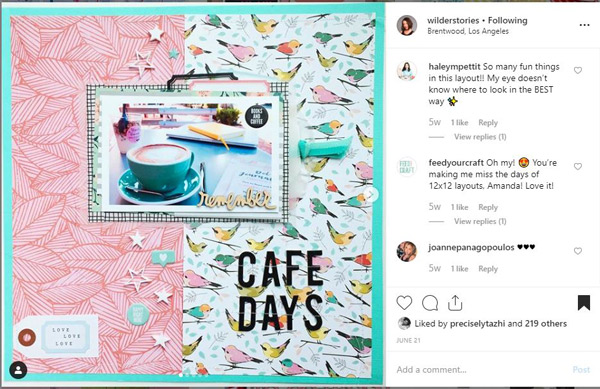
I create a template for myself or a sketch from that layout in Photoshop. To do this I decide what it is I want to “lift” from the layout. In this instance, I was inspired by the split background papers, the placement of the photo with layers behind it, the title placement and the paper tag.
Here’s the template/sketch I created:

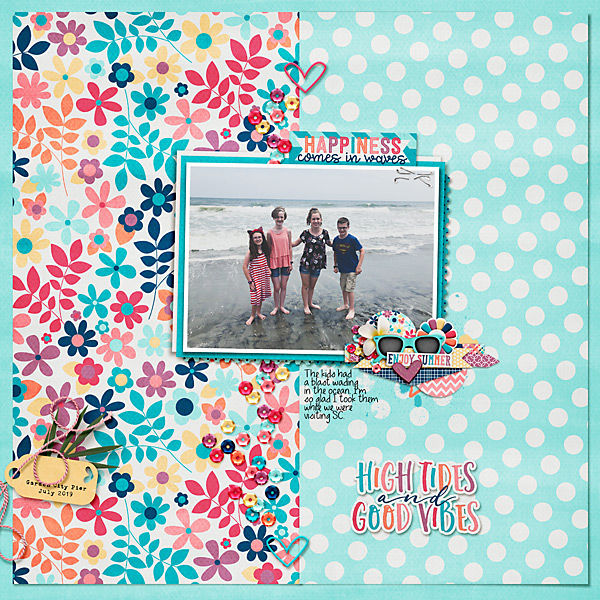
From here, it was super easy to add my own photos, background papers, title, and embellishments.
I always begin with adding the background papers. Then I add the photo and get the placement of that exactly where I want. Next, I add any accent papers, such as the layered papers behind the photo. Next comes any elements that I definitely wanted to include from the original layout, such as the tag. Then I add the title. Lastly, I accent with additional elements.
Here is my completed layout:
I do want to note that it is advisable that you credit the layout you used as your inspiration. I just put a note and a link to the layout, if possible, in my layout description box.
Do you scraplift layouts you’ve been inspired by? I’d love to hear your process for doing this!!