January 26 - Repeating, Transforming and Connecting Shape/s to Make a Frame

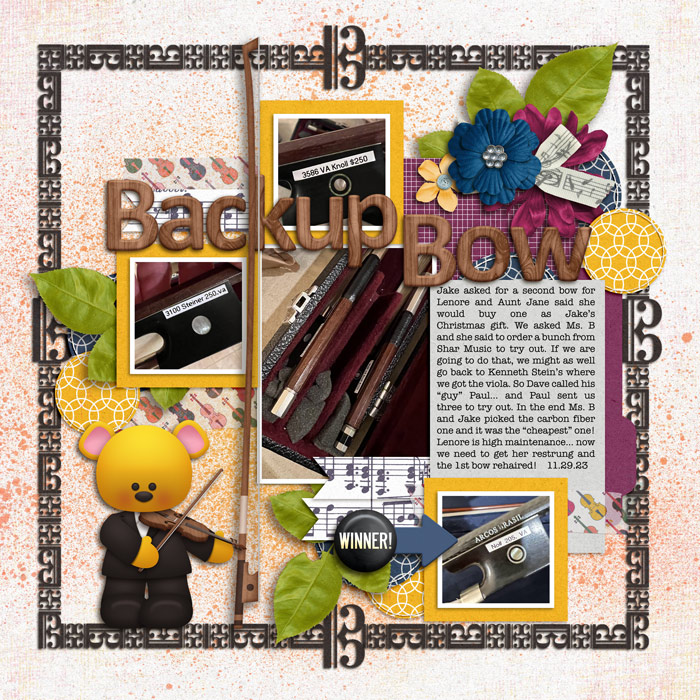
I sure hope I did this right... Used the shape "Tile 7" in Photoshop Elements as my repeating shape... when turned 90degrees, it is the alto clef used by viola players. :) I created my frame rotating, flipping, stretching, rotating again, and resizing the tile.
 
Last edited:
Wow! This was a tough one ... and took a REALLY long time!
For my shapes, I used the ornamental shapes from PSCC - one is a header of sorts, the other is the fleur d'elise. I rotated, flipped, and resized the shapes to create the 2 different frames for my photos. I then duplicated each "frame" and added a bold stroke to the background layer and then clipped papers to all of the layers.
 
full
 
Thank you for the challenge, and it WAS quite a challenge!!! I spent hours making one frame and then realized I had used a frame from a kit to make it! duh! I did learn a few things doing this. Took me way too long. I used the number 2 and copied it then reversed it. I used the heart shape for the hearts on the corners. I sure hope I did this right!
https://the-lilypad.com/forum/galleries/moc12-day-26-wine-600.561334/
MOC12 Day 26 Wine  800.jpg
 
Thank you so much for the challenge my dear, I used the elliptical shape and the circle to create my flower-frame and flower at the top of the page. Full credits in gallery. Nice day!
 
I am not sure if I did this correct or not. I used a circle and overlapped it several times and removes some parts.
 
Thanks for the challenge! I created a frame by copying, rotating, flipping and resizing the following music note shapes:
Eighth Note, Flat Symbol, Half Note, Quarter Note, and Sixteenth Note.
 
Thank you for the challenge, and it WAS quite a challenge!!! I spent hours making one frame and then realized I had used a frame from a kit to make it! duh!
You weren't the only one - don't feel bad, i'm actually really glad you realised before i had to message you and ask you to change it! i feel so bad doing that!
 
rework of my original page @bellbird
New frames for my photos - using a large C in the Pooly Quirky font, I used 2 different papers clipped to it for Castaway Cay. Merged them and then duplicated, rotated and adjusted to create the frames. Because of the change, I decided to make those 2 photos black and white and added a DCL logo. I think I like this version better!

 
I think I'm caught up to here - so by now if you have submitted for day 26, you either have a comment in your page in the gallery from me, or a 'conversation' about something requiring confirmation or modification or attention from me.

If you have neither a comment nor private conversation from me, please send a conversation to me.
To everyone that has had to do some adjusting or re-submit, thanks for being good sports. :beat
 
I loved playing around with this! I started with a S from the Old Newspaper Types font, duplicated and mirrored it and then attached them to each other. I then duplicated them again and built the frame. For the corners, I attached four O:s of the same font to connect the different sides. I clipped a paper to the frame and used a 3D style on it.

 
I used a circle as my shape, duplicated it and used the Transform -> Warp tool to transform each circle into a different blob, to then layer on top of each other and make my frame. I have never ever used the warp tool before (didn't even know where to find it) so I'm delighted to have explored these new blob making skills! :)

 
Tricky...I used the check mark from the shapes tool in PSCC. I skewed the Plaid check mark to make it longer and skinnier to resemble a sword, the red check mark I didn't transform so it would look more like a ninja star. I then rotated and stacked them on top of each other and duplicated each cluster to make the frame.
 
I used the custom shape snowflakes and made a frame. They ARE rotated but I realize now that it isn't visible. Hope it's ok!
 
Last edited:
I used a diamond shape and transformed, rotated and used the outline to create a frame. I'm not sure I love this one but I made the page in Affinity vs Ps so I pushed the limits a bit.

 
Oh this was easier than I thought, I just went for a basic shape and played around with the various transform tools - skew, warp, distort, perspective. Would have no chance of replicating!


I used a standard circle frame from PSE and did all the stuff.
Day 26 - Fly - frame process.jpg
 
catching up on my last pages, hope I did this correct!! using the font Abril Display to write my pup's name, Perola (pearl), I used lowercase and capital letters, applied distort , warp, rotate...hope it's ok for the challenge!! oh, and I used a epoxy style on the "frame"

 
Wow, this was a tough one for me. I deleted my first attempt. In this frame, I used the oval shape with no fill. The second oval is turned 90 degrees, squished, and resized. Then I copied these to complete the frame. I used a silver style and added a drop shadow to the group.

 
Back
Top