January 25: Photo Treatment/Technique: Artistic sketch (Photography challenge)

In Artisan 5 - I think 4 also has these options, if I remember correctly.

You can also use Filter, Stylize, Show Edges. There is even a box to check for color and it will draw it in color. Play with the adjustments. I did not check color in my example.

You can also use Filter, Stylize, Threshold. Play with the colors to get the look you want.

Play with the options and see what you get. It will also depend on the photo you want to use. Here is a quick example of each filter. I did not convert to B&W to start with. You can also try that as a first step. It will most likely give you different results.
View attachment 198755

If you look at the pages people have posted already, most have used a photo with distinct lines. My example photo has too many subtle color/shade differences that don't clearly define the object. So your picture would really make a difference in the end result.

Here is one I did for the speed scrap earlier this month. I used Stylize, Show Edges.
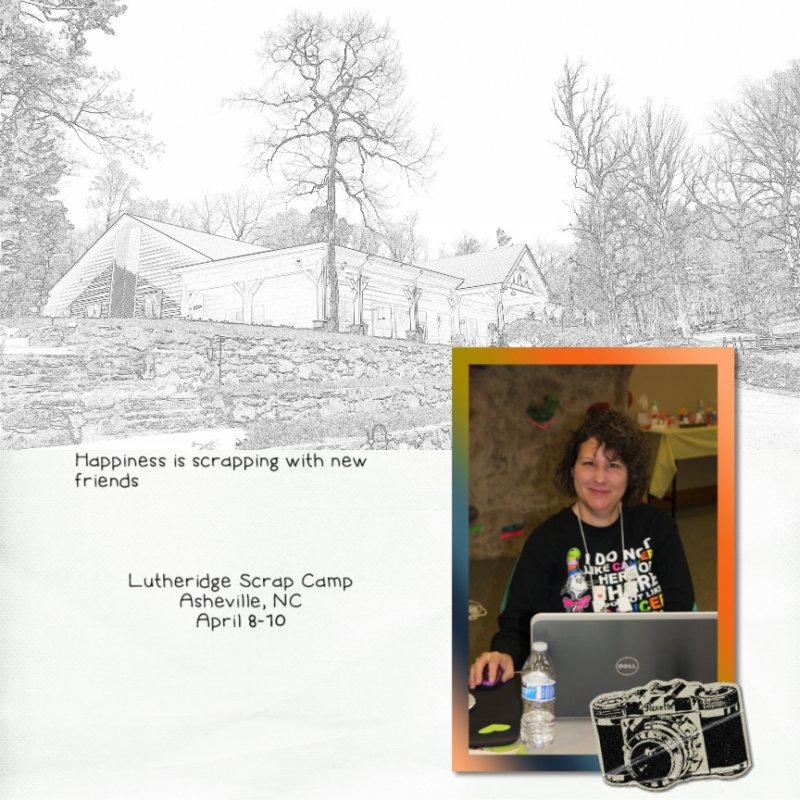
Great. Thank you. I didn't play with all the different options...in fact I rarely use those tabs! Maybe I should.


The small size makes the sketch effect hard to see, so here is a close up
Screen Shot 2017-01-25 at 7.20.24 PM.png

Sorry, that still doesn't do it justice ... but I gotta run.
 
Using Artisan 5 - Filter, Stylize, Show Edges with color option. Then I used Colorize on the Touchup ribbon to add some more purple to the lavender. Finally, I applied a mask. I used the same mask for the actual photograph.
 
Great. Thank you. I didn't play with all the different options...in fact I rarely use those tabs! Maybe I should.
Oh do! It is soo much fun. But the picture you pick really does affect it. I first tried with a different photo and it just wasn't working.
 
Thanks for the great tut. Couldn't add color because the base photos were black and white. Here's mine:
 
I love this technique!! So So fun!! I might have to start getting a little more creative and actually using some of those buttons! Thanks for the great lesson.
 
I tried and abandoned several other photos before settling on this one. Thank you for the awesome challenge! I had fun learning a new technique:

 
My paint shop pro 9 did a terrible job at this, no matter how much I played with it. I wound up using a phone app called Deep Art Effects (It has many arty type filters for photos!) to make my photo.

full
 
Back
Top