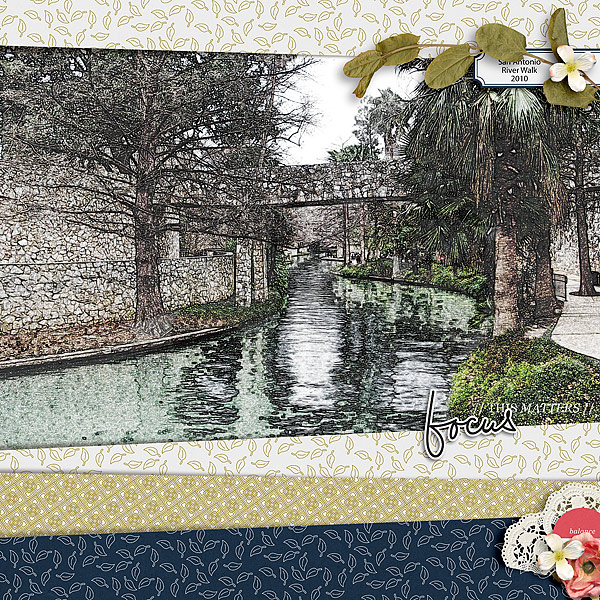
January 25: Photo Treatment/Technique: Artistic sketch (Photography challenge)

Ditto to all those giving you kudos on your explanation Farrah! I added another layer or two and played with blending modes but unfortunately didn't save that psd to explain. :(

and my original
DSCN4138.JPG
 
I Have Never Heard Of Photos Being Turned Into Sketches & My
Scrapbooking Program Isn't Capable Of Doing This,So I Went
To Snapstouch Like You Suggested & Turned My Photo Into A
Sketch & Made My Layout With The Sketch...

For My Captivating Layout:

I Used:Cottage Romance By Etc By Danyale &
:It's My Life By Little Butterfly Wings

Captivating (640x640).jpg
 
MOC_25 photo treatment_web.jpg

MOC_25 photo treatment
Supplies: Lynn Grieveson - Red Lobster kit, February Chill kit

Loved the challenge and the great step-by-step explanation. I'll have to admit it scared me at first and I may not have chosen the best photos to show off the technique as I did it on both photos in the layout. Bust it was fun & I always wanted to know how to do this. I'm sure I'll be playing with other photos using the technique.
 
Thank you for this tutorial! This was fun to play with today. There are just so many possibilities with this! I've loved looking at all the beautiful pages completed with this technique. Great challenge.
 
I want to say there's a way. I'm not at home, but let me check this afternoon. If I find it, I'll post it

You can use Filter/Edge/Draw Edges - and play with the different thresholds that's what I did, but I'm not liking it as much as some of the things I've seen here, so may play with the online site we were given.

well, couldn'tget the online to look good, so the Artisan Effect was actually better. LOL
I have something I don't love but it'll do
 
Last edited:
Back
Top