Disappearing Title Technique
Happy Wednesday my artful friends! I’m popping in today with a helpful hint for placing title work on patterned background. Don’t you just love all the luscious patterned papers in kits? I love to use them as backgrounds on my pages, but they can make the title very difficult to read because it gets lost in patterns and colors. There is a simple and quick fix for this dilemma, though. Just add a small solid colored border around the title to give it a bit of separation from the background.
Here is an example of this technique:
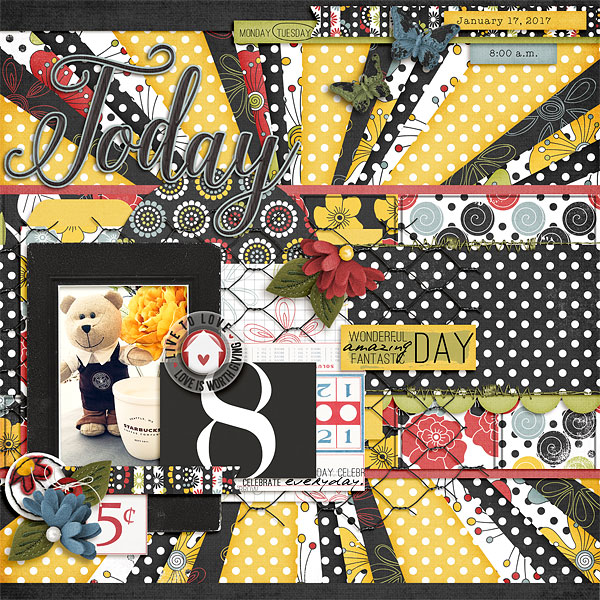
Notice the thin, blue border around the word “Today” at the top of the page? I created that to help make the title more visible on the page. Here is what it looked like before I added the border:
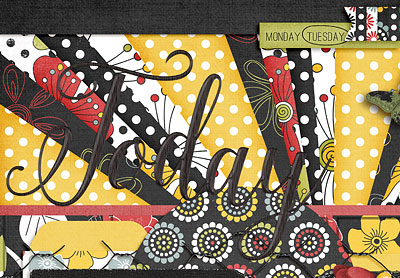
See how it kind of blends into the patterned background? There is an easy fix, though. Just follow these simple steps:
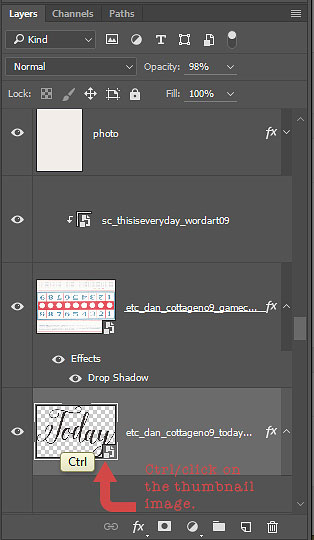
1. Select the Title layer in the layers palette (Ctrl/Cmd and Click on the title thumbnail in the layers palette). You should see marching ants surrounding the title on the page.
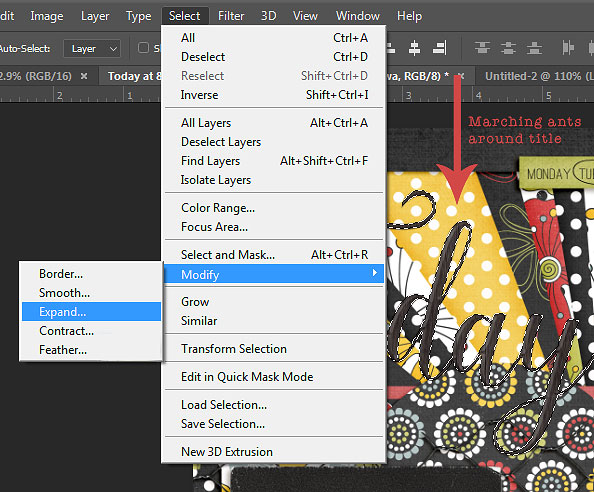
2. With the title selected, choose Select>Modify>Expand. Choose the number of pixels in the pop up box. I expanded the selection 10px on my page. You can adjust this number to find the size that you like.
3. With the expanded selection still active (marching ants will show on the page), create a layer just below the title in the layers palette. (Alt > New layer button will automatically create a layer below the active layer.)
4. With the new layer active, fill the selection (with any color) by hitting Ctrl/Alt and Backspace Key. This command will use either the foreground or background color. The specific color isn’t important, because this layer will be used as a clipping mask.
5. The last step is to clip the solid paper of your choosing to the expanded selection (Ctrl/G or Ctrl/Alt/G, depending upon what version of PS or PSE you are working in). I also added a very slight drop shadow to the original title layer, and a regular alpha shadow to the expanded selection layer. Here is what my layers look like:
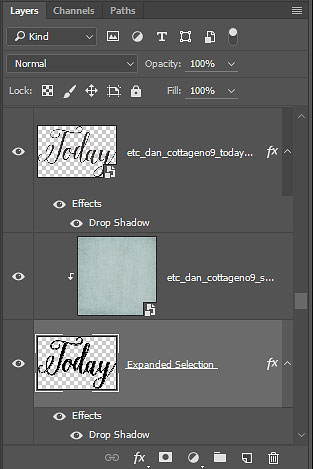
And there you have it – disappearing title problem fixed. 🙂
(BTW – if you are wondering what digital goodness I used to create my layout, you will find the full credits by clicking on the first layout above. Most of materials I used are in the SOSN sale today at 50% off. )
Until next time ~
Judie