Photopea: 1 year of lessons & my Premium (paid level) experience
It’s nearly been a year since I started using Photopea, an online graphics program that looks and feels rather similar to another well-known graphics program, and documented that on the blog here . There was some renewed interest regarding this program in the forum and over iNSD, so I thought I’d post some user experience updates. Not to blatantly plug myself but it’s worth reading that post first if you need context, otherwise this may just sound like some whinging because it hasn’t all been smooth sailing like that optimistic first post suggests, but it’s still been less frustrating than my old Photoshop CS6 that I could no longer use after changing computers. Last month I tried out a single month at Premium level on Photopea to see if it improved some of the issues I was having with the free version. And it generally improved my user experience, but is it worth the cost in the long run for me personally?
Here’s a fairly exhaustive look at the costs and some gripes with Photopea you may be interested in if you are considering using it.
The subscription itself: In a refreshing change from most online services these days, there is no ongoing subscription requiring direct debit or similar for Photopea Premium. You renew it on a regular basis if you want to keep Premium status active, or it reverts to the free version with it’s right hand panel dedicated to regularly changing advertising. There isn’t even an annoying bunch of emails warning you of the impending return to the ad-filled version like I would have thought (and yes, I checked spam) so I wasn’t quite prepared when I reached the end of the month.
Ad’s were one of the things that I wondered about, if they were detracting from Photopea’s performance while I was using it to scrapbook. Apart from being a real screenhog sometimes (foreshadowing some of the glitches about to be discussed below), whenever ads would change over, or if there was a particularly ‘heavy’ ad (where it seems to move a lot or have a lot of flashing text like a gif, as opposed to a static jpeg style ad), the system used to become non-responsive and just freeze. No keyboard or mouse input would make a difference (I don’t have a touch screen anymore or would have tried that as well in frustration). It just seemed the ads were bogging it down or taking up it’s memory or bandwidth, or something technical behind the scenes when all I wanted to do was move an element or add a shadow etc. (That said, I do often have a heap of tabs open at any one time in Chrome and Photopea still uses a browser even in the downloaded version as discussed in the previous blog post)
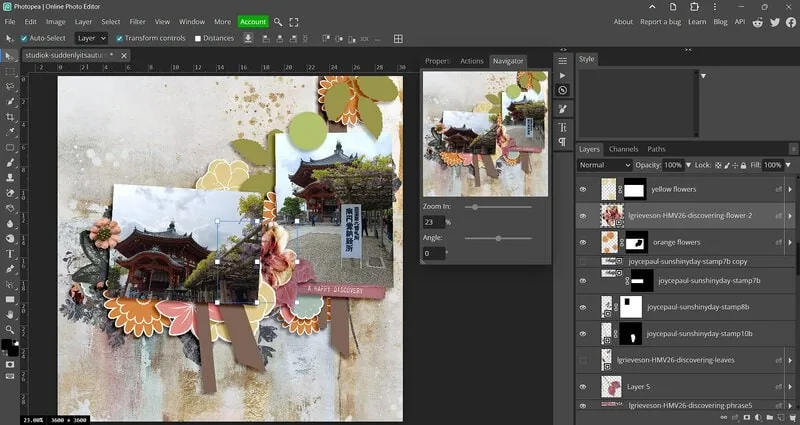
Removing ads has, for me at least, very much improved this. It also has given back some of the workspace visually so that I can have my beloved Navigation panel open and not overlapping the scrapbook page or whatever I’m working on. I can also extend the Layers Palette so I can read the full layer names (for easier crediting and just finding the layer I want at any given time because before all I could really see were the first few characters of each layer name). It now looks almost identical to my previous well-known graphics program and maybe that’s partly why my gripes, nothing huge and deal breaker-ish but the little things that can add up, they continue to plague me.
But on to the is it worth it.
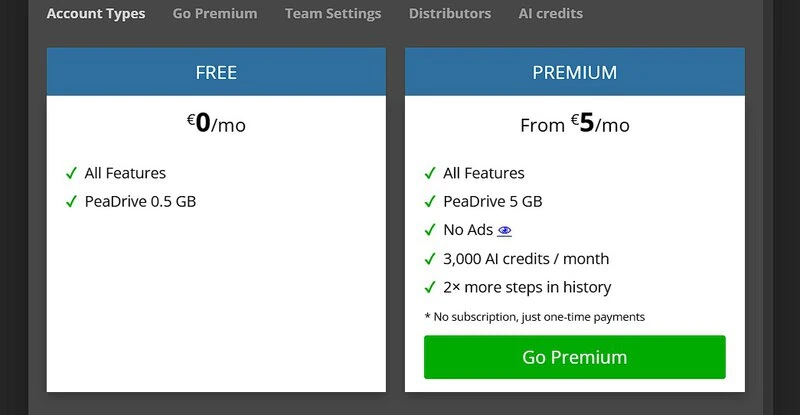
So the touted $5 a month (that I quoted in the first blog post) is actually 8 Euro’s a month for a single user when you get to the next screen – if there’s multiple users it can be equivalent to 5 Euros. For me, 8 Euro’s is $AUD15. I pay about $AUD10 a month for Amazon Prime and another i don’t even know how much at this point for Audible on top of monthly phone bills etc so do I really want to pay $15 (plus any bank-imposed international conversion fees) to scrap 3-4 times a month (which is my average)? As the site reminded me, I could sign up for a longer and save, and yes, the program was nicer to use while in Premium mode so maybe I would scrap more with less resistance.
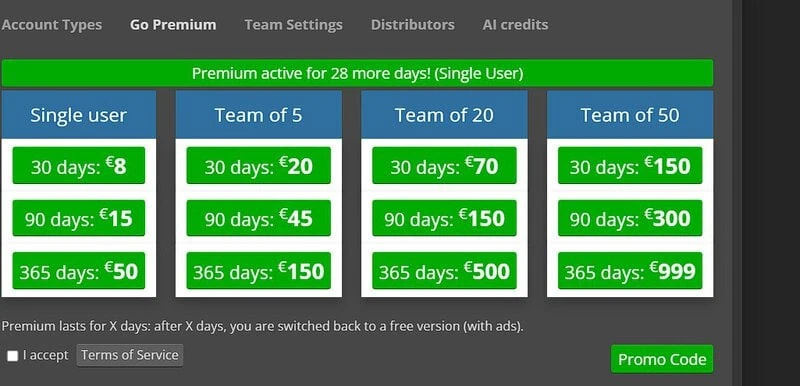
The sign up process itself was through an emailed link which initially made me wary so we ended up using a pre-paid international currency card and only a one-month payment to limit risks. After a couple hours, it worked out and the red account button went green which you can see in some of my screenshots. I guess choosing a longer plan would also make this less inconvenient.
Comparing to other paid programs: A year on Premium is equivalent at the current exchange rate to $AUD81.31, or $USD58.79, which brings it down to about $AUD6.78 per month. This is still substantially better than the equivalent Photoshop Only Plan on Adobe that runs at $AUD35.99 per month, according to a quick Google search; or $AUD360 for a 3-year license of Photoshop Elements (PSE) (which equates to $4.44 per month over the 3 years but that’s a lot upfront and a commitment that potentially leaves me with nothing to show for it (a product I don’t own and potentially can’t even open layouts made with it after the 3 yrs are up).
I do miss a few things that I’ve realised over the months of using Photopea and it’s not without it’s gremlins.
- Font handling: I still have an issue with the way Photopea handles fonts and particularly sizing. I find I’m overwhelmed by font options now (it seems to have more fonts under A & B than I had loaded in my old Photoshop and too much choice can be paralysing and scrolling through options takes forever and for someone indecisive, that can be problematic) and beyond that, the font sizing is so far removed from the way I was used to fonts being sized in any Adobe or Microsoft program. I have 2 different issues with this: The first is it means I can’t use fonts as very large titles without having to use Transform to enlarge them as all the fonts seem to now be tiny and the maximum size of 150pt feels to me like it’s really around 60-70pt.
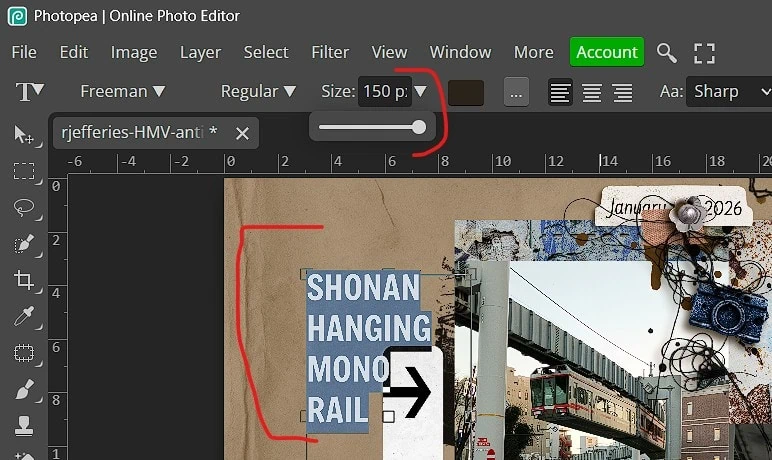
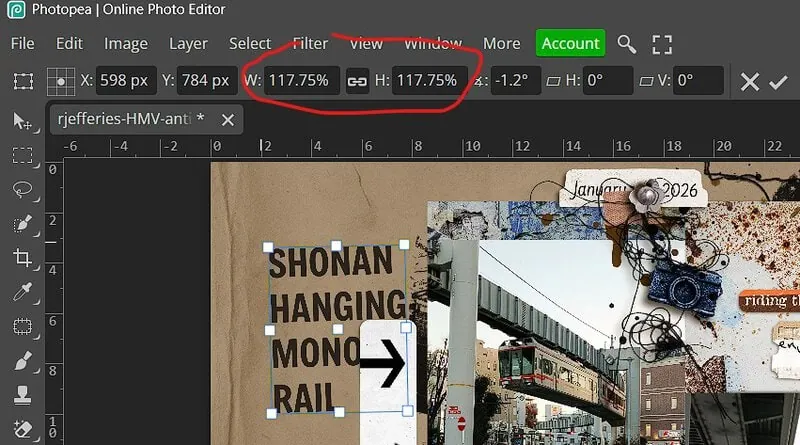
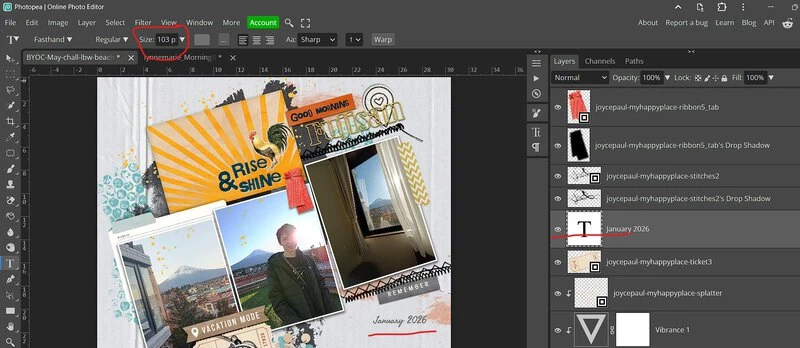
I know each font is sized slightly differently when it is created but so you can see what I mean, below is the date with the elements around it for scale (which I would think would be around a 12 point font in other programs), and above is how I made a title, which to me isn’t all that large, using the maximum 150pt font size and then transform to enlarge it (gasp, i hear some of you think given the way pixels work). To fill the page with a monogram back during my MOC challenge, I think I had to rasterize the text layer and transform it as well (or bring in a big alpha from the store).
Typing journalling in a size 30ish font or larger is something I still struggle with mentally because it feels like it would give a kindergarten learn-to-read size of text when printed! It’s something I figure I’ll eventually get used to but for instance: for this date to be legible, on the final layout it’s typed in size 103pt; at 24pt, it was tiny compared to the wordstrip (And no I haven’t printed anything yet…)
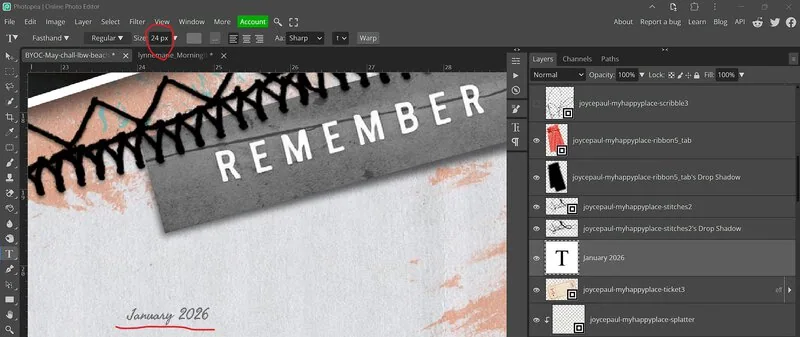
- No Snapshot function: I used to love the Snapshot function in the History menu of PhotoshopCS6 that would allow you to set a history set point effectively that you could return to without having to hit Undo a dozen times, which as an indecisive scrapper, it would be a bit of a safety net. I could have another idea that involves a significant reorganisation of a page and not have to worry about only being able to go back 10 or however many steps in the History before my previous version is lost to a data or memory dump, because I could just go back to that moment I had hit Snapshot (and often I had 3 or 4 Snapshots per freestyle page). There’s no such feature in Photopea that I can see, the History palette is pretty empty. An extra 2 steps in History as a on of the perks of Premium membership really doesn’t fix that issue for me.
- Can’t ‘Delete all Hidden Layers’: I also miss the ability to ‘delete all hidden layers’. I can’t find this option anywhere in Photopea and given my process often involves trialling every paper in a kit or throwing a whole kit on the page and then progressively turning things off to go more minimalist, I often have a lot of hidden layers by the time I’ve saved my final version of a layout. ‘Delete all hidden layers’ was usually my last step before saving and archiving my TIFF files to reduce filesize. In Photopea, I now delete those hidden layers one by one, (the monotony!) usually while internally grumbling and probably looking visibly annoyed. I do wonder about whether I could make or use some kind of Action or Script that does that for me but that would involve me learning how to make those so I continue to grumble with that.
- Can’t just ‘click and drag’ to apply the same shadows or layer effects to other layers. I can’t remember exactly what I used to do in Photoshop for this, it was like a shortcut of holding maybe ctrl+shift and dragging the layer style, going off muscle memory that’s fading, but it was less annoying than right clicking to find ‘copy layer style’ then having to right click and paste layer style – it felt like less steps and I miss that efficiency
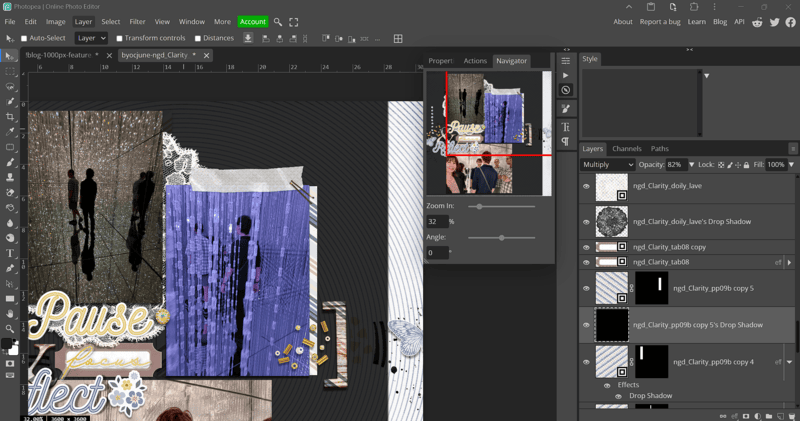
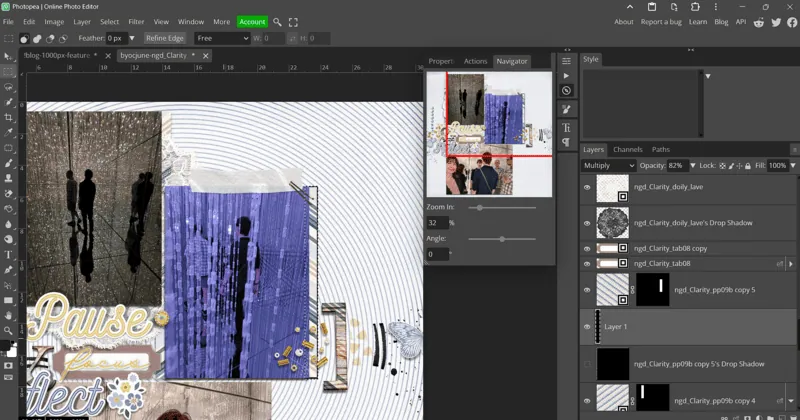
- One step forward with masks, 2-steps back when separating layers: I think most digiscrappers love masks and non-destructive editing. When you use a mask on a layer or edit it through warp for example, and then separate the shadow, the shadow is for some reason restored magically on that new layer and no changed carried over so you have to edit the shadow separately. This is a step backwards from PhotoshopCS6 for me.
- Here I’ve cut a small strip of the Clarity diagonal stripe paper to use behind a photo using a mask so the whole paper is still intact in case I decide to change the size of the mat. It had a shadow layer applied to it. When it was put on the layer below It was the full size paper shadow, so in the second screenshot I’ve had to cut the shadow down before warping it etc. which is why it’s called Layer 1. It can be the same if you use a template and separate the shadows sometimes. So sometimes I think painting in the shadows would be quicker
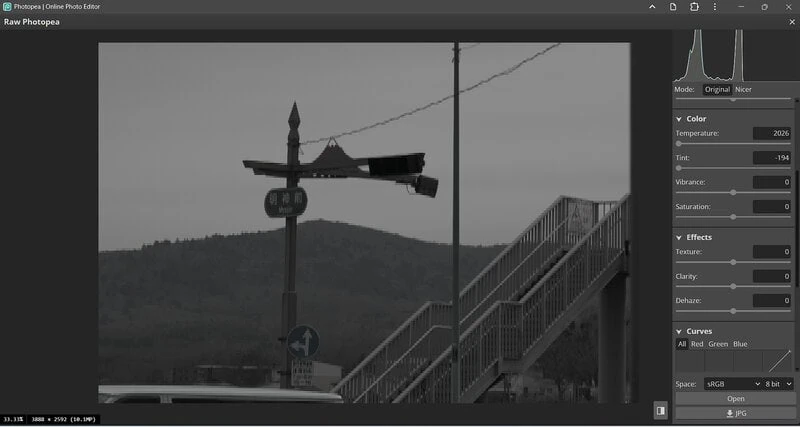
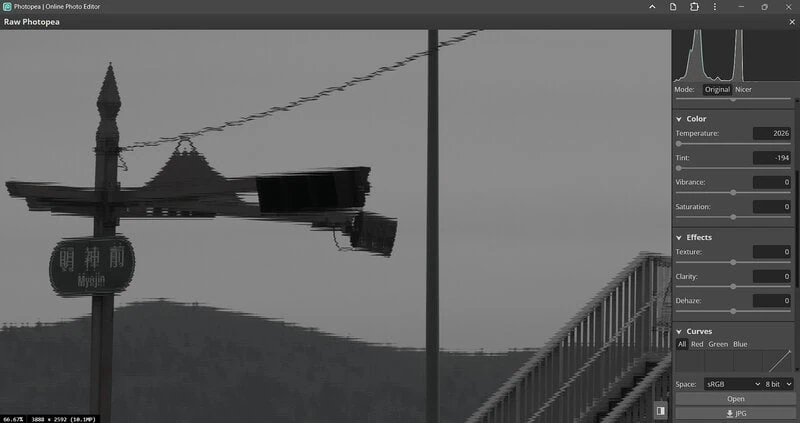
- Issues with RAW conversion? I still use my beloved Canon 7D DSLR from several years ago and if you know the benefits of shooting RAW and the processing possibilities those images present, well, not with Photopea. Everything seems to have some kind of weird double exposure (like a poorly offset duplicate or shadow over the top) or just some kind of weird pixelation. Have a look at the power line in this photo, not a smooth curve at all. Maybe there is some kind of calibration or plug-in to work with RAW imports but it’s not apparent to me and this was really disappointing because I had hoped that Premium would improve this.
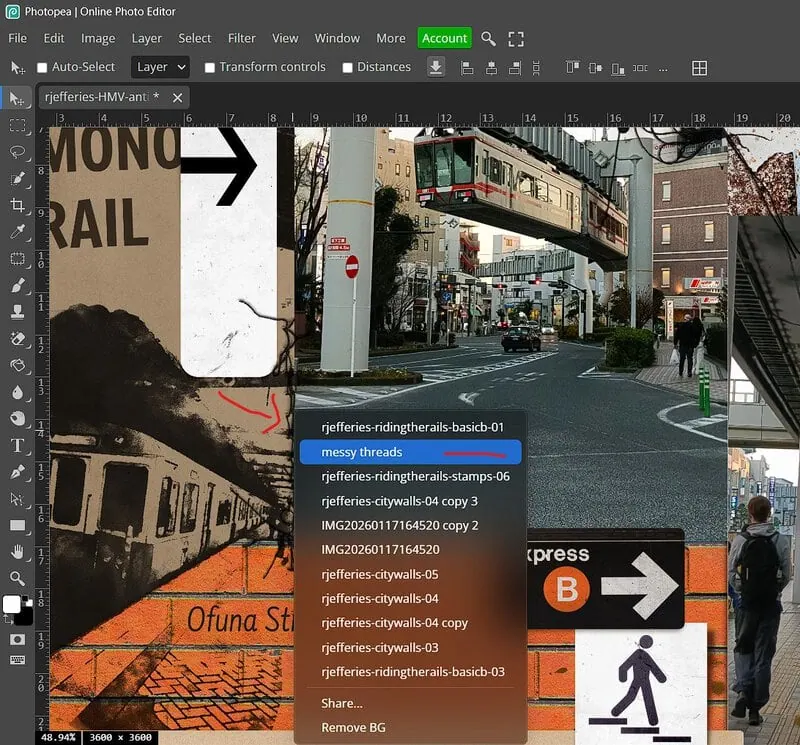
- The Ctrl Click Selection Issue: Even on Premium, the ability for Photopea to ‘ctrl click’ anywhere on the layout and select the layer I want rather than searching for it in the Layers Palette feels annoying and random. The order of layers is always random and rarely the layer I’ve ‘ctrl clicked’.
- For example when I’ve tried to click on these messy threads to adjust where they sit on the page, I’ve annoyingly activated and dragged the background layer instead (Photopea seems to acknowledge the messy thread layer is there, but on the point I ctrl+clicked (several times at different spots on the messy thread), it has the order of layers starting with the background in this case, and while the workaround here may be to lock the background layer, it could equally be any of the other layers in that right click menu that it randomly activates and moves, rather than keeping the layers in the ‘top down’ order like they are in over on the Layers Palette). And no, it’s not selecting the layers from the bottom up given the background is first on that list and the messy threads are above my photo layers & Rachel’s City Walls stamp layers). I like logical order and I like consistency and this issue has neither.
- Glitches: It’s also not without it’s glitches.
- Where’s my menu? Sometimes I can’t find a right-click menu or a drop down that should be next to the Layers Palette where I clicked, and I’ll think it’s my mouse not working or the program deciding not to let me use that function at times – only to have the menu pop up some where completely unexpected, like on the other side, in the opposite corner which baffles and annoys me and moreover slows my process down. (I can’t be sure if this happened through my Premium subscription now, this may have been to prevent the ad’s from being blocked by functional menus – this screenshot is from my early Photopea days (with ther ed Account button at the top)).
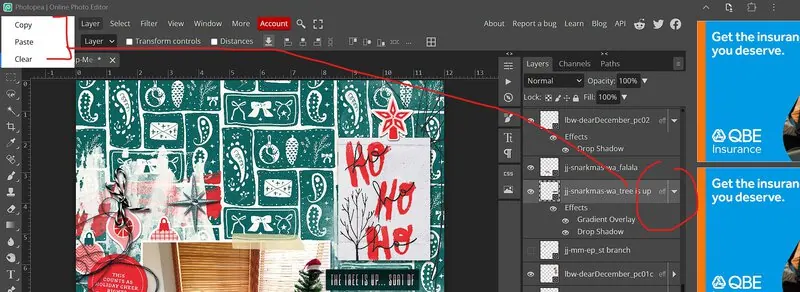
-
- Screen Proportions: Before Premium, it would also just decide to change the screen proportions so it felt like I had the smallest amount of workspace – randomly maximising the ad space and/or the layers palette width and squishing my layout into less than a third of the screen (which on my 15-inch laptop, that makes me feel like I might as well scrap on my phone screen) – gremlins happen but grrr. How this would translate for scrappers using 2 screens, I’m not sure. The Panels are fixed, they can’t really be ‘floated’ or customised other than turning tools off as far as I can tell so I do miss my more customised workspace of CS6 in this respect.
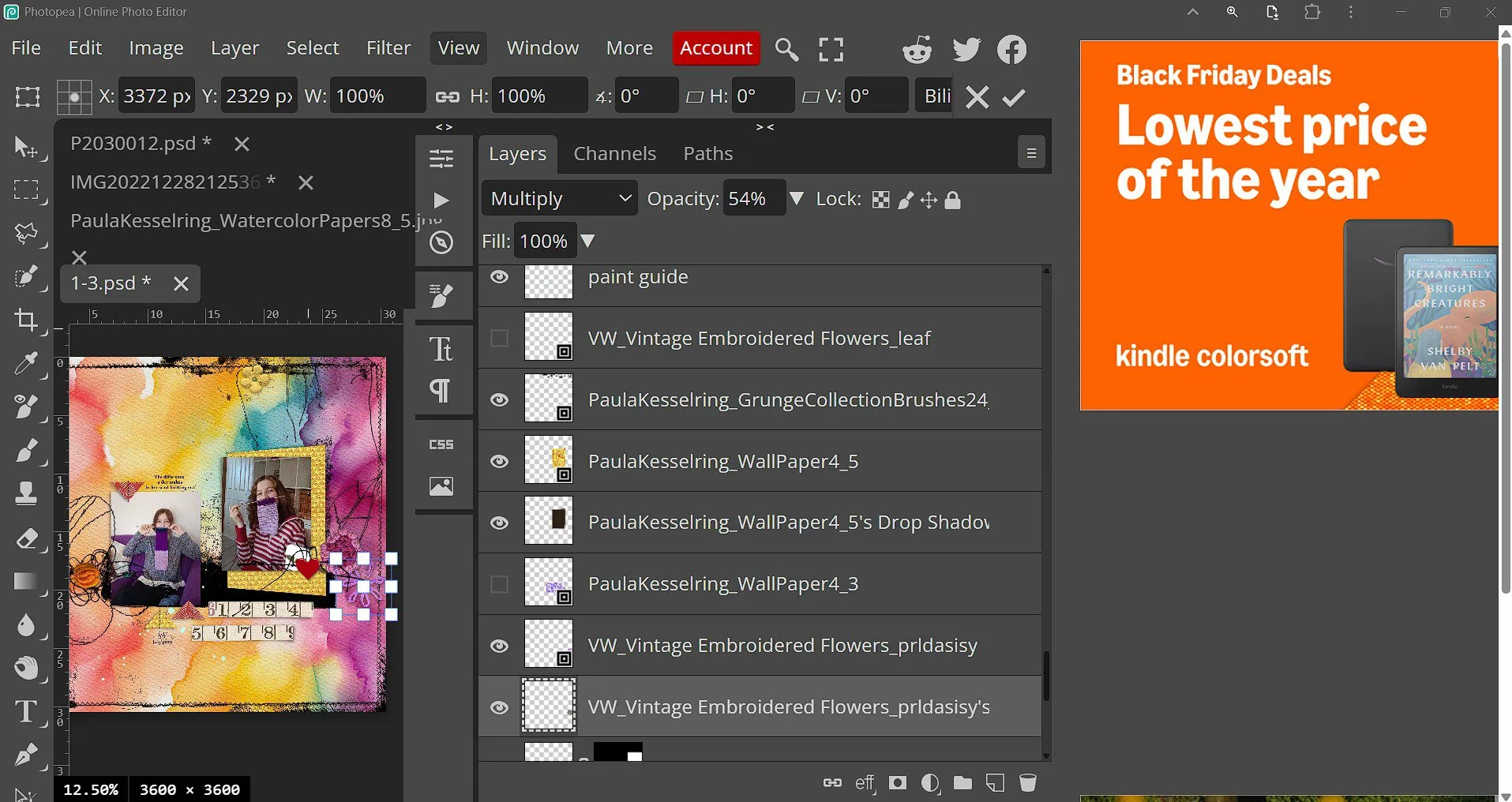
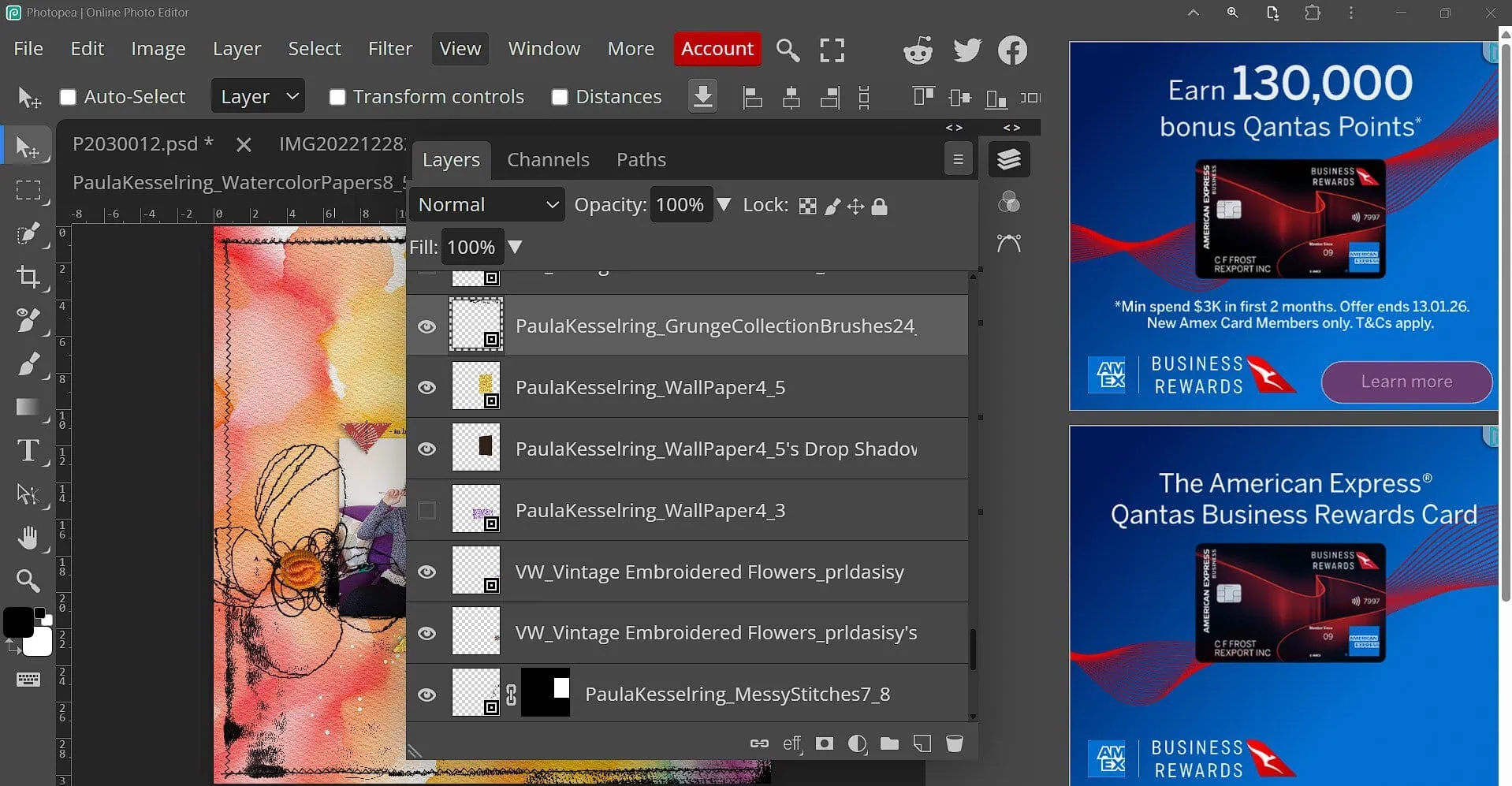
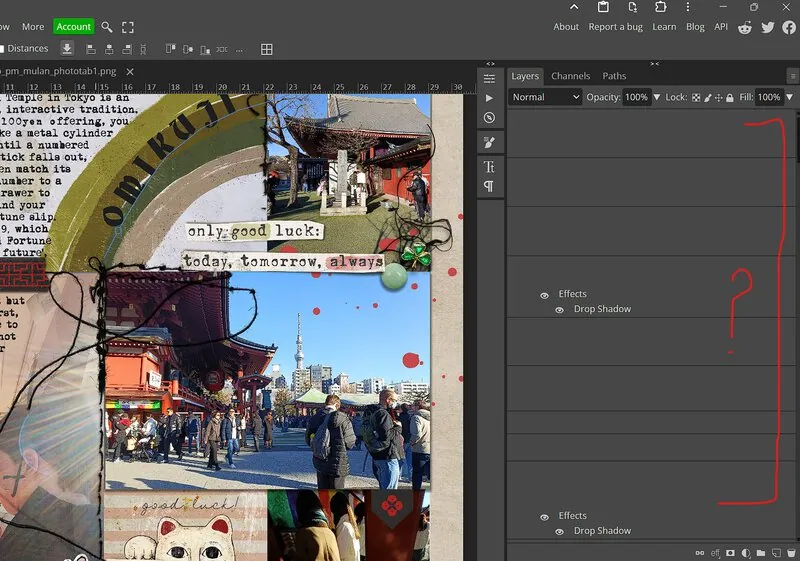
- What labels?: And it has glitched in a way that just took all my Layer Palette labels away. No thumbnails or anything, talk about scrapping blind but lucky they were back when I rebooted but still, see how my process can be slowed down? (Do other online programs also experience glitches like these???)
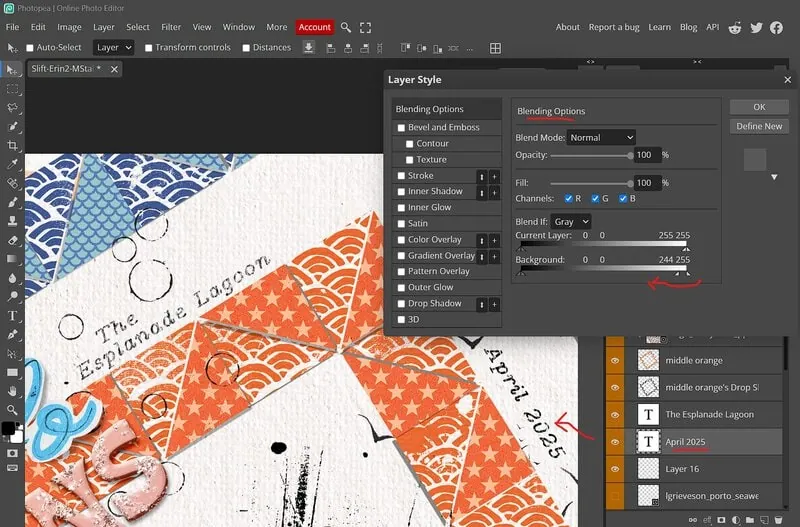
It’s not all bad. Like I mentioned in the first blog post, it has a lot of the functionality that I was used to with Photoshop. Since then I’ve found that I can use the ‘Fonts don’t float’ blending sliders in the Layer Effects, although I found this was possible before going Premium as well.
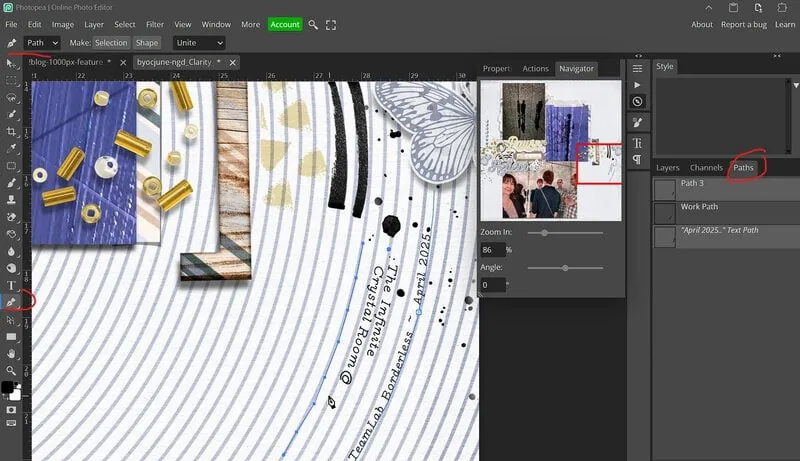
And it has the ability to create Paths (which I’m really no expert at creating and only use very infrequently like to journal on this curve but it’s a plus for Photopea to me)
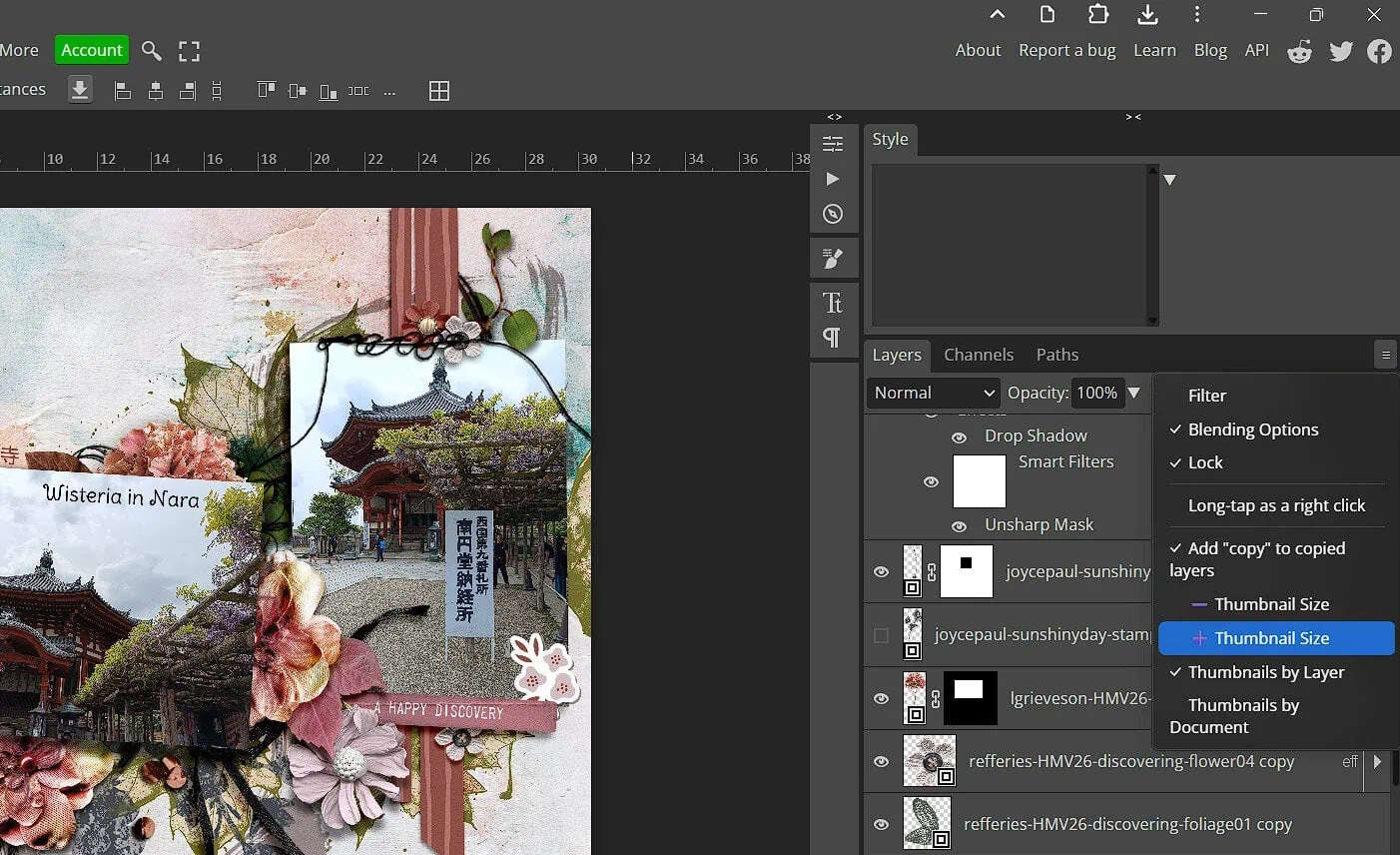
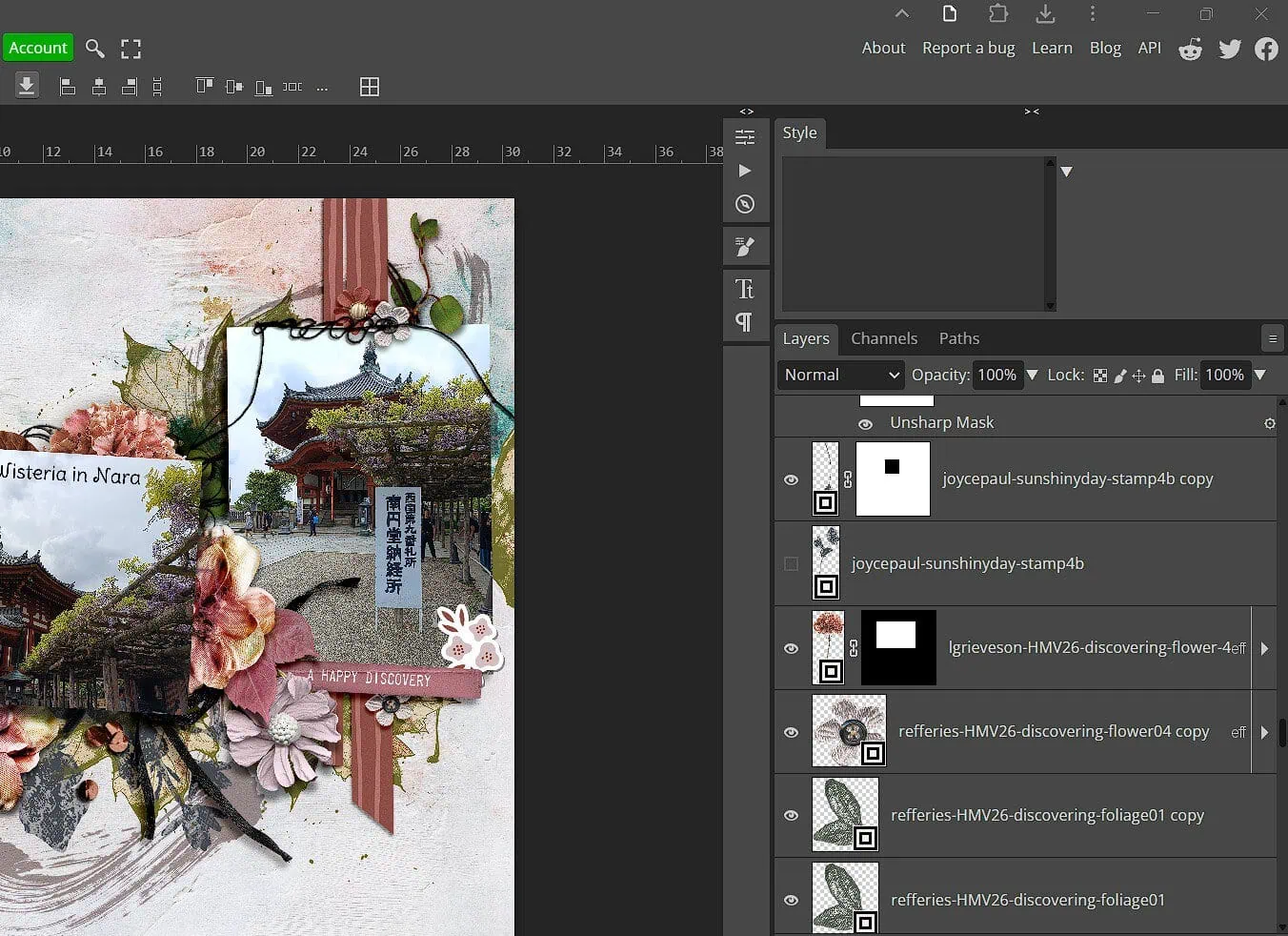
And, here’s the thing with this next one; I’m not sure if the option was always there and I just hadn’t found it because the right side was so crowded by ad’s, but I can increase the size of the Layers Palette thumbnails now (which I forgot how much I missed previously when trying to find staples or click and move some stitching or tiny details on a layout).
So to answer the ‘is it worth it?’ question: Well that depends on the frequency of use to me and what program features are important for you.
In a MOC style month or when I have more time to participate, it would be worth paying for the Premium option of Photopea. Everything takes me longer in Photopea without Premium because it seems to be bogged down by the ad rotation, but it still has issues for me compared to my old, no longer an option for me, Photoshop CS6 that also slow me down. There is a lot less commitment required for the ad-free perk than signing up for something like PSE though which may not feel as comfortable as the CS6 I was used to using before.
Because Affinity is also free since being acquired by Canva, I would say it is worth trialling that or giving it more than a one-off go. For me, my first few attempts with it, it felt very backwards and had the tools I use segmented in a way that was not intuitive compared to Photoshop and it was taking me even longer to make a basic page than with just the free-version of Photopea. If you are willing to put in the time to learn it so that it becomes intuitive or are just starting out with graphics programs, Affinity may be a better choice. It may glitch and have limitations that annoy me too though, so I guess we’ll see when I have some serious time to try that out and use Angela Toucan’s , our resident expert, guidance and forum tips.