January 6: Dispersion (Technique Challenge)

This was certainly a challenge! Thank you so much @Genniejoy for figuring it out in Artisan. I didn't do it exactly the same way, but your tutorial got me on the right track! I wanted to put the dispersed image back on the original background so I just overlayed it to get the look I wanted. Love learning new tools - thanks so much for hosting!!
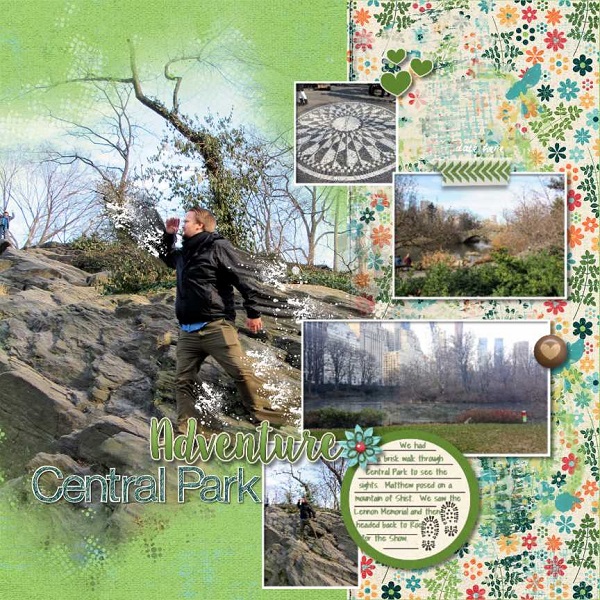
 
This took a couple of tries, but turned out really neat! I used the technique on the photo of my daughter - some of the splatter extends onto the patterned paper to the right. Thanks for the challenge. :)

 
hoooo boy Jan this was something!! I really hope I did this ok! I had to google a tutorial for CS4 (yes, my program is THAT old lol) because I realised I need to see it happen rather than read it ....but I'm not sure if it made my page better or worse :giggle ... I could just be totally talent-less at dispersion :giggle

 
Looks great! I use Artisan too and these are the challenges I find the most difficult because I'm not a "player" in the program!

I am so beyond UGH. I can't even get past #2 on Genniejoy's instructions because I have no idea how to use the wand tool and not having any luck at p2P for extracting a photo. Can't get it to work. :madd
 
I am so beyond UGH. I can't even get past #2 on Genniejoy's instructions because I have no idea how to use the wand tool and not having any luck at p2P for extracting a photo. Can't get it to work. :madd
so sorry to hear it! The wand tool is my nemesis, so I feel your pain!:banghead
 
Lori - where did you find videos on how to do this in Artisan? PS. I am still using Artisan 4.
Robin - I'm so sorry, I realize that I forgot to say that I did this in PSE despite the fact that I don't scrap there!!!! @Genniejoy wrote up some instructions for Artisan users though, earlier in this thread.
 
@IntenseMagic Help, please! Is this correct? I have followed the steps but mine isn't looking like the others.
Any help or suggestions would be so appreciated. This challenge has me wanting to give up.
BiOXylw.jpg
 
@IntenseMagic Help, please! Is this correct? I have followed the steps but mine isn't looking like the others.
Any help or suggestions would be so appreciated. This challenge has me wanting to give up.
BiOXylw.jpg

Yes!! I can totally see the technique! I think it's just a matter of the different brushes that are used, but I totally see the dispersion perfectly!! Don't give up!! You've got this! Create one of your awesome scrapbook pages with it and consider yourself good to go!!
 
I am so beyond UGH. I can't even get past #2 on Genniejoy's instructions because I have no idea how to use the wand tool and not having any luck at p2P for extracting a photo. Can't get it to work. :madd

Hi Ruth... what can I do to help you out? I will admit that I am not really familiar with that program, but I may be able to help you find a work around for the technique. I'm also going to tag @Genniejoy because she may be able to give you some advice.
 
Hi Ruth... what can I do to help you out? I will admit that I am not really familiar with that program, but I may be able to help you find a work around for the technique. I'm also going to tag @Genniejoy because she may be able to give you some advice.
Thank you for that! Apparently this is being talked about in our Artisan group :agree. Popular subject. Several ladies have done a decent job so I'm following some of their ideas and seeing what happens. I'm going to pack it in soon because my head isn't keeping up now. I'll start fresh again tomorrow. Thank you for replying.
 
Thank you for that! Apparently this is being talked about in our Artisan group :agree. Popular subject. Several ladies have done a decent job so I'm following some of their ideas and seeing what happens. I'm going to pack it in soon because my head isn't keeping up now. I'll start fresh again tomorrow. Thank you for replying.

Don't stress about it too much! As I have told others, I am not looking for perfect dispersion...Lord knows mine is far from perfect and I am still learning. I'm just want everyone to play around with it and do the best they can. I know some programs are more limited than others. I can tell when someone has really tried and challenged themselves. Just tag me or message me if you need me! I will help in any way that I can!!
 
I love how mine turned out and this isn't something I would've ever tried without MOC! Thanks for the great how-to! I found it super easy to follow.

 
Yes!! I can totally see the technique! I think it's just a matter of the different brushes that are used, but I totally see the dispersion perfectly!! Don't give up!! You've got this! Create one of your awesome scrapbook pages with it and consider yourself good to go!!

Yes! I was dreading having to try again. I'll scrap this bad boy in the am. Thanks!!
 
I love that this one really challenged me, there is ALWAYS something new to learn in Photoshop. I appreciate your tutorial, it was wonderful. Thank you for the challenge!

 
Screen Shot 2018-01-08 at 12.56.59 AM.png
OK, so I tried your technique. And, I don' t know if I didn't liquify enough or if I chose the wrong scatter brush, but my original dispersion didn't look very... disperssed. So I started trying to liquify it more, but ended up adding an effect called "ocean ripple" to it, which made... the effect you see on the smaller photo here. Pretty cool. It kinda looks like your windows when you go thorugh the car wash. I decided I had to stop playing with it. If I need to redo my dispersing, please let me know.

And, the original, non dispers-y photo.
IMG_3973 2.JPG
 
Last edited:
Back
Top