
- Joined
- Apr 2, 2010
- Messages
- 11,337
Thank you to all who participated in March's challenge. Your pages were wonderful! Please help me congratulate @angels as the winner of the March 2023 Mixed Media Challenge! 
Those who participated, please watch your inboxes for your discount coupons. They will be coming in the next day or so, and thank you for your patience!
******* Rachel Jefferies April 2023 Mixed Media Challenge *******
April's challenge is all about having fun with Rachel's amazing mixed media papers! I want you to PLAY & HAVE FUN! Now don't worry, you can do this! It may sound intimidating, but it's really not. Mixed media scrapping isn't hard, we are just overthinking it. MM is just a matter of incorporating mixed media products and/or techniques into our layouts. Plus, Rachel has done most of the work for us.
In the January 2023 Challenge, Aly gave some great tips regarding the placement of photos using the rule of thirds. I'd like to add to those tips and say, "let the mixed media background paper determine where you place your photos/clusters". Look for natural areas where there's either a break in the design or the pieces of the design intersect. Pile your photo(s)/clusters on top of an existing collage to make it look like it was always there. Don't be afraid to tweak things to make them your own, but most of all have fun and enjoy the process.
Examples:
Let me walk you through a couple of layouts to show you what I mean when I say Rachel has done most of the work for us with her products.
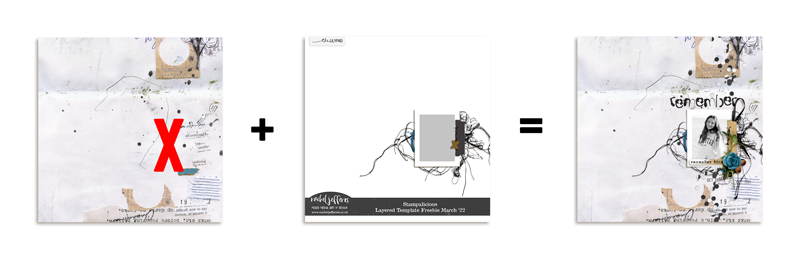
Building collages is a common mixed media technique, so I started with a collage paper from Rachel's Enduring: Mixed Media Collages. I loved that it had collage pieces on the top and bottom of the right side with an area in the middle that could hold photo(s).
Next I picked a template (Stampalicious Layered Template Freebie March '22) that had the photo on the right side. I tweaked the template a bit and moved the photo/cluster up to be between the top and bottom collage pieces on the background paper.
Then I scrapped as usual adding my photo, paints, elements, title, etc; and just like that my page was complete!

Layout linked to the gallery for credits
Here's another example of letting the background paper determine the design.

I started with the Stampalicious: Heathland templates.
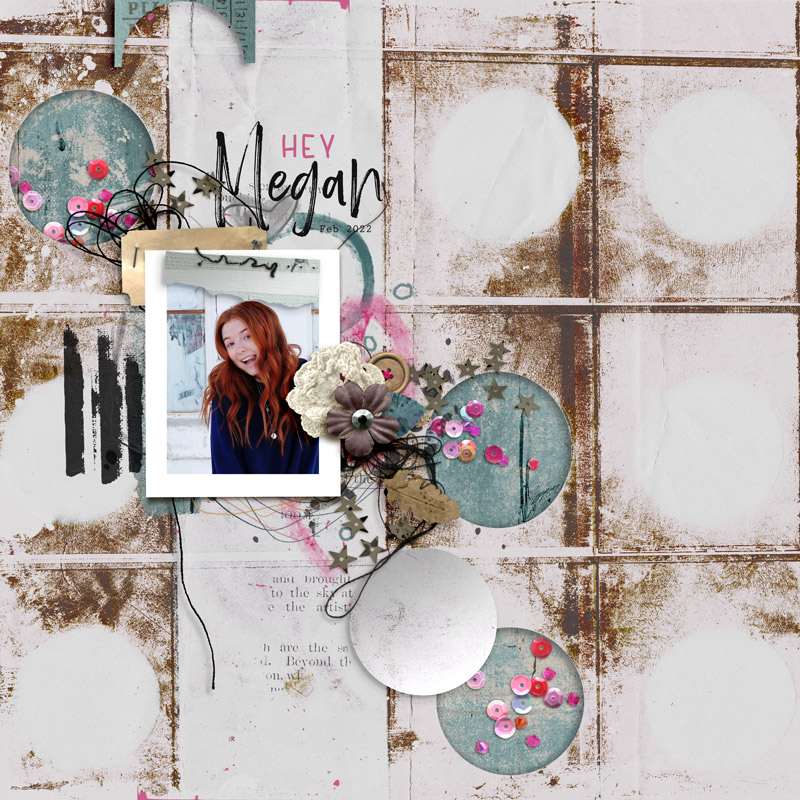
Then, I picked the circle paper from Give Yourself Permission. I loved all the circles, but rotated it 90 degrees to the right so the band portion without circles ran top to bottom.
I then moved the photo/cluster from the template up and to the right, so it fit in the band portion of the paper.
Next, I used the elliptical marquee tool to cut out three circles from the background paper (one on the left and two on the right) to create flow down through the layout. Tip: hold down the shift key while selecting the circle portions to get a true circular selection.
Then, I added a colored paper and sequins below the cut out circles to show through and give more color to the layout.
Last, I embellished the layout pretty much according to the template. I used teal and pink colored elements to create flow down through the layout. It's as simple as that... easy peasy, right!
Layout linked to the gallery for credits.
Now it's your turn to create a mixed media layout featuring Rachel's paper products.
Challenge Requirements:
Prizes and other important notes:
If you have any questions about the challenge, please tag me. Rachel is also available for any questions about the new prize set up or tracking at @Rachel Jefferies
Those who participated, please watch your inboxes for your discount coupons. They will be coming in the next day or so, and thank you for your patience!
******* Rachel Jefferies April 2023 Mixed Media Challenge *******
April's challenge is all about having fun with Rachel's amazing mixed media papers! I want you to PLAY & HAVE FUN! Now don't worry, you can do this! It may sound intimidating, but it's really not. Mixed media scrapping isn't hard, we are just overthinking it. MM is just a matter of incorporating mixed media products and/or techniques into our layouts. Plus, Rachel has done most of the work for us.
In the January 2023 Challenge, Aly gave some great tips regarding the placement of photos using the rule of thirds. I'd like to add to those tips and say, "let the mixed media background paper determine where you place your photos/clusters". Look for natural areas where there's either a break in the design or the pieces of the design intersect. Pile your photo(s)/clusters on top of an existing collage to make it look like it was always there. Don't be afraid to tweak things to make them your own, but most of all have fun and enjoy the process.
Examples:
Let me walk you through a couple of layouts to show you what I mean when I say Rachel has done most of the work for us with her products.
Building collages is a common mixed media technique, so I started with a collage paper from Rachel's Enduring: Mixed Media Collages. I loved that it had collage pieces on the top and bottom of the right side with an area in the middle that could hold photo(s).
Next I picked a template (Stampalicious Layered Template Freebie March '22) that had the photo on the right side. I tweaked the template a bit and moved the photo/cluster up to be between the top and bottom collage pieces on the background paper.
Then I scrapped as usual adding my photo, paints, elements, title, etc; and just like that my page was complete!
Layout linked to the gallery for credits
Here's another example of letting the background paper determine the design.
I started with the Stampalicious: Heathland templates.
Then, I picked the circle paper from Give Yourself Permission. I loved all the circles, but rotated it 90 degrees to the right so the band portion without circles ran top to bottom.
I then moved the photo/cluster from the template up and to the right, so it fit in the band portion of the paper.
Next, I used the elliptical marquee tool to cut out three circles from the background paper (one on the left and two on the right) to create flow down through the layout. Tip: hold down the shift key while selecting the circle portions to get a true circular selection.
Then, I added a colored paper and sequins below the cut out circles to show through and give more color to the layout.
Last, I embellished the layout pretty much according to the template. I used teal and pink colored elements to create flow down through the layout. It's as simple as that... easy peasy, right!
Layout linked to the gallery for credits.
Now it's your turn to create a mixed media layout featuring Rachel's paper products.
Challenge Requirements:
- Create a new scrapbook layout or creative project using Rachel's mixed media paper products AND letting the mm background paper determine/support your design.
- Please TELL us how the mixed media pattern helped determine your layout design.
- RJ templates are allowed, but not required.
- Photos are optional.
- Use at least 75% of Rachel's Product. Any remaining percentage must be product from another current TLP designer.
- The product can be currently available in the TLP Shop or be retired products from Rachel or a current TLP designer.
- Hybrid projects are also welcome and the same product rules apply. Where digital products are used in a hybrid project they must all come from current The LilyPad designers, and at least 75% must be Rachel's Product.
- Upload your layout to the Rachel Jefferies Designs Gallery at TLP with your product credits.
- For your challenge entry to be counted, you MUST upload your finished layout to this thread. Please link your gallery image to your post in this thread, as it helps us leave love on your layout (and validate your project).
- No double-dipping… your layout must be created for this challenge only, no others. You must create a NEW layout for this challenge.
- This challenge will remain open for the monthly coupons until April 30, 2023.
Prizes and other important notes:
- All participants who post their page during the challenge month by the end of month deadline and meet the criteria will be eligible for a coupon of 15% off their next order (from Rachel's shop) of $10 or more.
- ONE lucky random winner who posts their page during the challenge month by the end of month deadline and meets the criteria will receive an $8.00 coupon for Rachel's Shop here at The LilyPad!
- Complete ALL twelve of Rachel's Mixed Media Challenges at The LilyPad in 2023 for a chance to enter her Annual Draw. The first drawn winner will be offered a three month Guest Gig on her Creative Team and the second drawn winner will receive a $20 coupon to her shop here at The LilyPad!
- In order to be eligible for the annual drawings for the Guest Gig or the $20 coupon to Rachel's shop, you will need to do the following:
- Complete ALL twelve of Rachel's Mixed Media Challenges at the LilyPad in 2023 by December 31, 2023 by 11:59 PM PDT. (Featured Product Challenges and Hear My Voice Challenges are excluded from the tracker and annual draw).
- Post the challenge layout in the appropriate challenge month thread for Rachel's Jefferies Mixed Media Challenges. We will keep an accumulative list for you in each month's challenge thread to make this easier. For example: Your January Challenge layout must be posted in the January Challenge thread and linked back to the gallery --even if you complete it in November, it must still be posted in the January Thread).
- Complete your tracker form with links to each challenge layout by December 31, 2023 by 11:59 PM PDT.
- Note: for the annual drawings, challenge pages will be accepted for individual challenges after the actual challenge month and the end of month deadlines have both passed.
- In order to qualify for the monthly winners coupon draw of $8 and the participation coupon you must complete the challenge during the challenge month by the end of month deadline as stated in each challenge thread.
- Find your 2023 Tracker Submission Form Here
- Past Challenges are here: JAN 2023 | FEB 2023 | MAR 2023 |
If you have any questions about the challenge, please tag me. Rachel is also available for any questions about the new prize set up or tracking at @Rachel Jefferies
Last edited:


