
tkradtke
Professional Brainstormer
- Joined
- Dec 28, 2009
- Messages
- 5,906
Hello everyone!
I am so excited to be hosting my first MOC challenge! My challenge is a journaling challenge, but it’s not so much about what you say, but how you’re saying it. Subway style posters have become very popular over the past few years and you see variations everywhere. Some examples of subway style signs are:


The basic things that you see with the subway style signs are that the words are fully justified (left to right and top to bottom) and they mix different font styles and sizes to fill the space.
For your Day 22 page, your challenge is to create a page with journaling done in the subway style. Your page must follow these guidelines:
For my first page, I journaled about my daughter’s outfit choice for one of our days at Disneyland…
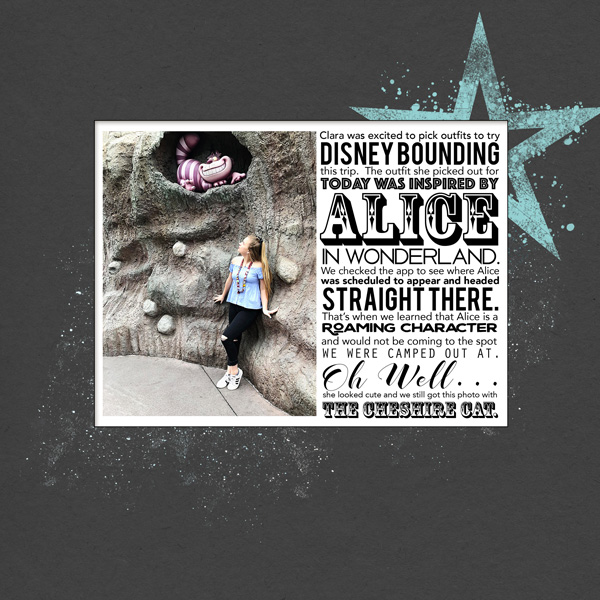
In my example, I journaled in sentence form with variations in font size, style and actual to emphasize certain words within my journaling. It was a little daunting at first, but once I got going, it was fun to pick out which fonts to use.
I had so much fun with the first one, that I decided to try another sample with a list...
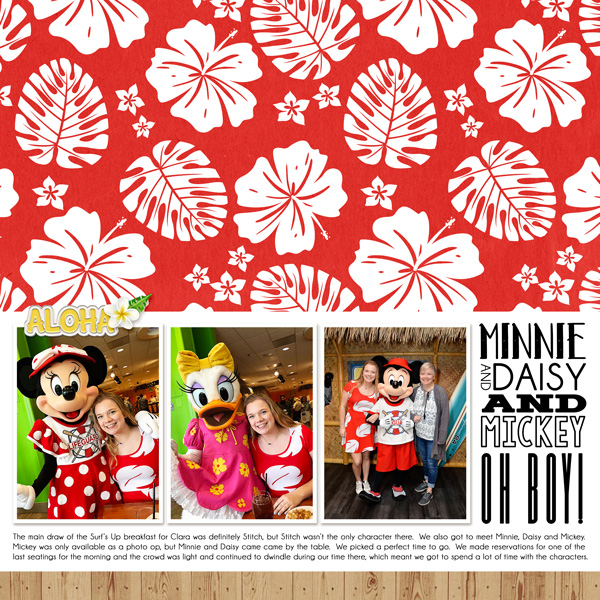
There are various ways to journal in the subway style, but the most straightforward way I found was to go line by line. I opened a new canvas in Photoshop in the size 3x4 with a transparent background. I would type a line in a normal font size (I used 12pt) and then began to try out different fonts. Once I picked a font, I would use the move tool to expand the line to fill the horizontal space. Then I moved on to the next line. When my journaling was complete, I merged the visible layers and dragged my journaling onto my page. You can also do a version of this directly on your page by using the show grids feature to give you guidelines for the width of your journaling.
And if you need any more inspiration, check out these amazing Polly pages by @Iowan and @AnneofAlamo...


To recap the rules:
Your page must be a new page in order to count for the Month of Challenges. Your page must be posted in three places:
Have fun with this challenge and I can’t wait to see what you create!!
I am so excited to be hosting my first MOC challenge! My challenge is a journaling challenge, but it’s not so much about what you say, but how you’re saying it. Subway style posters have become very popular over the past few years and you see variations everywhere. Some examples of subway style signs are:
The basic things that you see with the subway style signs are that the words are fully justified (left to right and top to bottom) and they mix different font styles and sizes to fill the space.
For your Day 22 page, your challenge is to create a page with journaling done in the subway style. Your page must follow these guidelines:
- Your journaling can be either full sentences, or list form. Whether you choose to journal as sentences or as a list you must have at least five lines of text. Song lyrics, poems, book quotes, etc. are also acceptable as journaling.
- You must have at least three different font variations. This can be in font size, style (bold, italics) or the actual font. Your font variations must be listed in your credits.
- Your journaling must be fully justified across a rectangular space (filling the entire space, left to right and top to bottom).
- For your subway journaling, you cannot use premade word art, journal cards, or elements that are done in the subway style. You also cannot use alphas to create your signs; you must use fonts.
For my first page, I journaled about my daughter’s outfit choice for one of our days at Disneyland…
In my example, I journaled in sentence form with variations in font size, style and actual to emphasize certain words within my journaling. It was a little daunting at first, but once I got going, it was fun to pick out which fonts to use.
I had so much fun with the first one, that I decided to try another sample with a list...
There are various ways to journal in the subway style, but the most straightforward way I found was to go line by line. I opened a new canvas in Photoshop in the size 3x4 with a transparent background. I would type a line in a normal font size (I used 12pt) and then began to try out different fonts. Once I picked a font, I would use the move tool to expand the line to fill the horizontal space. Then I moved on to the next line. When my journaling was complete, I merged the visible layers and dragged my journaling onto my page. You can also do a version of this directly on your page by using the show grids feature to give you guidelines for the width of your journaling.
And if you need any more inspiration, check out these amazing Polly pages by @Iowan and @AnneofAlamo...
To recap the rules:
- Create a page with subway style journaling. It can be in sentence or list form, but must have at least three different font variations, and be fully justified. There must be five lines of journaling. Your font variations must be listed in your credits.
- You may use song lyrics, poems, book quotes, etc., for your journaling
- You cannot use alphas, premade word art, journal cards, or elements that are done in the subway style.
Your page must be a new page in order to count for the Month of Challenges. Your page must be posted in three places:
- Uploaded to the TLP Gallery (not an outside hosting site).
- Posted in your page thread you created in the MOC Layouts Folder. You should have one post per completed challenge page. If you complete all 31 challenges, your thread should contain 31 posts. Please do not comment in the participants’ page threads so we can keep them clean.
- Posted in this thread. People can comment here if they wish.
Have fun with this challenge and I can’t wait to see what you create!!
Last edited:


