Masking And Frames
Two of my favorite digital scrapbooking products to use are masks and frames. It’s fun to combine the two products. Let me show you how you might do this in Photoshop.
Create your digital page; my pages are often 12 x 12 inches. Place your photo on your page. Duplicate your photo (Control + J). I changed the blending mode to hard light on the duplicate photo to add a bit of emphasis to the inner portion of the photo. You can click the eyeball (in the left side of the layer) to turn this duplicate photo layer off until you are ready to work with it, if desired. Then open up a frame psd with a clipping mask or a jpeg frame. A frame psd will have layers, one of which will be the frame and another will be the clipping mask for your photo. A jpeg frame will be a single layer frame that will be placed overtop of your photo. For my sample, I used Picture Perfect Crumpled Frames by Dawn Inskip. Your photo will be on the layer above the frame’s clipping mask. The frame that I used had two frames together so I merged the two layers first and clipped the photo to it (shortcut is to hold down ALT key while hovering between the two layers to be clipped together, you will see the cursor change to a downward arrow, and then click).
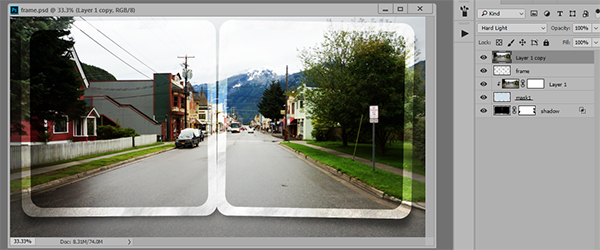
I created an inverse mask on the duplicate photo layer (top layer) by pressing the ALT key and clicking onto the mask icon at the bottom of the layers palette. With a soft brush at about 70% opacity, I brush the inner section of the photo to add emphasis. This duplicate layer is above the photo frame; a soft brush can erase some of the photo edges. By using the duplicate photo overtop of the frame and extending off the edges of the frame, it adds a little more impact to the photo.
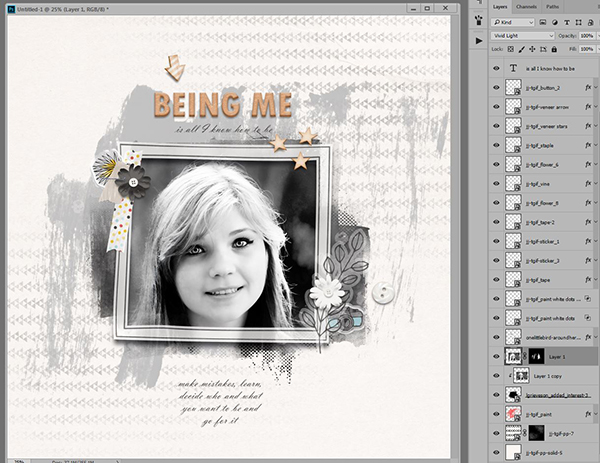
In this second sample, I used a frame element from One Little Bird’s Around Here. Beneath the frame, my photo was duplicated and one photo is clipped to a mask from Added Interest by Lynn Grieveson and the blend mode of duplicate photo was changed to vivid light, and then was brushed overtop some of the hair and for added emphasis by creating an inverse mask (as described above).
The possibilities are endless as to what you can create by using a mask and frames together. I hope that I have inspired you to play.