AnneofAlamo
Slippers IN sunshine? Even better!
- Joined
- Aug 30, 2009
- Messages
- 19,717
Hello! I am buzzing with excitement to host today's challenge! Ready, lets get into it!
I love to study paper layouts. The shadowing and depth. Then try and achieve it digitally on my memory pages. It causes me to get better at this craft. Over the past year, I have been following paper cut outs, and paper sculpture on PINTEREST. It is a wonder of EXTREME shadowing!
Sculpture with paper & shadows is a 3D fantasy! It is very fun and freeing to play.
Playing is so important to get mojo moving and smiles happening!
Today's challenge you are going to recreate
3D cut out art/paper sculpture world/place
DIGITALLY
(Place meaning a view into particular position or point.)
YOU CAN DO THIS!
The awe of the cut out art/paper sculpture is the shadows, using deep and full shadows to create the illusion of depth and going thru layers to reach the bottom! Seeing things (elements) as your eye reaches the bottom layer!
Using deep shadows and duplicated/descending paper layers along with elements to show a peek of your world (real or imaginary). This can be fantasy or perhaps where you live or would love to live! The view into your little world/place is totally up to you.
I can't wait to peek into your world!
REQUIREMENTS:
Here is my example page; Heat Haven
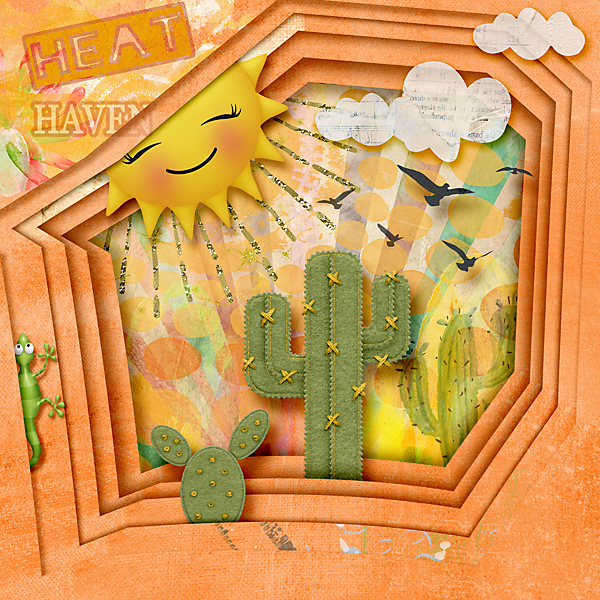
Here is a visual to see how I placed 5 different elements on 5 different descending paper layers:

This is to help you create, and use layers and deep shadows to draw your eye to the world you create. You can use size, distance, spread and opacity to add depth to each of your layers. Don't forget to play around with warping it too
here is a quick one, that has only 3 layers, but hope it helps you understand:

My sisters Pollys made a few more, they will be in the gallery within next few hours...but here is a quick view to just stare in awe at:

to recap:
Your page must be a new page in order to count for the Month of Challenges. Your page must be posted in three places:
I love to study paper layouts. The shadowing and depth. Then try and achieve it digitally on my memory pages. It causes me to get better at this craft. Over the past year, I have been following paper cut outs, and paper sculpture on PINTEREST. It is a wonder of EXTREME shadowing!
Sculpture with paper & shadows is a 3D fantasy! It is very fun and freeing to play.
Playing is so important to get mojo moving and smiles happening!
Today's challenge you are going to recreate
3D cut out art/paper sculpture world/place
DIGITALLY
(Place meaning a view into particular position or point.)
YOU CAN DO THIS!
The awe of the cut out art/paper sculpture is the shadows, using deep and full shadows to create the illusion of depth and going thru layers to reach the bottom! Seeing things (elements) as your eye reaches the bottom layer!
Using deep shadows and duplicated/descending paper layers along with elements to show a peek of your world (real or imaginary). This can be fantasy or perhaps where you live or would love to live! The view into your little world/place is totally up to you.
I can't wait to peek into your world!
REQUIREMENTS:
- no photos allowed-this is all creating with product.
- must have a peek hole with at least 3 stacked descending PAPER layers(to create the 3d effect) to show depth using extreme shadows.
- at least 3 elements sandwiched within those PAPER layers (in between the layers)
- the name of your world must be on the page
Here is my example page; Heat Haven
Here is a visual to see how I placed 5 different elements on 5 different descending paper layers:
This is to help you create, and use layers and deep shadows to draw your eye to the world you create. You can use size, distance, spread and opacity to add depth to each of your layers. Don't forget to play around with warping it too
here is a quick one, that has only 3 layers, but hope it helps you understand:
My sisters Pollys made a few more, they will be in the gallery within next few hours...but here is a quick view to just stare in awe at:
to recap:
- no photos allowed-this is all creating with product
- must have a peek hole (shape) with at least 3 stacked/descending paper layers using extreme shadows.
- at least 3 different layers must have something/element tucked in it.
- the name of your world must be on the page
Your page must be a new page in order to count for the Month of Challenges. Your page must be posted in three places:
- Uploaded to the TLP Gallery (not an outside hosting site).
- Posted in your page thread you created in the MOC Layouts Folder. You should have one post per completed challenge page. If you complete all 31 challenges, your thread should contain 31 posts. Please do not comment in the participants’ page threads so we can keep them clean.
- Posted in this thread. People can comment here if they wish.