Artsy Digital Paper Templates
Hello all my artsy friends! I’m just dropping in today with a quick tip on how to use artsy digital papers as a template for your digital page design. I recently created this page with a fabulous collab called Fallscape by Little Butterfly Wings and Studio Basic Designs:
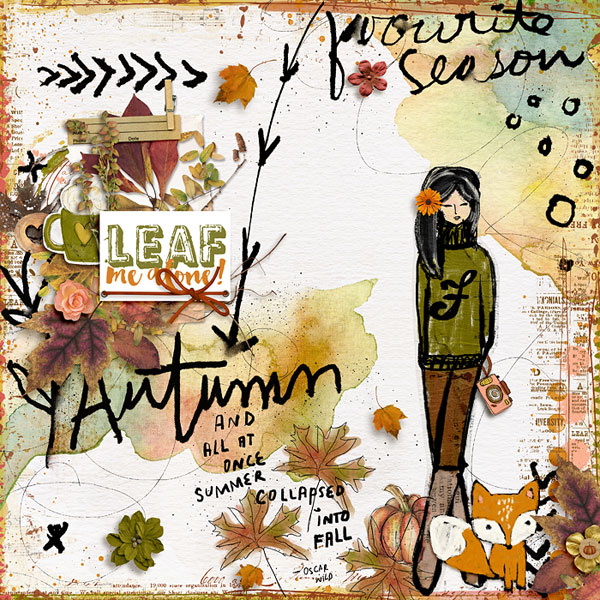
This page came together about as quickly as if I had used a digital scrapbooking template. That usually does not happen when I am creating on a clean slate, but I found that the artsy background page was just as good as a template. I used the background paper to direct my design and the elements just fell into place on the page. Here is what the plain background page looks like:
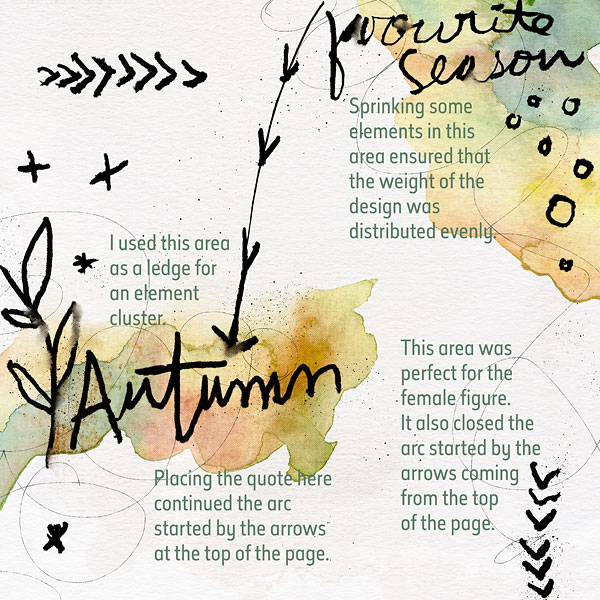
As you can see, the background paper has the outline of a design arc that helps the eye travel around the page. It starts at the top with the arrows that lead the eye down the page. I continued this arc with the added quote at the bottom of the page, then turned the design back to the top of the page with the doodled female figure and finished it back at the top of the page with a sprinkling of elements.
Don’t underestimate the value of some background papers to act as a rough template for your digital page design. Here are some tips for things to look for on background papers:
1. Examine the background page for design shapes, like the arc on the page above.
2. Look for ledges like the watercolor paint splash and word Autumn. These areas are a good place to include element clusters because they provide a solid resting place so the elements do not look like they are floating on the page.
3. When adding dimensional elements to artsy backgrounds, make sure that you either center them on the page, or distribute them around the page so that it is not heavily weighted to one edge.
Artsy background pages (like the one above) are especially suited for this technique, but don’t overlook patterned background papers in traditional kits. You never know what design treasures you might find!
Until next time ~
Judie (HeyJude)