
- Joined
- Jul 17, 2012
- Messages
- 15,731
Welcome to Summer School 2024! Here is your fourth weekly challenge.
This week we are on a holiday break just in time for the last week of the Christmas in July sale! All Christmas, Winter, and DYD products are on sale so grab some from the store or some from your stash and come try this cut out background technique.
I am revisiting an old MOC challenge from 2020 that Jenn McCabe presented called Cut Out Background. You can find the original challenge at the following link: https://the-lilypad.com/forum/threads/january-19-cut-out-background.69312/
Your CUT OUT BACKGROUND challenge for this week is to pick a Christmas, Winter, or DYD patterned paper for the FOUNDATION of your page. Cut some shapes out of the patterned paper and then put the cut-out paper pieces back in a different way. You can shift the pieces, tilt the pieces, resize the pieces, recolor the pieces, over lap them ... heck you can even cut up the entire patterned paper and put it all back on the page differently than how it started. The pattern paper and cut-out pieces need to make up 95% of the page's FOUNDATION. The other 5% of your page foundation - can be some paint, stamps or other papers peeking out from underneath.
I gave this a try with a Christmas tree paper. In my example below, I cut 6 pieces out of my pattern paper using 3 different tree elements from a Christmas element pack. I shrunk the two biggest tree cut-outs and centered them over their original spots. I kept the other four cut-outs the same size but shifted the pieces slightly and placed them back onto my page with just a tiny bit of the solid background peeking through. I then built my page around the cut-outs. I even used them to hold my photo in place.
Here is my page:
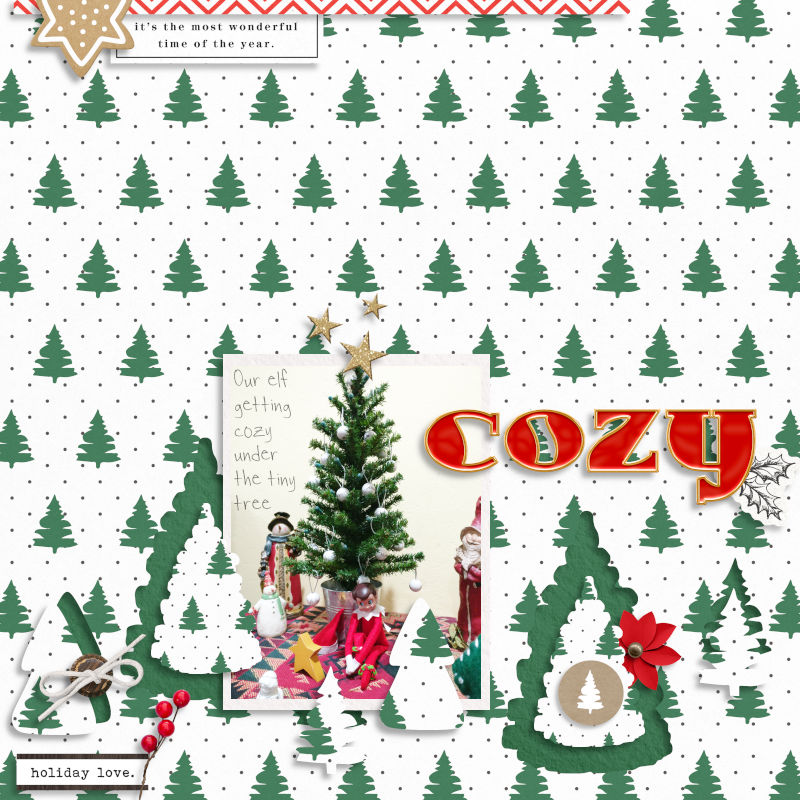
Products Used:
Holly Days Elements & Papers | Sahlin Studio
https://the-lilypad.com/store/Holly-Days-Elements.html
https://the-lilypad.com/store/Holly-Days-Papers.html
Merriment Alphas | Kim Jensen
https://the-lilypad.com/store/Merriment-Alphas.html
Rules Recap:
This week we are on a holiday break just in time for the last week of the Christmas in July sale! All Christmas, Winter, and DYD products are on sale so grab some from the store or some from your stash and come try this cut out background technique.
I am revisiting an old MOC challenge from 2020 that Jenn McCabe presented called Cut Out Background. You can find the original challenge at the following link: https://the-lilypad.com/forum/threads/january-19-cut-out-background.69312/
Your CUT OUT BACKGROUND challenge for this week is to pick a Christmas, Winter, or DYD patterned paper for the FOUNDATION of your page. Cut some shapes out of the patterned paper and then put the cut-out paper pieces back in a different way. You can shift the pieces, tilt the pieces, resize the pieces, recolor the pieces, over lap them ... heck you can even cut up the entire patterned paper and put it all back on the page differently than how it started. The pattern paper and cut-out pieces need to make up 95% of the page's FOUNDATION. The other 5% of your page foundation - can be some paint, stamps or other papers peeking out from underneath.
I gave this a try with a Christmas tree paper. In my example below, I cut 6 pieces out of my pattern paper using 3 different tree elements from a Christmas element pack. I shrunk the two biggest tree cut-outs and centered them over their original spots. I kept the other four cut-outs the same size but shifted the pieces slightly and placed them back onto my page with just a tiny bit of the solid background peeking through. I then built my page around the cut-outs. I even used them to hold my photo in place.
Here is my page:
Products Used:
Holly Days Elements & Papers | Sahlin Studio
https://the-lilypad.com/store/Holly-Days-Elements.html
https://the-lilypad.com/store/Holly-Days-Papers.html
Merriment Alphas | Kim Jensen
https://the-lilypad.com/store/Merriment-Alphas.html
Rules Recap:
- Deadline is August 4 at 11:59pm EDT
- Your new page must include at least one Christmas/Winter/DYD patterned paper by a current Lilypad designer. The patterned paper must have at least three pieces cut out and replaced in a different way. You are free to use any other papers, elements, templates, styles etc. for your page.
- Page must be posted to the Lilypad Gallery and posted/linked in this challenge thread to enter. GALLERY RULES: Layouts must contain at least 50% TLP products. (Templates count as 15%.) Uploads must be less than 250k. List all credits (including the alpha); no off-site linking allowed.
- No double dipping - page should be created for this challenge alone.
Last edited:


