
- Joined
- Jan 14, 2012
- Messages
- 4,695
January 19: Clip Photo to Title/Alpha
Howdy Pad Scrappers!
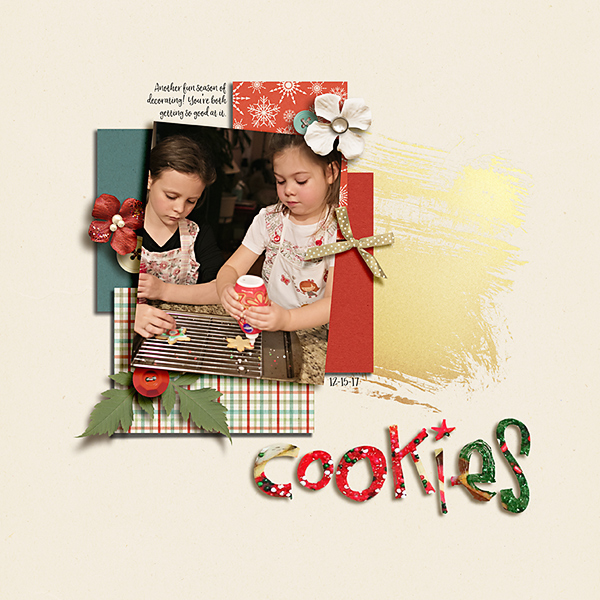
I’m so psyched to be hosting another fun challenge for MOC. Today’s challenge is one close to my heart because it involves photographs. You are going to create a unique title by clipping a photo to your alpha or font. Here’s an example I made:
Some tips:
* You can use a photo that contains easily recognizable images (like I did) or you can use one that is more abstract but creates interest, like a stained glass window or a sunset.
* Make sure you choose a font or alpha that is thick enough so we can see the photo clipped to it. In the layout above, I used CD Muckosky’s Markerific and Leftie Lucy alphas. Here are some great font options here and some great alphas here. Or you can use something from your stash, of course. Remember that fonts are products too. If you choose a font that is not TLP, please remember the 75% product rule (see below) when choosing your other elements for your page.
Now, on to the technique. In Photoshop, one of the easiest ways I know to attach something to a font or alpha is to "clip" it. Here’s how you do it:
1. Collect the alpha letters you want and get them all on the same layer. Or, type out the title you want in a font of your choice.
2. Place the photo in a layer right above the title layer.
3. Lastly, create a clipping mask by going to layer—> create clipping mask. Or, right click on the photo layer and select “create clipping mask.” Or, press CTRL-ALT-G at the same time (with the photo layer selected).
Here’s a great tutorial by Christa about how to do it if you’re using an older version of PS.
Here are some other ways to put photos in text:
MS Word
Corel
Picmonkey
Gimp
Pxture
Have fun! I’m excited to see all your pages and photos!
Here are the important details:
Challenge: Create a unique title by clipping a photo to your alpha or font. Make sure the letters are thick enough to see the photo.
Your page must be a new page in order to count for the Month of Challenges. Your page must be posted in three places:
Howdy Pad Scrappers!
I’m so psyched to be hosting another fun challenge for MOC. Today’s challenge is one close to my heart because it involves photographs. You are going to create a unique title by clipping a photo to your alpha or font. Here’s an example I made:
Some tips:
* You can use a photo that contains easily recognizable images (like I did) or you can use one that is more abstract but creates interest, like a stained glass window or a sunset.
* Make sure you choose a font or alpha that is thick enough so we can see the photo clipped to it. In the layout above, I used CD Muckosky’s Markerific and Leftie Lucy alphas. Here are some great font options here and some great alphas here. Or you can use something from your stash, of course. Remember that fonts are products too. If you choose a font that is not TLP, please remember the 75% product rule (see below) when choosing your other elements for your page.
Now, on to the technique. In Photoshop, one of the easiest ways I know to attach something to a font or alpha is to "clip" it. Here’s how you do it:
1. Collect the alpha letters you want and get them all on the same layer. Or, type out the title you want in a font of your choice.
2. Place the photo in a layer right above the title layer.
3. Lastly, create a clipping mask by going to layer—> create clipping mask. Or, right click on the photo layer and select “create clipping mask.” Or, press CTRL-ALT-G at the same time (with the photo layer selected).
Here’s a great tutorial by Christa about how to do it if you’re using an older version of PS.
Here are some other ways to put photos in text:
MS Word
Corel
Picmonkey
Gimp
Pxture
Have fun! I’m excited to see all your pages and photos!
Here are the important details:
Challenge: Create a unique title by clipping a photo to your alpha or font. Make sure the letters are thick enough to see the photo.
Your page must be a new page in order to count for the Month of Challenges. Your page must be posted in three places:
- Uploaded to the TLP Gallery (not an outside hosting site).
- Posted in your page thread you created in the MOC Layouts Folder. You should have one post per completed challenge page. If you complete all 31 challenges, your thread should contain 31 posts. Please do not comment in the participants’ page threads so we can keep them clean.
- Posted in this thread. People can comment here if they wish.


