
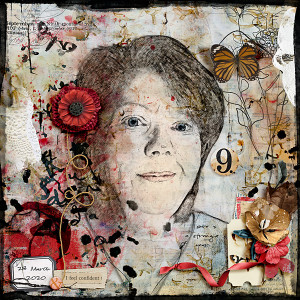
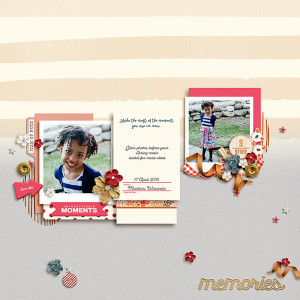
Wow, wow, wow, wow!!!!! This is absolutely amazing Christa! Something new that you'll hopefully give us a tutorial on (hint hint). All of the supporting elements and shadowing you added really add to the realistic look! I'm going to FroggyFavorite this one! I'll be back with the link.
@Cherylndesigns wow Cheryl, you really suprised me.. thank you so much for your wonderful comment and for the Froggy Fav... the tutorial is from the Photo Shop Training Channel on YouTube 5 EASY Steps to Create a REALISTIC Line Drawing From a Photo In Photoshop by Jesus Ramirez ... it is a video and real easy to follow.. I really had fun and then I just painted in a few things adding a layer above the drawing and set the blend mode to color .. for each color (example eyes blue on one layer with fill to 14%, lips red shade on another layer again color blend mode and then the same with the hair just to faintly add in some color) Thank you again my friend!!! I am honored for the froggy fav!
@cfile I was just blown away, Christa! I HAD to FF this! You really woke up my "tired eyes". Thanks for the information on how you achieved this! Your page is absolutely wonderful and you're very welcome, my friend! Well-deserved!!
Well deserved Froggy Fav! Wow, this is just so fun to look at. Love how you made your picture into a drawing. Love the grunginess and the pops of red! Brilliant! Thanks for the "tutorial," too. I'd like to try that. It would be a fun art journal challenge!
This site uses cookies to help personalise content, tailor your experience and to keep you logged in if you register.
By continuing to use this site, you are consenting to our use of cookies.