What do you want to learn?

@AnneofAlamo Now you have me curious, do you have an example that you can share?
There is a huge tutorial Listing HERE
The Tutorial is a Photo Technique (watercolor)
We had an amazing Polly named Farrah. She is a professional photographer (the real kind) lol and she did this tutorial. Sadly, she used photobucket for her examples and photobucket changed their upload availability.
So there are not photos,but I think I printed it out. I will try and find and photograph it..and post with the tutorial here.
 
@cfile !!! no, but I love that one, I love it!!!
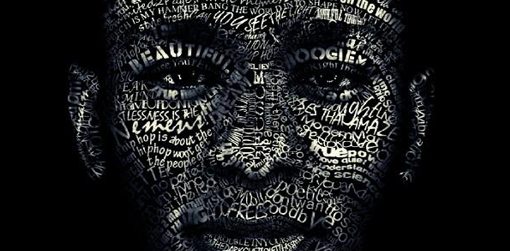
more of typography...
like this:
TT-face.jpg
 
@AnneofAlamo I did one similar for a challenge, years ago, pre TLP. I created words that represented me and then I made them into brushes to scatter over my face (image). I didn't use a displacement map to mold over the curves, haven't got that far.

Hey, that is one technique I'd love to learn, displacement maps, along with using gradients. :-)
 
There is a huge tutorial Listing HERE
The Tutorial is a Photo Technique (watercolor)
We had an amazing Polly named Farrah. She is a professional photographer (the real kind) lol and she did this tutorial. Sadly, she used photobucket for her examples and photobucket changed their upload availability.
So there are not photos,but I think I printed it out. I will try and find and photograph it..and post with the tutorial here.

Anne... what an awesome list!!! :)
 
DUH... :duh I just remembered that I had those pages on Google Drive, attaching them here.

The first one used adjectives to describe me, choosing fonts that accentuated the word. There is also "hidden" journaling, a letter to myself, across my face.

For the second one, I created brushes out of text, but no displacement map is used.

Yep, definitely pre-TLP. These were both done in 2013.

Marilyn sketch2.jpg
Marilyn Portrait sketch.jpg
 
Last edited:
@mcurtt I love the idea of making brushes and applying!
That was how I did it as well... using different type and making them brushes.. you can probably mask out the photo and then use type to brush on the make to reveal. It has been a long time since I did that.
 
love the gradient idea.
one of the technique I would learn is change color to match with the kit's colors. as my pictures have never the colors of the kit, I work with black and white but sometimes I would like to have color pictures.
and the second technique is to learn how to make shadows like @Isa Marks . they look so realistic. I know how to curve the shadow with the wave or with the deformation tool, but hers have something more and I want to learn that.
 
how to digitize my daughter's drawings in Illustrator so that I can use them in layouts
That's a cool idea! I usually end up including the photo, or dissolving the background. I bet Illustrator does it better!
 
@mcurtt I'm glad you answered the Art Journaling question! I was hoping you would. And your blending is awesome!
 
love the gradient idea.
one of the technique I would learn is change color to match with the kit's colors. as my pictures have never the colors of the kit, I work with black and white but sometimes I would like to have color pictures..

Have you looked at Lynn Grieveson's videos? Check out her YouTube channel under Lynn Grieveson Designs. She has six videos (so far). I can't remember for sure, but it might have been the first video where she talks about color overlays on her photos to have them match the kit. I've watched all six videos so far and have thoroughly enjoyed them. She gave some great tips, not only on overlays, but on adding soft light to give the pics a bit of punch.
 
i never know what i want to know until i see something i can't do that i want to do... it usually starts down the rabbit hole of pinterest - 1 thing tht comes to mind (because i saw someone do it in the MOC throwback/scraplift challenge gallery but i can't find it now - of course) is bent text for big or graphic titles like this:
3844b84bd1baaf3aa1bb3bd75314edc8.jpg

i think it probably has something to do with warp but i've never tried
 
Back
Top