
FarrahJobling
FarrahJobling
- Joined
- Dec 17, 2012
- Messages
- 6,974
Hello! Thank you for playing along with my technique scrap!
Although it's spring, the weather is still a bit crummy! I'm sooo over winter and ready for some warmer days! In honor of today's challenge, I'm going to use a spring photo, but you can use any photo you'd like.
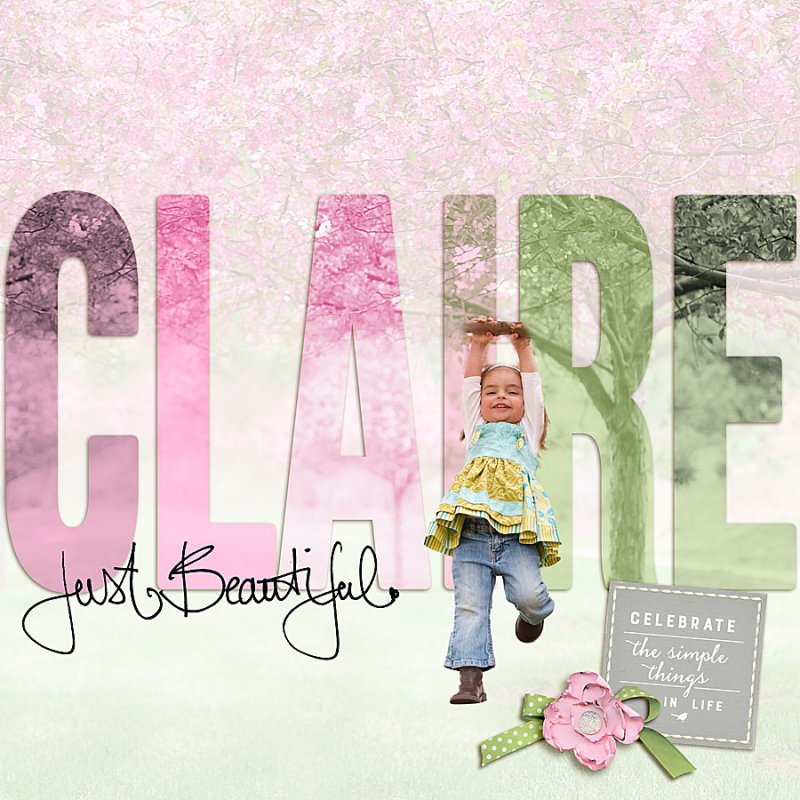
Today's scrap is a bit of a challenge....the idea is to combine the duotone MOC challenge with text....sooooo.....Think of a BIG photo you'll want to use and a word - you probably want to keep the word short
Please post your completed layout in The Lilypad gallery. GALLERY RULES: Layouts must contain at least 50% TLP products. (Templates count as 15%.) Uploads must be less than 250k. List all credits; no off-site linking allowed.
OK....Here we go:
1. Begin with a blank layout
2. Drag a LARGE photo onto your layout. The photo should be large enough to span the entire width of the page.
3. Think of a word that you will be clipping your photo to. TIP: You'll want to keep it short and use a FAT, BOLD font. Please use at least a 2-letter word
4. Each letter should be on it's own layer. For every letter in the word, copy the photo and clip to one of the letters.
5. For each of the photos clipped to individual letter, you must use the duotone technique (INSTRUCTIONS HERE) and use a different duotone color combo for each letter.
***NOTE- I am using the same photo, but if you want to mix it up and use multiple photos, that's ok too. The only requirement is that each letter is a different duotone color combo*****
***TIP- you may use the original photo as your background, as long as each letter is a different duotone***
6- The last thing is to make the layout your own...do anything you'd like to make it your style. =)
You have 24 hours to finish your pages. Layouts are due March 23, 2019 at 1pm Eastern time. Please load you pages to THIS gallery and post them below. Have fun!!!
Here is my example:
Although it's spring, the weather is still a bit crummy! I'm sooo over winter and ready for some warmer days! In honor of today's challenge, I'm going to use a spring photo, but you can use any photo you'd like.
Today's scrap is a bit of a challenge....the idea is to combine the duotone MOC challenge with text....sooooo.....Think of a BIG photo you'll want to use and a word - you probably want to keep the word short
Please post your completed layout in The Lilypad gallery. GALLERY RULES: Layouts must contain at least 50% TLP products. (Templates count as 15%.) Uploads must be less than 250k. List all credits; no off-site linking allowed.
OK....Here we go:
1. Begin with a blank layout
2. Drag a LARGE photo onto your layout. The photo should be large enough to span the entire width of the page.
3. Think of a word that you will be clipping your photo to. TIP: You'll want to keep it short and use a FAT, BOLD font. Please use at least a 2-letter word
4. Each letter should be on it's own layer. For every letter in the word, copy the photo and clip to one of the letters.
5. For each of the photos clipped to individual letter, you must use the duotone technique (INSTRUCTIONS HERE) and use a different duotone color combo for each letter.
***NOTE- I am using the same photo, but if you want to mix it up and use multiple photos, that's ok too. The only requirement is that each letter is a different duotone color combo*****
***TIP- you may use the original photo as your background, as long as each letter is a different duotone***
6- The last thing is to make the layout your own...do anything you'd like to make it your style. =)
You have 24 hours to finish your pages. Layouts are due March 23, 2019 at 1pm Eastern time. Please load you pages to THIS gallery and post them below. Have fun!!!
Here is my example:
Last edited:


 Thanks for hosting such a wonderful challenge.


