
mcurtt
give me all the paleo brownies
- Joined
- Jan 2, 2015
- Messages
- 9,263
Hi everyone, Marilyn here. I am hosting Rachel’s designer challenge this month. Can you believe that it is already March??? Even with that extra day in February, it seems that the year is speeding by.
Here are the February winners for the artsy alpha challenge hosted by Lisa:
The winners drawn at random are . . . .
$10 coupon goes to @marijke
$6 coupon goes to @redplaid3
- Your coupons will be delivered to you ASAP!
I won't kid you, I had some difficulty with my alpha brushes, my scatters went everywhere. But practice makes perfect, and it wouldn't be a challenge without growing, would it?
Without further ado, here is the March challenge. We went simple, a recipe challenge. With LOD still going on, and many of you participating in creating layouts for each designer, hopefully you will have time to fit this one in.
The recipe:
one photo (You may add a stroke to it which will NOT count as one of the 5 additional elements.)
two papers (They may be stacked, cut, blended. You decide.)
three word art elements (Either word strips or word art)
four types of marks (Rachel's signature)
five additional elements of your choosing. (You must list these additional elements when posting to this thread. If you opted to not stroke your photo but wanted it framed, that frame does count toward one of the five.)
-- For a total of fifteen layers.
Notes:
In my sample page, I've got two word strips and one word art. I modified one word strip, and that's okay. The original read “Being different is your superpower”, but since my other word art related to ME versus YOU, I did a bit of copying, cutting and pasting. But wait, there is no “M” in the original! What did I do? I selected and copied the “W” from superpower and rotated it. I then copied the “Y”, aligned all of the pieces of the word art, merged them together (CTRL E or COMMAND E on a Mac) and you'd never know...
Another tip that I found helpful... I was going a bit bonkers trying to determine if I had everything accounted for in my layout. So I decided to color code my layers to help keep things straight. If you RIGHT CLICK on the vertical bar to the left of your layer where the eye is located, you can see a list of colors. The Photoshop default is NO COLOR. I arbitrarily decided to set the word art to GREEN, the marks to GRAY, the five additional elements to RED. It was much more of a visual to determine if I met the requirements.

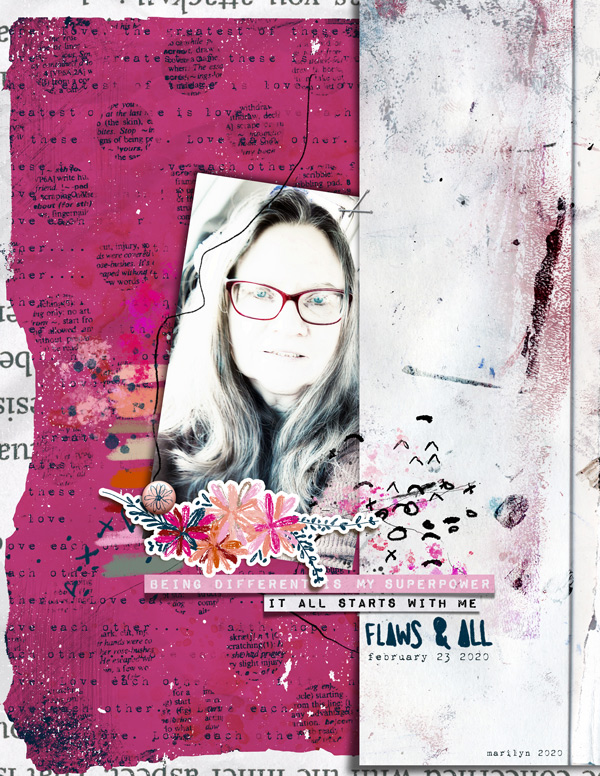
Here is my layout.
My five additional elements are: 2 paints, 1 pair of staples, 1 flower sticker, 1 brad.
I used Rachel's items from the main M3 February 2020 kit in addition to her M3 Feb 2020 Add-ons.
M3 Main Kit – I am Enough: https://the-lilypad.com/store/Mixed-Media-Monthly-Enough.html
Flaws & All – Mixed Media Artistry: https://the-lilypad.com/store/Flaws-And-All-Mixed-Media-Artistry.html
and a few other layout examples from the CT girls:
From Lisa @ArmyGrl:
Wildflowers and What a Wonder freebie.
Photo--snapshot of Martin Johnson Heade's Passion Flowers with Three Hummingbirds (1875)
Two papers--yes.
Three word snips--yes.
Four marks added (paper had some too)
Five Ellies: Flowers x 2, leaves, punchinella, stitch

From Aly @ajm
I used M3 Sept 2018 and M3 Feb 2019
2 papers are blend together
2 of the wort art also includes scribbles or/and paint
4 types of marks
5 elements: collage paper, flower, paper-bits (with the staples), paint and a staple for the photo

From Marijke @marijke

And now it is your turn. Let us see what inspires you.
------------------------------------------------------------------------------------------------------------------------------
Challenge Requirements:
· Where possible challenge layouts must use 100% of Rachel Jefferies Designs currently available in the TLP store (Collaborations including my Mixed Media Monthly Subscription Kits and Add Ons are also ok!). The exception to this is retired products that were previously for sale at TLP which can be used. A few elements here or there from other products that were previously available prior to Rachel's retirement or freebies may also be used.
· Upload your layout to the Rachel Jefferies Designs Gallery at TLP.
· For your challenge entry to be counted, you MUST reply to this thread with your finished layout. Please link your thread layout to your gallery.
· I'd like to see brand new pages, so no double-dipping with other challenges .
.
· The challenge will be open through March 31 at which time a random participant will win a $10 coupon to Rachel's shop. The winner will be announced when April’s challenge is posted.
New Release bonus entries
It feels great to scrap with fresh new releases, if you are scrapping with a product released during March 2020 (either a new release or a SOSN release) you'll get yourself a bonus entry for another chance to win a coupon should you not be the $10 coupon winner. One winner from the bonus entries will be picked from random to win a $6 coupon to Rachel's shop.
**It would be helpful when posting your page in this thread that you note you are eligible for the New Release Bonus Entry. Please post which March 2020 New Release (or March SOSN release) you used. This would make it faster for me cross checking all the entries when making the random draw for winners!
Any questions just ask @mcurtt and I will get back to you as soon as I can. Enjoy the challenge!
Here are the February winners for the artsy alpha challenge hosted by Lisa:
The winners drawn at random are . . . .
$10 coupon goes to @marijke
$6 coupon goes to @redplaid3
- Your coupons will be delivered to you ASAP!
I won't kid you, I had some difficulty with my alpha brushes, my scatters went everywhere. But practice makes perfect, and it wouldn't be a challenge without growing, would it?
Without further ado, here is the March challenge. We went simple, a recipe challenge. With LOD still going on, and many of you participating in creating layouts for each designer, hopefully you will have time to fit this one in.
The recipe:
one photo (You may add a stroke to it which will NOT count as one of the 5 additional elements.)
two papers (They may be stacked, cut, blended. You decide.)
three word art elements (Either word strips or word art)
four types of marks (Rachel's signature)
five additional elements of your choosing. (You must list these additional elements when posting to this thread. If you opted to not stroke your photo but wanted it framed, that frame does count toward one of the five.)
-- For a total of fifteen layers.
Notes:
In my sample page, I've got two word strips and one word art. I modified one word strip, and that's okay. The original read “Being different is your superpower”, but since my other word art related to ME versus YOU, I did a bit of copying, cutting and pasting. But wait, there is no “M” in the original! What did I do? I selected and copied the “W” from superpower and rotated it. I then copied the “Y”, aligned all of the pieces of the word art, merged them together (CTRL E or COMMAND E on a Mac) and you'd never know...
Another tip that I found helpful... I was going a bit bonkers trying to determine if I had everything accounted for in my layout. So I decided to color code my layers to help keep things straight. If you RIGHT CLICK on the vertical bar to the left of your layer where the eye is located, you can see a list of colors. The Photoshop default is NO COLOR. I arbitrarily decided to set the word art to GREEN, the marks to GRAY, the five additional elements to RED. It was much more of a visual to determine if I met the requirements.
Here is my layout.
My five additional elements are: 2 paints, 1 pair of staples, 1 flower sticker, 1 brad.
I used Rachel's items from the main M3 February 2020 kit in addition to her M3 Feb 2020 Add-ons.
M3 Main Kit – I am Enough: https://the-lilypad.com/store/Mixed-Media-Monthly-Enough.html
Flaws & All – Mixed Media Artistry: https://the-lilypad.com/store/Flaws-And-All-Mixed-Media-Artistry.html
and a few other layout examples from the CT girls:
From Lisa @ArmyGrl:
Wildflowers and What a Wonder freebie.
Photo--snapshot of Martin Johnson Heade's Passion Flowers with Three Hummingbirds (1875)
Two papers--yes.
Three word snips--yes.
Four marks added (paper had some too)
Five Ellies: Flowers x 2, leaves, punchinella, stitch
From Aly @ajm
I used M3 Sept 2018 and M3 Feb 2019
2 papers are blend together
2 of the wort art also includes scribbles or/and paint
4 types of marks
5 elements: collage paper, flower, paper-bits (with the staples), paint and a staple for the photo
From Marijke @marijke
And now it is your turn. Let us see what inspires you.
------------------------------------------------------------------------------------------------------------------------------
Challenge Requirements:
· Where possible challenge layouts must use 100% of Rachel Jefferies Designs currently available in the TLP store (Collaborations including my Mixed Media Monthly Subscription Kits and Add Ons are also ok!). The exception to this is retired products that were previously for sale at TLP which can be used. A few elements here or there from other products that were previously available prior to Rachel's retirement or freebies may also be used.
· Upload your layout to the Rachel Jefferies Designs Gallery at TLP.
· For your challenge entry to be counted, you MUST reply to this thread with your finished layout. Please link your thread layout to your gallery.
· I'd like to see brand new pages, so no double-dipping with other challenges
.· The challenge will be open through March 31 at which time a random participant will win a $10 coupon to Rachel's shop. The winner will be announced when April’s challenge is posted.
New Release bonus entries
It feels great to scrap with fresh new releases, if you are scrapping with a product released during March 2020 (either a new release or a SOSN release) you'll get yourself a bonus entry for another chance to win a coupon should you not be the $10 coupon winner. One winner from the bonus entries will be picked from random to win a $6 coupon to Rachel's shop.
**It would be helpful when posting your page in this thread that you note you are eligible for the New Release Bonus Entry. Please post which March 2020 New Release (or March SOSN release) you used. This would make it faster for me cross checking all the entries when making the random draw for winners!
Any questions just ask @mcurtt and I will get back to you as soon as I can. Enjoy the challenge!
Attachments
Last edited:


