Pocket style templates on A4?

berniek

I have a girl crush on the Naming Fairy
Joined
May 3, 2012
Messages
2,224
Does anyone of you know if there are pocket style (digital) templates available on A4 size? I have looked around but can't really find any.

I am thinking about doing my PL/P52/P-whatever-to-call-it on A4 because then I can just print it off at home and have the pages ready to view right after they happened and not after waiting a full year.

If I can't find any, should I just go with an 12x12 album or should I make those temps myself?
 
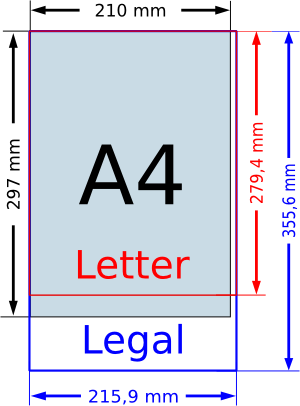
Lorry is really good with actions, and she resizes everything for her size. I'm not familiar with the dimensions of A4, but I imagine it is similar to 8.5x11..? Or that anything that is 8x8 would fit, so that'd be resizing anything 12x12 down to 75%, and then adding some borders? Maybe squares in small size. Making your own is easy enough, or using any of the png pieces from templates you've purchased to sort of piece together something that would work for you.
 
I must ask Lorry about the action she has. If it's really easy and quick, it may work? I don't know.
When I have to do some resizing, I better just make the whole thing myself. I don't know but that sounds easier? I am a perfectionist so I want it all perfect or not at all.

And yeah, well, whenever I buy templates I only save the tiff files and delete everything else so that's a no go on using the pngs. Thanks anyhow! :)

Here is an image about the sizings of most used papers.

Printer_Paper_A4_vs_letter_vs_legal.png
 
Last edited:
I used to delete all that too, then I thought up this "trick" and now keep it all again. Must delete.... no point in having 75 trillion of the same shape! Lol

Go find Lorry's "watch me scrap" video. Literally one or two clicks! She makes actions for everything! I'm in complete awe of her and wish I could make some, too. Not in PSE 12, though. :)

I suppose it would depend on the type of template you are doing. For pockets along the whole thing/pocket pages, making your own may be better, but other types of pages, I think resizing the template first wouldn't take much time. Cntrl a, cntrl t, select the dimensions and done.
 
It also looks like if you purchased any of Amy Martin's half pages or sixty twelves, those could be pretty adaptable. And I was just looking at templates in the shop, I think Lynne Marie had some "build your own template" packs, if you're not comfortable making your own shapes....

Also, copying and pasting pieces from your tif files into your own template. There was a "merge templates" technique challenge during DSD earlier this month, which gave me this idea. Maybe you can save a few of the pieces as individual pngs, just to have some shapes already built.
 
I totally bought all of Amy Martins Sixty Twelve template packs when she left! I never even thought about those..
I don't need the real pocket look, just like the blocked design. And I use Lynne-Maries BYOT with my PL pages this year. It's kinds easy and kinda not.
 
i called up some interesting looking using this in the bing search bar

scrapbook a4 pocket protector template
 
Last edited:
I used one of the sixty twelves doubled on a page for the 13 on the 13th layout I did. I'm not sure about the stitching pieces on those templates... not sure if they're all that adaptable.
 
Back
Top