
wendy85
Doin' a little chair dance here at my desk
- Joined
- Jan 10, 2013
- Messages
- 1,518
This is a techique challenge. You must include at least one photo and one mask in your project. You do not need to take a new photo if you have an existing photo that matches the requirements for this challenge. You need to clip a photo in the mask or brush like you with any other mask.
Can you believe we are already halfway of the month. This is making January going sooo fast. But let me tell you something about my challenge for you...
I love using paint in my pages, sometimes a lot of paint sometime little less. But what i do like about paint and or brushes is that they are easy to use as masks as well. When there are paint clusters in a kit or maybe just a brush it happens a lot i use it as mask for my photos.
It is not hard to do so. Take photo you want to use and a brush or paint as you prefer. Layer it somewhere on your page and clip the photo inside, just like you do with any other mask.


You are free to use more paint brushes, but there must be at least 1 used as a clipping mask.
This is what i did for this challenge
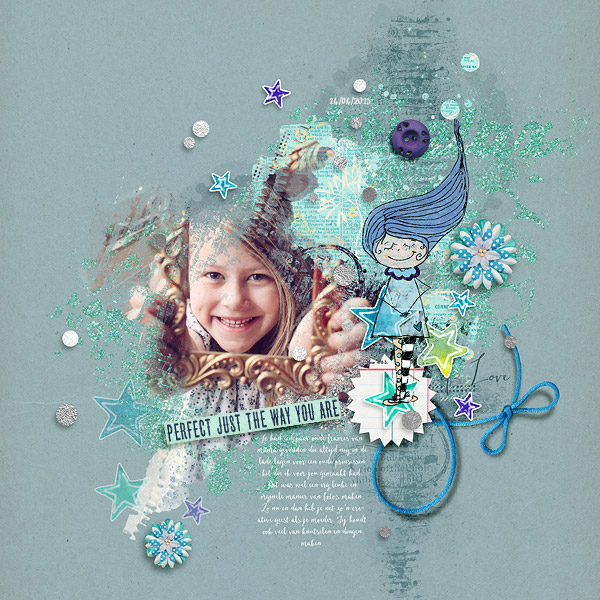
and here are 2 older pages from me where i used the same technique, but also with a little extra tho show you more options with this technique:


Requirements:
1. Create a page with a photo clipped in a mask
2. You must include at least 1 paint/brush element as mask.
3. You must include at least 1 photo.
Other Software Programs:
If you do not use Photoshop here are some resources that I found for layer masks and r paint in other programs. If your program is not listed you can search your software's help for the words CLIPPING MASKS, etc. for specifics on your programs abilities. I just want you play around with your software to see what it can do. These are just random founded tutorials to show you what i expect you to do with the paint brushes.
Photoshop Elements
Paint Shop Pro
Gimp
Craft Artist
Pixelmator
Your page must be a new page in order to count for the Month of Challenges. Please post your page in your page thread you created in this forum. You should have one post per completed challenge page. If you complete all 31 challenges, your thread should contain 31 posts. Please do not comment in the participants’ page threads so we can keep them clean. You should also post your page here in this thread, and people can comment here if they wish. Pages should contain at least 75% current Lilypad product (currently for sale in the store from either permanent designers or guest designers.
Can you believe we are already halfway of the month. This is making January going sooo fast. But let me tell you something about my challenge for you...
I love using paint in my pages, sometimes a lot of paint sometime little less. But what i do like about paint and or brushes is that they are easy to use as masks as well. When there are paint clusters in a kit or maybe just a brush it happens a lot i use it as mask for my photos.
It is not hard to do so. Take photo you want to use and a brush or paint as you prefer. Layer it somewhere on your page and clip the photo inside, just like you do with any other mask.


You are free to use more paint brushes, but there must be at least 1 used as a clipping mask.
This is what i did for this challenge
and here are 2 older pages from me where i used the same technique, but also with a little extra tho show you more options with this technique:
Requirements:
1. Create a page with a photo clipped in a mask
2. You must include at least 1 paint/brush element as mask.
3. You must include at least 1 photo.
Other Software Programs:
If you do not use Photoshop here are some resources that I found for layer masks and r paint in other programs. If your program is not listed you can search your software's help for the words CLIPPING MASKS, etc. for specifics on your programs abilities. I just want you play around with your software to see what it can do. These are just random founded tutorials to show you what i expect you to do with the paint brushes.
Photoshop Elements
Paint Shop Pro
Gimp
Craft Artist
Pixelmator
Your page must be a new page in order to count for the Month of Challenges. Please post your page in your page thread you created in this forum. You should have one post per completed challenge page. If you complete all 31 challenges, your thread should contain 31 posts. Please do not comment in the participants’ page threads so we can keep them clean. You should also post your page here in this thread, and people can comment here if they wish. Pages should contain at least 75% current Lilypad product (currently for sale in the store from either permanent designers or guest designers.
Last edited:


