
bestcee
In love with places I've never been to
- Joined
- Dec 18, 2013
- Messages
- 19,337
Hello! And welcome to Day 6 of Month of Challenges. I hope you are having fun so far! I've loved seeing your creativity in the Gallery!
For this challenge, we are going to create a Quadrant Layout. This challenge was inspired by gorgeous layouts where the layout has 4 separate smaller squares that combine to make 1 beautiful large layout! For this challenge, you will divide your page into fourths. They should not be long and skinny rectangles, but should be about the same width x height. For example, a 12x12 page would be four 6x6 square quadrants. An 8.5x11 page would be four 4.25x5.5 rectangle quadrants. Imagine folding your paper in half lengthwise, then widthwise.
Each quadrant should have a visible distinction from the others. You could use a different paper background in each quadrant or you could use visible stitches to separate each section, anything is welcome as long as there’s a visible distinction between quadrants.
Filling your Quadrants:
One quadrant will contain your title as the main focus. Two quadrants will contain photos as the focus. One quadrant can be decorated however you want – mixed media, elements, word art, your choice! Journaling is welcome in any of the quadrants, but is not required.
Here is my example:
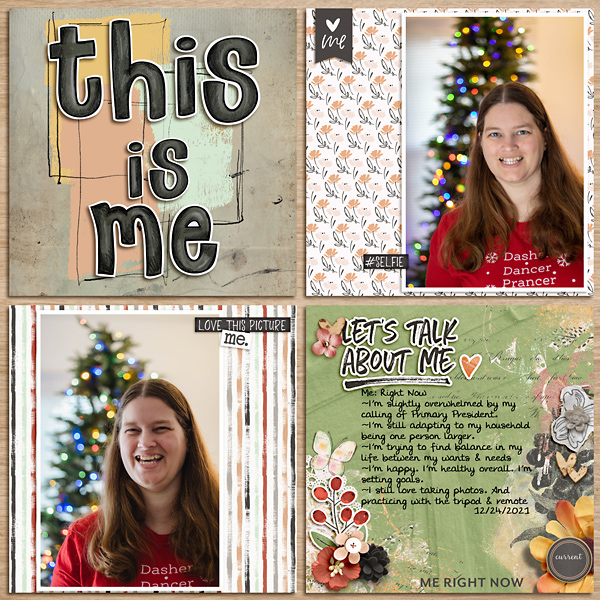
Here's an 8.5x11 example from Lisa (ArmyGrl)

And another example from Sheri (SeattleSheri)

And a more minimalist one from @lcpereyra

To Recap:
1. Your page should be visibly divided into 4 quadrants.
2. One quadrant with the title, two quadrants with photos, and one quadrant decorated.
3. No templates for this challenge please.
Your page must be a new page in order to count for the Month of Challenges. Your page must be posted in three places:
1. Uploaded to the TLP Gallery (not an outside hosting site).
2. Posted in your page thread you created in the MOC Layouts Folder. You should have one post per completed challenge page. If you complete all 31 challenges, your thread should contain 31 posts. Please do not comment in the participants’ page threads so we can keep them clean.
3. Posted in this thread. People can comment here if they wish.
Your page must contain Lilypad product (pages with photos and font only do not count). If you use product from other stores, your pages must contain at least 75% current Lilypad product (currently for sale in the store from either permanent designers or guest designers).
For this challenge, we are going to create a Quadrant Layout. This challenge was inspired by gorgeous layouts where the layout has 4 separate smaller squares that combine to make 1 beautiful large layout! For this challenge, you will divide your page into fourths. They should not be long and skinny rectangles, but should be about the same width x height. For example, a 12x12 page would be four 6x6 square quadrants. An 8.5x11 page would be four 4.25x5.5 rectangle quadrants. Imagine folding your paper in half lengthwise, then widthwise.
Each quadrant should have a visible distinction from the others. You could use a different paper background in each quadrant or you could use visible stitches to separate each section, anything is welcome as long as there’s a visible distinction between quadrants.
Filling your Quadrants:
One quadrant will contain your title as the main focus. Two quadrants will contain photos as the focus. One quadrant can be decorated however you want – mixed media, elements, word art, your choice! Journaling is welcome in any of the quadrants, but is not required.
Here is my example:
Here's an 8.5x11 example from Lisa (ArmyGrl)
And another example from Sheri (SeattleSheri)
And a more minimalist one from @lcpereyra
To Recap:
1. Your page should be visibly divided into 4 quadrants.
2. One quadrant with the title, two quadrants with photos, and one quadrant decorated.
3. No templates for this challenge please.
Your page must be a new page in order to count for the Month of Challenges. Your page must be posted in three places:
1. Uploaded to the TLP Gallery (not an outside hosting site).
2. Posted in your page thread you created in the MOC Layouts Folder. You should have one post per completed challenge page. If you complete all 31 challenges, your thread should contain 31 posts. Please do not comment in the participants’ page threads so we can keep them clean.
3. Posted in this thread. People can comment here if they wish.
Your page must contain Lilypad product (pages with photos and font only do not count). If you use product from other stores, your pages must contain at least 75% current Lilypad product (currently for sale in the store from either permanent designers or guest designers).


