
- Joined
- May 3, 2013
- Messages
- 4,556
January 19: Create a Stamped Background
Hello friends! I hope you are enjoying this year’s MOC as much as I am and have been inspired to create some layouts. Your pages are filling the gallery and it is such wonderful inspiration! It has been a highlight of my month and I’m delighted to be today’s host!
I scrap digitally and traditionally as I love the process of each. When I scrap traditionally (aka paper and glue), I love to stamp on my layouts. I enjoy the process of stamping with ink pads, acrylic and rubber stamps, and physically making impressions on paper. And I adore the handcrafted look of the stamped images. With ink stamping, you can see the paper texture, variations in ink absorbency by the paper, color layering, and (in my case) the messy-ness of the process. Here is an example of what paper stamping looks like on plain and textured cardstock:
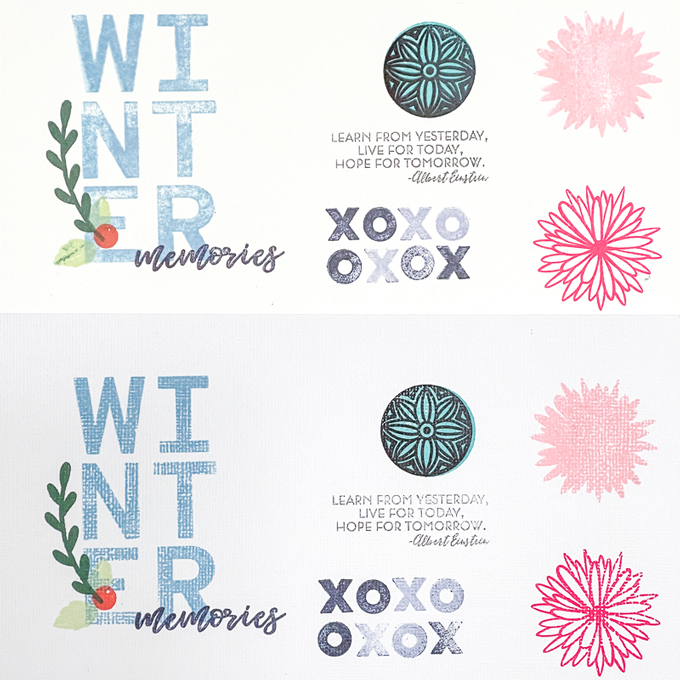
Obviously I am not a pristine stamper, but you can see that paper stamping has a unique look that adds texture and interest. Inks can be layered, with darker inks showing through lighter inks, you can achieve lighter shades of ink with repeated stamping (by not re-inking the stamp), and you can have uneven ink coverage. Ink stamping is different from paints, gesso, and watercolors as ink stamping ultimately has a defined edge that does not bleed, drip, or run down the paper. It stays put where it lands on the paper.
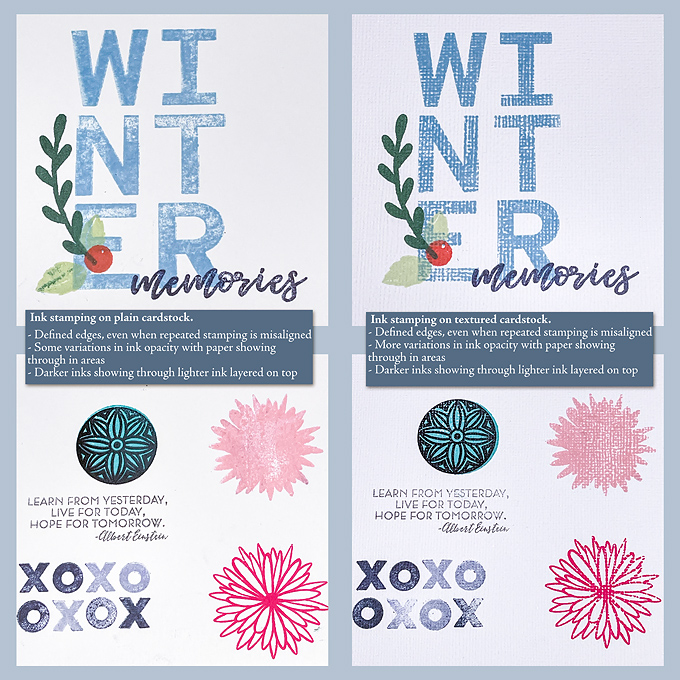
While I really enjoy the hands on experience of paper stamping, I can’t ignore the awesome ease of digital clean up (aka - no clean up!). So more often than not, I am pulling out my digital stamps to replicate the look on my digi layouts. This year for MOC I decided to challenge us - myself included - to find those digital stamps and get busy creating a stamped background.
Therefore, today’s challenge is to use digital stamps and make a stamped background page, and use it on your layout.
Rules for this challenge: Your layout for this challenge should include the following:
Here is the layout I made for this challenge:

Just to add in a bit more visual description, on the left is the background paper I initially made with alpha stamps from Allison Pennington's Inclination kit and on the right I highlight some of the adjustments I made to digitally replicate ink stamping.
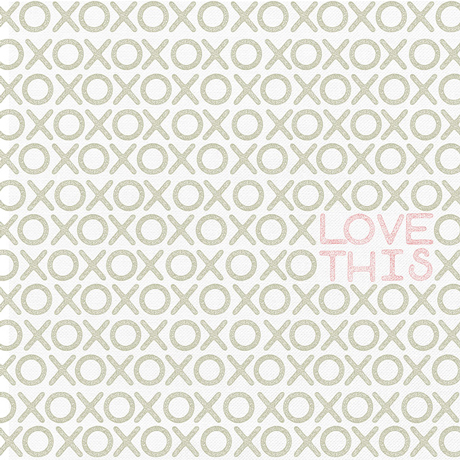
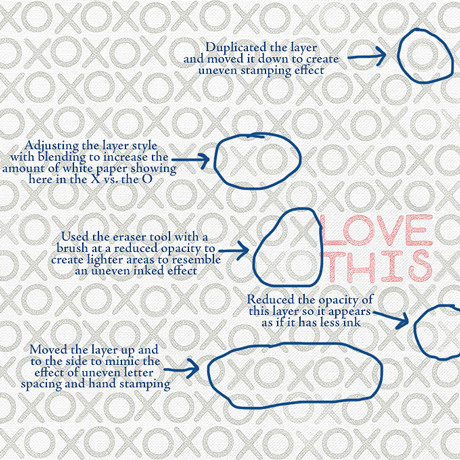
The alphas were already styled to look like textured stamps. I wanted the paper to look more realistic so after I stamped out each letter, I selectively adjusted the spacing of some layers, duplicated other layers and shifted the layer top layer to replicate a "smudged" stamp look (I'm a very imperfect ink stamper!), and played with opacity and blending layer of some of the individual stamped letter layers to create a more realistic ink stamped look. I also slightly adjusted the ink color for the final stamped background paper. The differences are subtle, but I feel it better represents the stamped look I was going for. The final background paper became this:

There are several simple techniques create this look including:

*** WHAT IS CONSIDERED A DIGITAL STAMP? For this challenge, a stamp is a digital image of anything is flat, one dimensional, and you could envision as an acrylic or rubber stamp that gets inked up and leaves an impression when stamped on paper. Here is a guide to help determine what can be used to create the stamped background:

I hope this challenge encourages you to get creative and replicate a paper & ink stamped look for your digital layout!
Remember:
Your page must be a new page in order to count for the Month of Challenges. Your page must be posted in three places:
1. Uploaded to the TLP Gallery (not an outside hosting site).
2. Posted in your page thread you created in the MOC Layouts Folder. You should have one post per completed challenge page. If you complete all 31 challenges, your thread should contain 31 posts. Please do not comment in the participants’ page threads so we can keep them clean.
3. Posted in this thread. People can comment here if they wish.
Your page must contain Lilypad product (pages with photos and font only do not count). If you use product from other stores, your pages must contain at least 75% current Lilypad product (currently for sale in the store from either permanent designers or guest designers).
Hello friends! I hope you are enjoying this year’s MOC as much as I am and have been inspired to create some layouts. Your pages are filling the gallery and it is such wonderful inspiration! It has been a highlight of my month and I’m delighted to be today’s host!
I scrap digitally and traditionally as I love the process of each. When I scrap traditionally (aka paper and glue), I love to stamp on my layouts. I enjoy the process of stamping with ink pads, acrylic and rubber stamps, and physically making impressions on paper. And I adore the handcrafted look of the stamped images. With ink stamping, you can see the paper texture, variations in ink absorbency by the paper, color layering, and (in my case) the messy-ness of the process.
Here is an example of what paper stamping looks like on plain and textured cardstock:Obviously I am not a pristine stamper, but you can see that paper stamping has a unique look that adds texture and interest. Inks can be layered, with darker inks showing through lighter inks, you can achieve lighter shades of ink with repeated stamping (by not re-inking the stamp), and you can have uneven ink coverage. Ink stamping is different from paints, gesso, and watercolors as ink stamping ultimately has a defined edge that does not bleed, drip, or run down the paper. It stays put where it lands on the paper.
While I really enjoy the hands on experience of paper stamping, I can’t ignore the awesome ease of digital clean up (aka - no clean up!). So more often than not, I am pulling out my digital stamps to replicate the look on my digi layouts. This year for MOC I decided to challenge us - myself included - to find those digital stamps and get busy creating a stamped background.
Therefore, today’s challenge is to use digital stamps and make a stamped background page, and use it on your layout.
Rules for this challenge: Your layout for this challenge should include the following:
- Use a solid, plain background paper only.
- Your paper should not have any pattern, stamps or paint to start.
- Your solid, plain background paper can have a cardstock texture.
- Create a stamped background paper using digital stamps.
- For the purpose of this challenge, stickers, paint and gesso do not count as stamps.
- You can use alphas, shapes, and icons.
- SEE BELOW FOR EXAMPLES OF WHAT WILL AND WON'T WORK AS STAMPS FOR THIS CHALLENGE
- You must cover your entire background paper with stamps.
- The background paper must comprise at least 50% of your final layout.
- i.e. don’t create the background paper and then cover it all up with photos and elements! Let it shine as a focal point.
- I need to be able to see that you created a filled stamped background paper.
- You may create the rest of the layout however you desire
- You do not need to use photos, but your page must contain TLP product
Here is the layout I made for this challenge:
Just to add in a bit more visual description, on the left is the background paper I initially made with alpha stamps from Allison Pennington's Inclination kit and on the right I highlight some of the adjustments I made to digitally replicate ink stamping.
The alphas were already styled to look like textured stamps. I wanted the paper to look more realistic so after I stamped out each letter, I selectively adjusted the spacing of some layers, duplicated other layers and shifted the layer top layer to replicate a "smudged" stamp look (I'm a very imperfect ink stamper!), and played with opacity and blending layer of some of the individual stamped letter layers to create a more realistic ink stamped look. I also slightly adjusted the ink color for the final stamped background paper. The differences are subtle, but I feel it better represents the stamped look I was going for. The final background paper became this:
There are several simple techniques create this look including:
- Adjusting the opacity of the digital stamp layer.
- Duplicating the stamp layer, adjusting the opacity of that layer and "bumping" that layer a bit with the arrow tools to slightly move it.
- Using a brush at a lower opacity and erasing parts of a stamped image to create variations in the stamped image's "ink coverage".
- Adjusting the blending layers in Photoshop
- Menu: Layer -> Layer Style -> Blending Options -> Adjust sliders of "this layer" and "underlying layer"; this is trial and error and often works better when you have a textured cardstock and/or contrast in your stamp and background colors.
- Anne has a great Photoshop tutorial here
- There may be ways to replicate this in other programs but unfortunately I only know PhotoShop. Regardless, this technique isn't necessary for the challenge and is simply one of many ways to create a realistic digital stamped image.
*** WHAT IS CONSIDERED A DIGITAL STAMP? For this challenge, a stamp is a digital image of anything is flat, one dimensional, and you could envision as an acrylic or rubber stamp that gets inked up and leaves an impression when stamped on paper. Here is a guide to help determine what can be used to create the stamped background:
I hope this challenge encourages you to get creative and replicate a paper & ink stamped look for your digital layout!
Remember:
Your page must be a new page in order to count for the Month of Challenges. Your page must be posted in three places:
1. Uploaded to the TLP Gallery (not an outside hosting site).
2. Posted in your page thread you created in the MOC Layouts Folder. You should have one post per completed challenge page. If you complete all 31 challenges, your thread should contain 31 posts. Please do not comment in the participants’ page threads so we can keep them clean.
3. Posted in this thread. People can comment here if they wish.
Your page must contain Lilypad product (pages with photos and font only do not count). If you use product from other stores, your pages must contain at least 75% current Lilypad product (currently for sale in the store from either permanent designers or guest designers).


