***Winner Announced*** Technique Challenge #1 - Swiss Cheese - DSD 2018

I like this technique but clearly I need some help (further suggestions) with the shadowing. Even though I used an inner shadow, I still think my cutout appears to be on top of the paper rather than underneath. Any ideas?

Anyway, here it is:
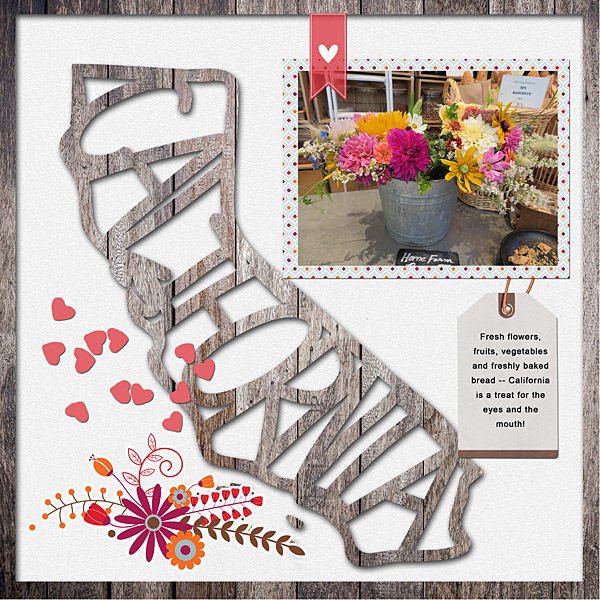
 
I like playing with shapes, and I knew exactly what to do when I saw this template. :) It was perfect for your technique challenge, Jenn!
 
I like this technique but clearly I need some help (further suggestions) with the shadowing. Even though I used an inner shadow, I still think my cutout appears to be on top of the paper rather than underneath. Any ideas?

Anyway, here it is:

@flowersgal- to me, it looks as if you put an inner shadow style on the white paper? I think, if you put a regular shadow style instead, the cutout would appear to be behind/below the white, not above it. Usually whatever has an inner shadow on it will appear to be "cut out" like that.
 
I would love to know how to do this in Affinity photo. Is there a technical term for “marching ants”?

Sorry for the delay, I had a kid issue! I’ll have to research that software. I guess marching ants would be equivalent to making a selection? I’m not sure though.
 
I like this technique but clearly I need some help (further suggestions) with the shadowing. Even though I used an inner shadow, I still think my cutout appears to be on top of the paper rather than underneath. Any ideas?

Anyway, here it is:


Hmmm, is the wood paper on top? I think I would put the white paper on top and cut out the California from that paper? Let me know, I’ll think on the shadows. I’m not in front of photoshop at the moment!
 
yum! best thing about swiss cheese is there are zero calories if you just eat the holes!
No79C1N.png
 
Eventhough This Was An Interesting Challenge...It Took Me A Really Long Time To Complete My Layout...I Made 3 Cut-Out Star Shapes...I Hope You Can See Them Clearly...This Layout Was All About Fall Excitement! & Using My Newly Purchased DSD Kits!...I Had So Much Fun Making This With All My New Lilypad Goodies & Some Familiar Fall Favorites Already In My Stash!...Thanks For The Challenge!...

*P.S...This Is The Largest Cluster I Have Ever Made In A Layout!...So Fun!...

*For My Parade Of Color:Fall-I Used:{A Lot Of Kits!}

*Something Wicked-Sahin Designs & Sabrina's Creations
*Welcome Autumn-Bundle-Mommyish
*Turning It Around-Lynn Grieveson
*Art Crush No.8-Artsy Bits & Pieces-NBK Design
*Art Crush No.4-Artsy Bits & Pieces-NBK Design
*Art Crush No.4-Paper Set-Fusion-NBK Design
*Photograph-M3-Bundle-Paula Kesselring
*Fantabulous Fall-Kate Hadfield & Kim Jensen
*Autumn/Autumn Falling/Pumpkin Carving-All Kits By Kristin Aagard
*Capturing Fall-Collab-The Lilypad

 
Last edited:
I would love to know how to do this in Affinity photo. Is there a technical term for “marching ants”?

Me again.... so I found this video: https://vimeo.com/channels/affinityphoto/130975378 and then I found a forum post that has a few ways to make selections. Since I'm not familiar with the software, I don't know if Google is leading me in the right path! I hope on of these works! https://forum.affinity.serif.com/index.php?/topic/45683-how-to-create-selection-from-layer/
 
Hmmm, is the wood paper on top? I think I would put the white paper on top and cut out the California from that paper? Let me know, I’ll think on the shadows. I’m not in front of photoshop at the moment!
Nope, the wood paper is underneath the white and the cutout is on the white. I'll try KayTeaPea's suggestion and see how that looks. Maybe I just need to keep experimenting with it to see what looks good to me.
 
Nope, the wood paper is underneath the white and the cutout is on the white. I'll try KayTeaPea's suggestion and see how that looks. Maybe I just need to keep experimenting with it to see what looks good to me.
lol! Yes, then it's definitely the shadowing! It look great the way it is though too! I think she might be right. Just use a regular paper shadow that you normally use on a layered paper. Let me know, I'll try to help!
 
Last edited:
it's hard to see - I've done this challenge before and I know the paper you choose can really make a difference on how the shadowing pops. But my F in the lower left is my cut out

 
Nope, the wood paper is underneath the white and the cutout is on the white. I'll try KayTeaPea's suggestion and see how that looks. Maybe I just need to keep experimenting with it to see what looks good to me.

Are you using a cutout shadow style? Actually the cutout shadow only simulates a cutout as there is no actual cutout involved. You have the thing that is supposed to look as if it was underneath on top and apply the cut out shadow.
 
Back
Top