- Joined
- Sep 17, 2012
- Messages
- 13,843
**** Winner Announced! Congratulations, Ferdy! ****
I will message you shortly!
Woo Hooo! Happy DSD! Let's get scrappin'!
I'm hosting one of the technique challenges this go around, and we are going to try out Swiss Cheese! No, not the real cheese, more the technique when scrapping! This technique means that you have two layers of paper, then there are cut outs or holes in the top layer. I always use a plain paper on top, and cut out shapes to see the pattern behind! This challenge is super easy! I hope you give it a try!
Here are the steps:
First, the layout I'm working on is using Bella Gypsy's School Rules and Scrapping with Liz Funky Journal Templates plus her August Cut Outs. For the background, I have two paper layers, and then I have Liz's cut out on top. Here is my Layer's Palette and what my layout looks like.


Next, you need the marching ants on the item you are cutting out. So, I press Control and clicked the thumbnail of the layer in the Layers Palette. Then they started marching around the outer edge of the words. (You can also try Control + A, if you have that layer selected.)
Here are my ants.

After you have the ants marching, choose the top most paper layer. In my case, it is the white layer. Once you have that layer chosen, press delete. This deletes the selection that we have with our marching ants.
Then, turn of the visibility of the top most layer - this is the words on my layout - by clicking on the eye on the left side. Here is my Layer's Palette and what my layouts looks like immediately after I pressed delete. It looks funny for the moment.


See, that is silly looking! So, to fix this, you are going to add a shadow to the white paper. Then play with the bottom paper layer for patterns and colors to see what you like. Here is my page with shadows, and different paper examples.
Shadowed and patterns:

Green polka:

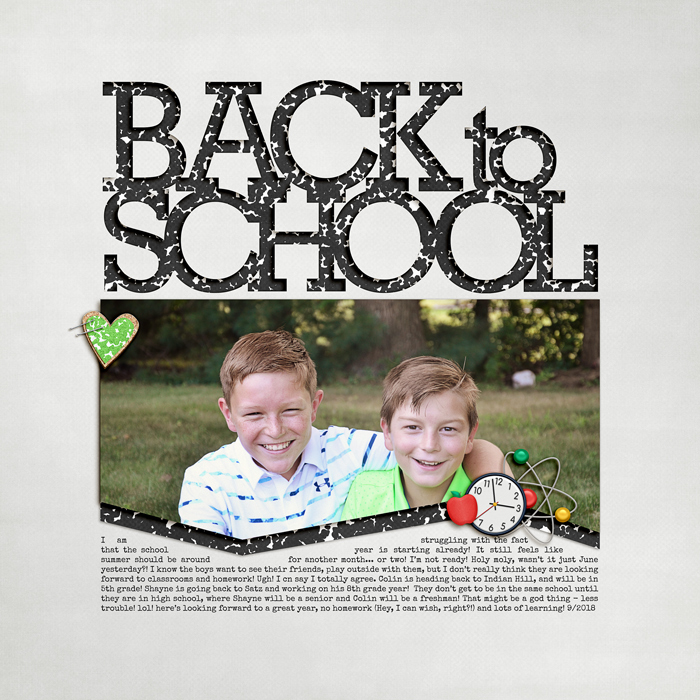
And, my final layout, with a composition notebook pattern.
Note, you can also try this technique using shapes, templates or fonts. It's a lot of fun! Here are some more examples of cut outs I've used on my pages!


Excited to see what you create! Thanks for joining in!
This game closes on Tuesday, October 9th at 11am EDT.
A winner will be picked at random and will receive a $3 store coupon to The Lilypad!
I will message you shortly!
Woo Hooo! Happy DSD! Let's get scrappin'!
I'm hosting one of the technique challenges this go around, and we are going to try out Swiss Cheese! No, not the real cheese, more the technique when scrapping! This technique means that you have two layers of paper, then there are cut outs or holes in the top layer. I always use a plain paper on top, and cut out shapes to see the pattern behind! This challenge is super easy! I hope you give it a try!
Here are the steps:
First, the layout I'm working on is using Bella Gypsy's School Rules and Scrapping with Liz Funky Journal Templates plus her August Cut Outs. For the background, I have two paper layers, and then I have Liz's cut out on top. Here is my Layer's Palette and what my layout looks like.
Next, you need the marching ants on the item you are cutting out. So, I press Control and clicked the thumbnail of the layer in the Layers Palette. Then they started marching around the outer edge of the words. (You can also try Control + A, if you have that layer selected.)
Here are my ants.
After you have the ants marching, choose the top most paper layer. In my case, it is the white layer. Once you have that layer chosen, press delete. This deletes the selection that we have with our marching ants.
Then, turn of the visibility of the top most layer - this is the words on my layout - by clicking on the eye on the left side. Here is my Layer's Palette and what my layouts looks like immediately after I pressed delete. It looks funny for the moment.
See, that is silly looking! So, to fix this, you are going to add a shadow to the white paper. Then play with the bottom paper layer for patterns and colors to see what you like. Here is my page with shadows, and different paper examples.
Shadowed and patterns:
Green polka:
And, my final layout, with a composition notebook pattern.
Note, you can also try this technique using shapes, templates or fonts. It's a lot of fun! Here are some more examples of cut outs I've used on my pages!
Excited to see what you create! Thanks for joining in!
This game closes on Tuesday, October 9th at 11am EDT.
A winner will be picked at random and will receive a $3 store coupon to The Lilypad!
Last edited: