
What's new
cfile

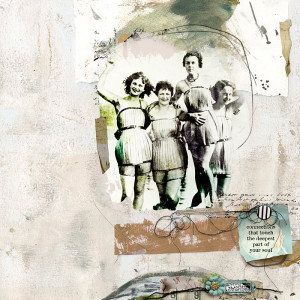
Connections in the Grocery Store

  • Media owner cfile
  • Date added
Description
MOC12 Day 16 Human Connections
Credits:
MPM | Foundation https://the-lilypad.com/store/Memory-Pockets-Monthly-Foundation-2021-edition.html
Fiddle Dee Dee Designs | Shadows - Dressed Up
https://the-lilypad.com/store/Shadows-Dressed-Up-Photoshop-Tool-Styles.html
Mommyish | 2020 Shadows CU/PU
https://the-lilypad.com/store/PU-CU-2020-Shadow-Styles.html
font: Ana’s Faded Typewriter
-------------------------
photo pixabay
====================
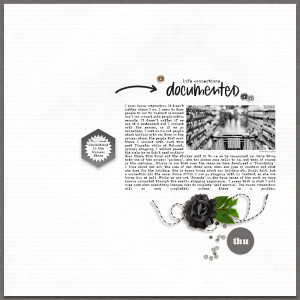
Journaling: "I enjoy human interaction. It doesn’t matter where I am, I seem to draw people to me! My husband is amazed how I can connect with people within seconds. It doesn’t matter if we are at a restaurant and I connect with the server, or if we go somewhere, I just smile and people start talking with me. Even in the grocery store, the people that work there I connect with. Just this past Thursday while at Walmart, grocery shopping, I walked passed the aisle (as we didn’t need anything down there this time) and the stocker said hi to me as he recognized me. Same thing with one of the grocery “pickers”.. she too always says hello to me, and then of course is the cashiers... Gloria is one that over the years we have developed a “friendship”. I know about her son, the loss of her other sons, when she goes on vacation and what she does for the holidays. She in turns knows about our holidays etc. Small talk, but a connection all the same. Since COVID I now go shopping with my husband, so she now knows him as well. While we are not “friends” in the true sense of the word, we have become connected through the weekly shopping experience. I guess that is what I will miss most when everything changes over to complete “self service”. The human interaction will go away completely unless there is a problem."
Ah, you know I'm a sucker for a black & white photo and lots of whitespace! I enjoyed reading your journaling and am glad you have these kinds of connections. It is a good challenge for me to think about people I encounter fairly regularly but may not stop to interact with.
 
This is life, isn't it? Daily connections intertwined throughout our errands and work and play. Every person has a story, that's for sure. Love the photo you chose to illustrate the journaling...something we all do, grocery shopping!
 
Well yes, I can believe this about you simply because of the comments and responses you leave here. This is a great page about you. Congratulations
 
This is such a beautiful page! I love the intentional use of color and the nostalgic feeling of the photo.
 
Christa, your page is beautiful! I wish I could remember how to place text around an object, and so many more things! It's hard to take the time to look them all up as I'm
behind on the challenges. Anyway, I love your journaling. I don't know you but I remember you have always been so kind and helpful to me. You make great comments to everyone. As I was reading your text, I thought "I can absolutely see Christa being this way." It's the way I pictured you! You are an awesome human being! I really wish I could know you. Love your page and story!!!
 
@gduncan oh Glenda, how sweet of you to say that.. you are making me blush with your comments :) Thank you so much!!!

Re the text boxes, I made 2 text boxes with this page. In PS/PSE using the Text tool, draw out a box to type in.. I did the left side column first, typing all of my journaling. Then I duplicated that text box with text included and shut off the layer (eye next to the text layer in layer panel)... on the original text box, put your cursor on one of the words in your journaling and it will bring up the marquee tool with little squares on each side of the box and in the corners. Grab the bottom one holding down the shift key and move the box up to make it even with the bottom of the photo.

now turn back on the second text box. In the journaling, put your cursor on the next word from the first box where you left off and highlight and delete the portion from the first box (in the second) that you will not need any more. The marquee rectangle should still be on with the boxes.. using the right side square holding the shift down, pull that square over to stretch the text box to the left .. that should move the text under the photo and stop the stretching at the edge of the photo.

That is how I did the L shaped journaling box.

I hope that makes sense. :) Let me know if you need more assistance, and thanks again Glenda for your sweet comments :)
 

Media information

Media category
Pollywog Team Layouts
Added by
cfile
Date added
View count
413
Comment count
12
Rating
0.00 star(s) 0 ratings

Image metadata

Filename
20240116MOC16humanconnect8.jpg
File size
243 KB
Dimensions
800px x 800px

Share this media

Back
Top