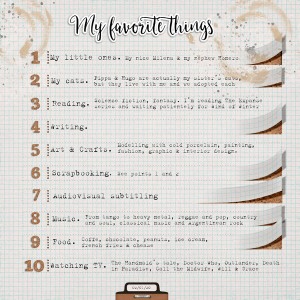
I absolutely love this.. first because your name here at the pad is paper wings and the cut outs in the paper are like paper wings .. how very very clever!!! [ I am with @AnneofAlamo and need to know how you did the paper tears! ] .. I love that the cork board bg underneath peeks through.. well done! I absolutely loved reading your favorite list and I love the graph paper.. Terriffic!
@AnneofAlamo @[URL='https://the-lilypad.com/forum/members/cfile.3223/']cfile[/URL]
Well, it was a trial and error type of thing. I use Photoshop. I drew the basic shape of the background that will be seen under the curl and cut it from a cork texture paper from Academic kit by Kristin Aagard (to no mess up with the graph paper) and applied Inner Shadow layer effect. Then I cut rectangles from the graph paper and used the Transform>Warp command from the Edit menu. This is when the trial and error portion begins. You've got to give it the shape with the handles. Lastly, the shadows. I've got some shadow styles from Mommiysh, but I needed something more. With Layer Style>Create Layer command, you can separate the styles from the layer. So I'd got a new layer with the shadow and I could move and tweak it with Transform>Warp. I know there's must be a better way to create the shadows over the curl, but I just brush some light grey with a big brush, applied Gaussian Blur and deleted the excess. Hope I've been clear, it's the first time I write a "tutorial" in English.
This site uses cookies to help personalise content, tailor your experience and to keep you logged in if you register.
By continuing to use this site, you are consenting to our use of cookies.