
FarrahJobling
FarrahJobling
- Joined
- Dec 17, 2012
- Messages
- 6,974
Hello! Thank you for playing along with my technique scrap!
It's nearly HALLOWEEEEEEN and time for some spoooooookiness!
Today, I'm going to give you 3 quick techniques to add some spookiness to your Halloween photos. First, we are going to turn someone into a ghost using the motion blur filter. Next, we'll add some fog using a simple soft brush and lastly, we will turn day into night with a couple of adjustment layers.
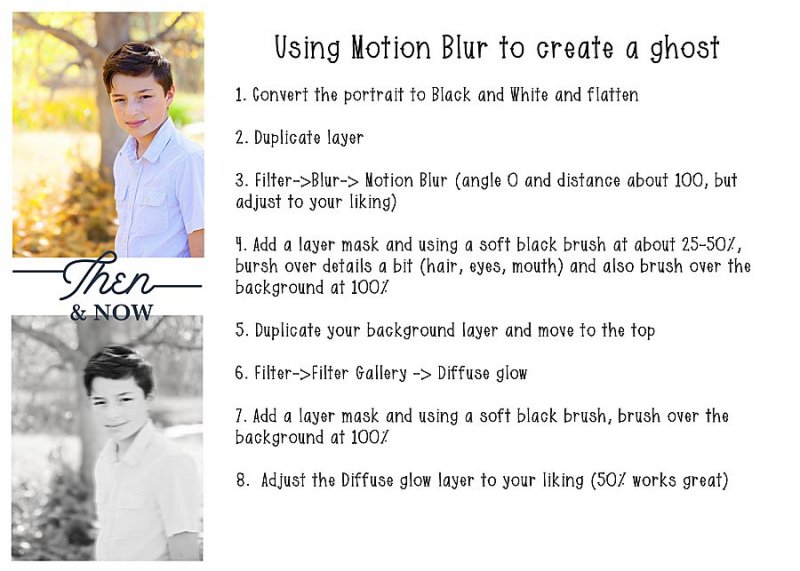
1. Using Motion Blur to create a ghost
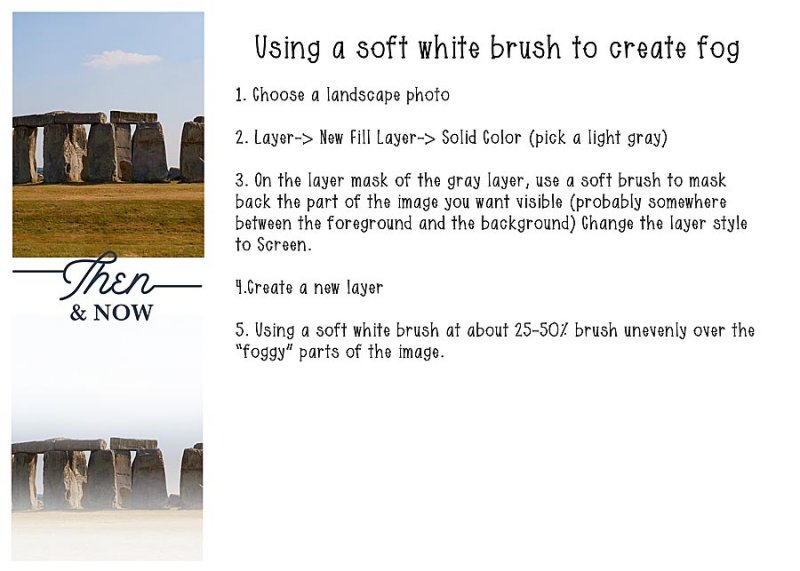
2. Using a soft white brush to create fog
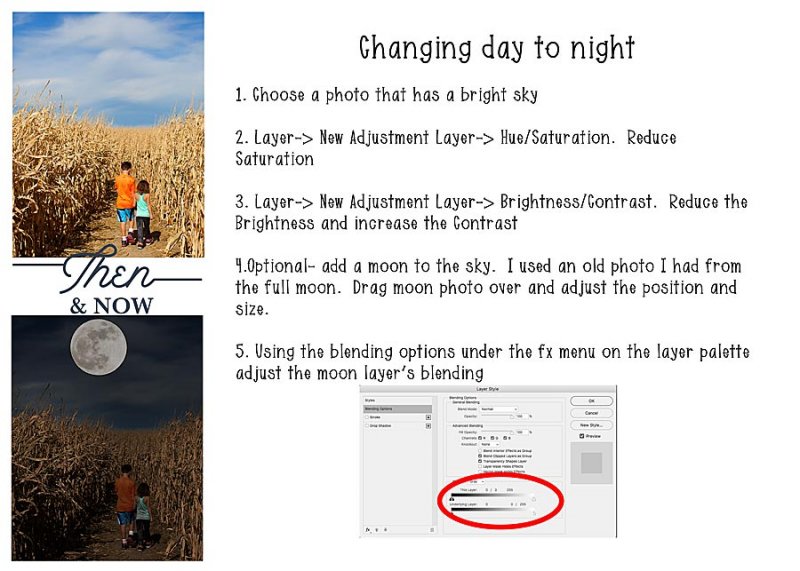
3. Using adjustment layers to change day to night
****If you would like to use my moon photo HERE is the link****
SLOW SCRAP INSTRUCTIONS
For today's scrap, I'd like you to create a layout using ONE of the examples of above to add spookiness to a photo on your LO. You don't have to use a Halloween photo and it doesn't have to be a Halloween LO
That's the only requirement on your layout, but of course, as always....please participate in the discussion and make a LO you love!
Please post your completed layout in The Lilypad gallery. GALLERY RULES: Layouts must contain at least 50% TLP products. (Templates count as 15%.) Uploads must be less than 250k. List all credits; no off-site linking allowed.
This is a slow scrap so you have 24 hours to complete your LO. You must have your page posted here by: 3pm ET- October 26, 2018 to qualify! Please remember that your layout must comply with our gallery rule of 50% TLP products. I will be PMing the eligible scrappers their participation prize from this thread. I can't wait to see what you all come up with!
It's nearly HALLOWEEEEEEN and time for some spoooooookiness!
Today, I'm going to give you 3 quick techniques to add some spookiness to your Halloween photos. First, we are going to turn someone into a ghost using the motion blur filter. Next, we'll add some fog using a simple soft brush and lastly, we will turn day into night with a couple of adjustment layers.
1. Using Motion Blur to create a ghost
2. Using a soft white brush to create fog
3. Using adjustment layers to change day to night
****If you would like to use my moon photo HERE is the link****
SLOW SCRAP INSTRUCTIONS
For today's scrap, I'd like you to create a layout using ONE of the examples of above to add spookiness to a photo on your LO. You don't have to use a Halloween photo and it doesn't have to be a Halloween LO
That's the only requirement on your layout, but of course, as always....please participate in the discussion and make a LO you love!
Please post your completed layout in The Lilypad gallery. GALLERY RULES: Layouts must contain at least 50% TLP products. (Templates count as 15%.) Uploads must be less than 250k. List all credits; no off-site linking allowed.
This is a slow scrap so you have 24 hours to complete your LO. You must have your page posted here by: 3pm ET- October 26, 2018 to qualify! Please remember that your layout must comply with our gallery rule of 50% TLP products. I will be PMing the eligible scrappers their participation prize from this thread. I can't wait to see what you all come up with!


 I'm reading all of the instructions right now and am anxious to try them.


