
- Joined
- Nov 18, 2010
- Messages
- 9,653
Hi everyone. Welcome to the TECHNIQUE SLOW SCRAP which starts at 6:00 PM PST and will close at 7:00 PM PST, in the chat room.
All instructions will be posted in the chat room, every 10 minutes, throughout the hour, and also will be posted here in this thread. Following the chat, you will then have 24 hours to complete your layout, post it into the speed scrap gallery and also here in this thread, to qualify for the prize coupon. You have until 7:00 PM PST time (please check your local time conversion) on Friday, January 24, 2020 to get your layout completed and posted in gallery and here in this thread.
Here's the MOC Day 23 challenge LINK to read up about PAINT DIPPING, which is the technique we'll discuss tonight in the chat room.
Paint dipping is a fun way to adorn an element or title and bring extra attention to it.
There are many ways to achieve this look, here are a few ideas for you, which we'll discuss tonight in the chat room:
⦁ Select a brush and swipe or stamp onto the product.
⦁ In PS, select bevel and emboss layer style to enhance your paint.
⦁ TLP styles https://the-lilypad.com/store/Styles/ to create a new look to a brush layer.
⦁ Clip a paint product to your element/title.
⦁ Try clipping other products to simulate paint onto your element/title.
⦁ Select a style from the TLP store, there is a large selection to choose from.
⦁ Paint with a hard edged brush for a solid paint stroke.
⦁
Come to the chat room tonight and let's discuss these together! We might come up with some other ideas too!
One of the techniques shared by SeattleSheri (in #2 post of MOC Day 23 thread) was about using the bevel and embossing style. Here an article about that if you'd like to read more about it.
https://blackbirdpublishing.com/bevel-and-emboss-basics-with-photoshop/
For PSE, find out how to select that layer style.
https://community.adobe.com/t5/photoshop-elements/newbie-needs-help-bevel-emboss/td-p/9361990
Here is the online article that was my inspiration for this technique, if you'd like to read through it.
Here's my sample page.
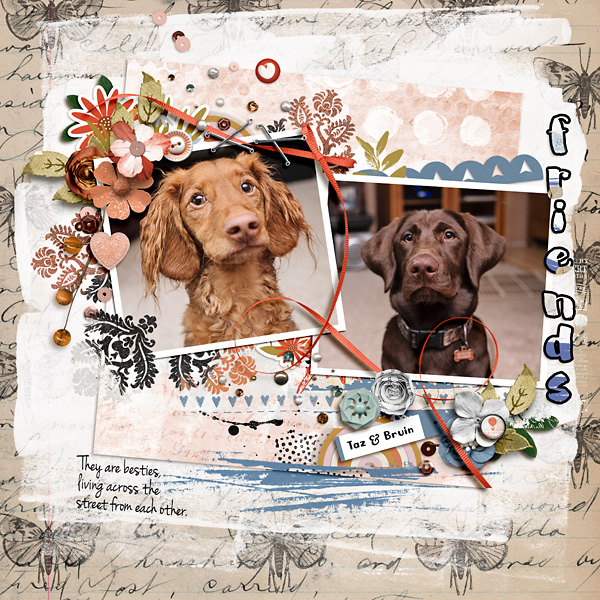
SLOW SPEED SCRAP INSTRUCTIONS (UPDATED THROUGHOUT THE DURATION OF THE CHAT):
Please post your completed layout in The Lilypad gallery. Please note for MOC participants: pages should contain at least 75% current Lilypad product (currently for sale in the store from either permanent designers or guest designers). GALLERY RULES: Layouts must contain at least 50% TLP products. (Templates count as 15%.) Uploads must be less than 250k. List all credits; no off-site linking allowed.
***INSTRUCTIONS***
1. Start by adding 2 papers for your base.
2. Add 1-4 photos but if using multiple photos, they must overlap/touch each other. Optional: frames may be used.
3. Add elements anywhere around 3 sides of your photo(s), may add them over or under your photos, they can but don't have to touch the photo(s). You must leave one side unadorned with no elements.
4. Add a title or WA on that side that is unadorned with no elements. You will apply one of the paint dipping techniques to the title/wordart.
5. Add one more element that has been paint dipped anywhere on your page.
6. Add journaling/text/wordart anywhere on your page.
7. Finish your page off with date strip or text if desired, but not required.
All instructions will be posted in the chat room, every 10 minutes, throughout the hour, and also will be posted here in this thread. Following the chat, you will then have 24 hours to complete your layout, post it into the speed scrap gallery and also here in this thread, to qualify for the prize coupon. You have until 7:00 PM PST time (please check your local time conversion) on Friday, January 24, 2020 to get your layout completed and posted in gallery and here in this thread.
Here's the MOC Day 23 challenge LINK to read up about PAINT DIPPING, which is the technique we'll discuss tonight in the chat room.
Paint dipping is a fun way to adorn an element or title and bring extra attention to it.
There are many ways to achieve this look, here are a few ideas for you, which we'll discuss tonight in the chat room:
⦁ Select a brush and swipe or stamp onto the product.
⦁ In PS, select bevel and emboss layer style to enhance your paint.
⦁ TLP styles https://the-lilypad.com/store/Styles/ to create a new look to a brush layer.
⦁ Clip a paint product to your element/title.
⦁ Try clipping other products to simulate paint onto your element/title.
⦁ Select a style from the TLP store, there is a large selection to choose from.
⦁ Paint with a hard edged brush for a solid paint stroke.
⦁
Come to the chat room tonight and let's discuss these together! We might come up with some other ideas too!
One of the techniques shared by SeattleSheri (in #2 post of MOC Day 23 thread) was about using the bevel and embossing style. Here an article about that if you'd like to read more about it.
https://blackbirdpublishing.com/bevel-and-emboss-basics-with-photoshop/
For PSE, find out how to select that layer style.
https://community.adobe.com/t5/photoshop-elements/newbie-needs-help-bevel-emboss/td-p/9361990
Here is the online article that was my inspiration for this technique, if you'd like to read through it.
Here's my sample page.
SLOW SPEED SCRAP INSTRUCTIONS (UPDATED THROUGHOUT THE DURATION OF THE CHAT):
Please post your completed layout in The Lilypad gallery. Please note for MOC participants: pages should contain at least 75% current Lilypad product (currently for sale in the store from either permanent designers or guest designers). GALLERY RULES: Layouts must contain at least 50% TLP products. (Templates count as 15%.) Uploads must be less than 250k. List all credits; no off-site linking allowed.
***INSTRUCTIONS***
1. Start by adding 2 papers for your base.
2. Add 1-4 photos but if using multiple photos, they must overlap/touch each other. Optional: frames may be used.
3. Add elements anywhere around 3 sides of your photo(s), may add them over or under your photos, they can but don't have to touch the photo(s). You must leave one side unadorned with no elements.
4. Add a title or WA on that side that is unadorned with no elements. You will apply one of the paint dipping techniques to the title/wordart.
5. Add one more element that has been paint dipped anywhere on your page.
6. Add journaling/text/wordart anywhere on your page.
7. Finish your page off with date strip or text if desired, but not required.
Last edited:


