Question from a Rookie

sahlink

sahlink
Designer
Joined
Apr 29, 2009
Messages
7,331
I need to ask the Project Life Experts...

For those of you who are doing a hybrid approach, (using digi products / digi journal cards) How do you print the cards? Do you print them on your home printers? Is it still cost effective? do you get good quality prints? Do you take them to a printer? Do you use the Project Life service from Persnickety Prints. Inquiring minds want to know.
Thanks
:heartslub
 
I do 100% of my printing at home...I print journaling cards, elements etc on matte presentation paper on my all in one printer and photos on my Selphy. I'm pretty happy with the quality of the prints all around. I think I figured that the Selphy prints cost about 27 cents which is expensive as far as printing goes but I'm usually printing 2-4 separate photos per 4x6 (I like to do smaller photos and journaling in the same pocket a lot of the time). I honestly don't know the cost of printing on my all in one, but I'm all about the convenience of being able to print what I want when I want it.
 
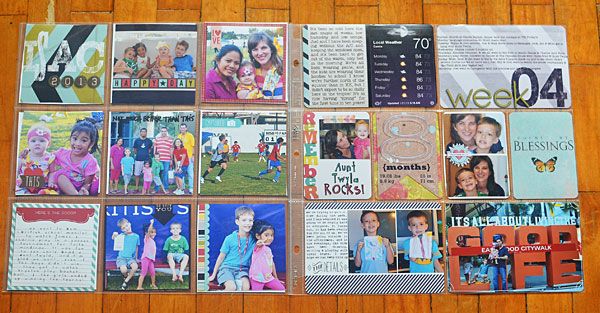
I print exclusively from the photo developer at the mall. I'm totallly happy with how it's turned out. Here's a sample:
PLWeek4.jpg
 
I print at home, ink goes a long way. I never calculated the cost, but it's more than reasonable for me, and you can't beat the convenience!
 
I most likely will print photos out of a printer (who is literally blocks away). But I'm curious about the journal cards. It SEEMS so easy. Just print them out, right?? But when I've tried printing on my home printer... and I wasn't happy with how it turned out. The color just seemed fade-y (is that a word?) Reds especially. Although I was printing on 110 Staples Cardstock (cuz' its a little thicker). Do you think it could be the paper I'm using? Does paper really make the difference??
 
Matte Presentation Paper makes a big difference, IMO. Also the print quality you're choosing. I've printed 'test cards' on 4x6 index cards just to try something out and the colors are usually not awesome. I print the final cards on Epson Matte Presentation Paper (using photo printing settings, not "standard" settings) and they're perfect.
 
Paper makes a huge difference! And so does having the correct settings for your printer. I tried printing some journal cards from the Feb BYOC on matte photo paper and was shocked when the colors were almost neon. Printed with the same settings on Bazzill Basics orange peel paper and they were more muted. I was still not totally happy because my photos were too yellow. Fiddled with the color space in PS and chose a different color profile for my printer, and the photos came out much better. So, it may take a bit of trial and error. But, yes, quality paper will make a huge difference!
 
So does the type of printer you have, I have an HP all in one photo printer and an Epson Workforce all in one office printer. The HP is a 6 cartridge system and the Epson is a 4 cartridge system..I printed out a set of embellishments for comparison and the HP was much crisper, brighter and truer to color than the Epson. My dream is to get a wide format Epson Artisan at some point...but it's so not in our budget right now...I was so excited when I found one last year on clearance for $35 at Staples..but it never worked for us...so we took it back for a special they were having where we got $50 trade in credit on any printer, which we then used to get our workforce.
 
Good point, Sarah! We have a Canon i9900, which is a wide-format printer with 8 color cartridges, so it really does a great job with color reproduction - when I can figure out the correct settings.
 
I agree- the paper makes such a difference! I was never crazy happy with my prints until i switched to Paper Source's Luxe Cardstock. I'm seriously IN LOVE with the difference they have made!
 
I wish I knew this before I just bought a ream of 110 cardstock! Have to put matte presentation paper on my "to buy" wishlist for when it's in the budget!
 
I agree- the paper makes such a difference! I was never crazy happy with my prints until i switched to Paper Source's Luxe Cardstock. I'm seriously IN LOVE with the difference they have made!

Off to check this out, thanks Valorie!
 
you may have already gotten the answer you were looking for krista, but i'll throw in my 2 cents...

i did mine hybrid last year. when i was in a hurry or only had a few things to print, i would do it at home. mostly though, i found it was cheaper and easier for me (but mostly just cheaper) to order prints online and go pick them up at the store near our home (meaning, i would order online and send the order to the 1-hour-processor at our grocery). worked great!! i saved my ink and paper, i got my pics in an hour. great print quality. happy.

when i DID print at home, i just used regular photo paper, split the 4x6 to hold 2 cards, and printed. i have a canon pixma and it prints reallly well. i've never had an issue with print quality of my at-home prints... just the cost is more than it costs to do it at the store.
 
It's paper source cover weight cardstock for me too! Though for certain journal cards, like the woodgrain cards I send them print at a photolab. I usually pop them on a 4x6 file along with a 3x4 photo. I print at costco. I LOVE persnickety prints (quality can't be beat!) and would love to send all my photos to them but I'm too impatient to wait for prints to come back.
 
Back
Top