Navigation
Install the app
How to install the app on iOS
Follow along with the video below to see how to install our site as a web app on your home screen.
Note: This feature may not be available in some browsers.
More options
Style variation
You are using an out of date browser. It may not display this or other websites correctly.
You should upgrade or use an alternative browser.
You should upgrade or use an alternative browser.
PL pages question
- Thread starter flipflop
- Start date

AnneofAlamo
Slippers IN sunshine? Even better!
- Joined
- Aug 30, 2009
- Messages
- 19,704
I use shutterfly..and I love them...I am in the process of showing the pages from the gallery and actual shots of my pages...I'll be back!
and
I
am
so
excited for you...
because when you print books, it makes this hobby even more fun..
I'll be back! lol
and
I
am
so
excited for you...
because when you print books, it makes this hobby even more fun..
I'll be back! lol
AnneofAlamo
Slippers IN sunshine? Even better!
- Joined
- Aug 30, 2009
- Messages
- 19,704
I only print 10x10 and I make my pages at 12x12 or 10x10 and they all fit in the books...you just have to pick the book DigiScrapping one near the bottom of the choices:
I went and looked at your gallery and there is only one that might lose a bit:

because the journaling is a bit close to the edge.
Here is actual book pics:

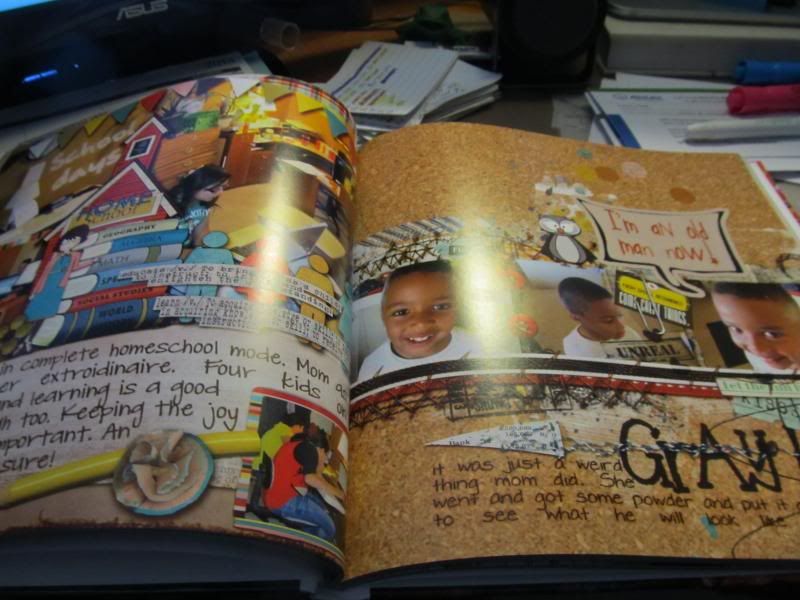
and here is the page

and

the edges are a bit lost...
I have learned to keep anything I really want to see away from the edges(called bleed) to make sure it can be seen.
here is a double page I did, that I should have brought the page in more.
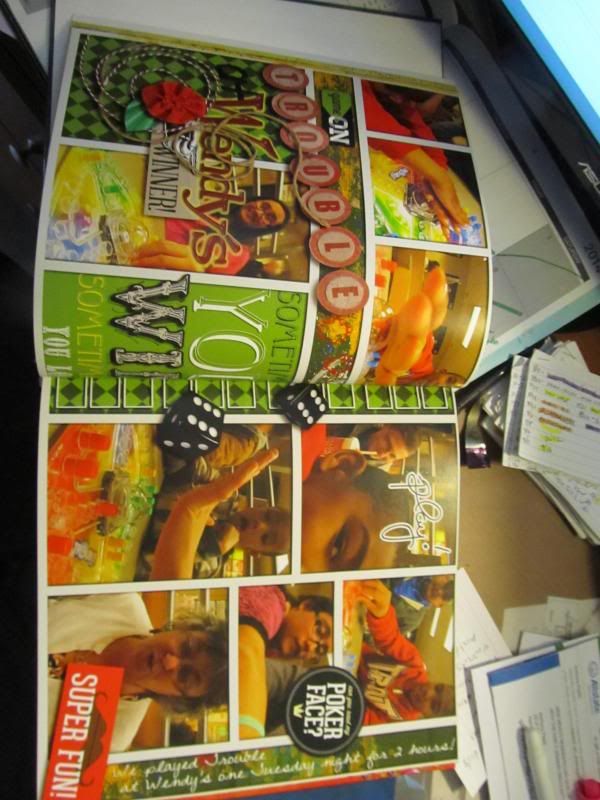


now your covers are smaller too...but you can move them around...
back cover:
you can see the missing parts
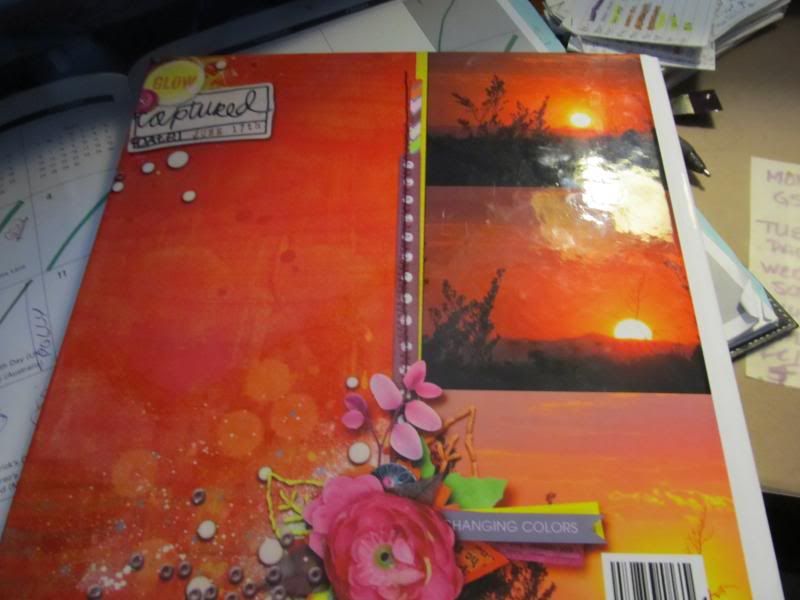
and be ready!!
there are usually codes all over the site for free shipping and 30-50% off your book...and
when you get your book, there is coupon in the box...so you have like 10 days to do another book...
Please, please show pics when you get it back!
I went and looked at your gallery and there is only one that might lose a bit:
because the journaling is a bit close to the edge.
Here is actual book pics:


and here is the page
and
the edges are a bit lost...
I have learned to keep anything I really want to see away from the edges(called bleed) to make sure it can be seen.
here is a double page I did, that I should have brought the page in more.

now your covers are smaller too...but you can move them around...
back cover:
you can see the missing parts

and be ready!!
there are usually codes all over the site for free shipping and 30-50% off your book...and
when you get your book, there is coupon in the box...so you have like 10 days to do another book...
Please, please show pics when you get it back!

bestcee
In love with places I've never been to
- Joined
- Dec 18, 2013
- Messages
- 19,337
I don't know if this is kosher to share, but wendyzine has actions for the different book printers for bleed. They help make sure you don't lose anything. I haven't seen any by a tlp designer though.

heathergw
Singing in the Neil mobile
- Joined
- Nov 7, 2011
- Messages
- 6,755
I haven't printed a book in awhile... but yes, you will lose some along the edges because they increase the size when they do a full page print and then you'll lose a bit in the binding too...

lauracw
Gets a funky high on yellow sun
- Joined
- May 24, 2012
- Messages
- 1,318
I used Artscow for the last book I printed and their editor has guide lines that show you what you're losing. I try to keep away from edges now, but if I goof up, I just shrink my page a little and put it on another paper, like a mat, so I don't lose details.

lorryfach
Likes to be chauffeured
- Joined
- Jul 13, 2011
- Messages
- 10,982
I made my save action add bleed to my pages when it saves the full-size flattened file, because, to me, that's way easier than worrying about what might be too near an edge when designing the page. I make the page I want, then I hit F12. Done.
Bleed is something you will have to deal with any time you print a bound book. It's not specific to PL nor to Shutterfly.
Bleed is something you will have to deal with any time you print a bound book. It's not specific to PL nor to Shutterfly.

dennydenny
Why can't it snow in the Bahamas?
- Joined
- Jan 11, 2013
- Messages
- 1,616
When I make a page I try to keep everything important within a half-inch border from the edge of the page
Last edited:

Nixenkind
Dreaming of boiling in Brisbane.
- Joined
- Aug 8, 2013
- Messages
- 901
My PL templates already have a generous frame to avoid that I lose things in print. But: because I hate this phenomenon, I don't print photo books, but single pages which I then slip into clear pockets. The printing company cuts 3mm from every side to avoid white edges, but since my templates have a wide frame, that's not noticeable in the finished page.
bestcee
In love with places I've never been to
- Joined
- Dec 18, 2013
- Messages
- 19,337
My PL templates already have a generous frame to avoid that I lose things in print. But: because I hate this phenomenon, I don't print photo books, but single pages which I then slip into clear pockets.
Yep. That's me! I hate having to calculate for bleed, so I prefer to print single pages overall. I am currently doing a couple books for family though, so I'm dealing with the bleed issue. I love the idea of making the page smaller all around, and then just using a background paper to offset the bleed issue.
lorryfach
Likes to be chauffeured
- Joined
- Jul 13, 2011
- Messages
- 10,982
That's all my action does. Duplicate the background paper and shrink everything else.
Thank you
Thank you all. I just didn't want to lose any so I'm thinking I'll make my pages have the extra edge (gotta check those guides too). I forgot about that one. It's been so long since I've digi-scrapped, but I'm trying to get back into it to help document out year and give as gifts at Christmas.
Anyways, I'm hoping this works for me. Thanks again ladies!
Thank you all. I just didn't want to lose any so I'm thinking I'll make my pages have the extra edge (gotta check those guides too). I forgot about that one. It's been so long since I've digi-scrapped, but I'm trying to get back into it to help document out year and give as gifts at Christmas.
Anyways, I'm hoping this works for me.
Thanks again ladies!
RebeccaH
Life is exciting, yes it is!
- Joined
- Jul 12, 2009
- Messages
- 11,875
yes, a tiny bit of the borderwill get caught up in the binding. i learned that with my 1st book. Now, I simply create the page with a small bit of play on the binding edge so i don't lose anything important. Another option would be to pay extra for the lay-flat pages. then you won't have to worry about it.