Make It Snappy (MIS) | July 6th @ 7 pm ET | Scrapping with Liz

Hope this is in time. It is in both the SwL gallery and the Speed Scrap gallery.

SwL_MBC_5_19Template
1. One Photo (taken by my DD, Zanna Boucher)
2. Four patterned papers
a. Kittydesigns_ttmm_paper2
b. prd_cattitude_pp_07
c. tangie_BaG_BonusPaper
d. tstroud-ttmm-pp1
3. Paint Splatter: nbk-sayhello-2017-ABP1-splatz1
4. Non-neutral background: CD_PainteyGlow
5. Animal Element: lgrieveson_meow-flair-2
Fonts: Myriad Pro and Nightingale
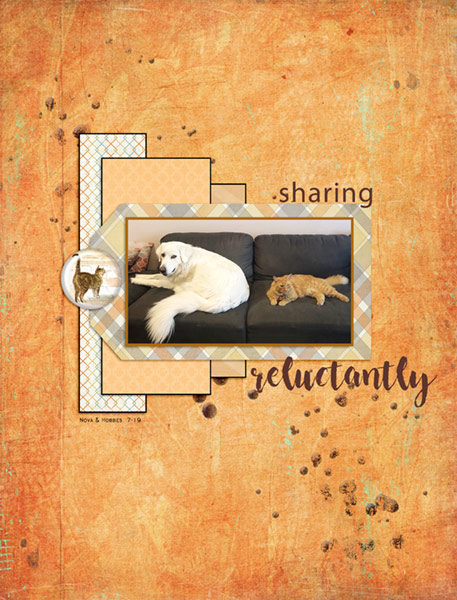
https://the-lilypad.com/forum/galleries/07-06-19_sharing.399269/
 
Last edited:
I used 1, 2, 4, 5 and 6...
1. Have one photo.
2. Have four patterned papers.
4. Have a non-neutral background (no whites, creams, blacks, greys, browns or navy) - Background might be hard to see, but it is a light blue.
5. Place title on photo.
6. Use both a button(s) and staple(s).​
 
1. Have one photo.
2. Have four patterned papers.
4. Have a non-neutral background (no whites, creams, blacks, greys, browns or navy).
5. Place title on photo.
6. Use both a button(s) and staple(s).

 
I don't really understand the MIS challenges. I don't see it listed in the calendar. Also, when I finally did see it at 9:15p.m. Saturday July 6, I felt like I'd already missed it, and never knew if there was a live place to be. Do I need to be signed up somewhere to get notification that the challenge is "on?" I would also like specific dates mentioned instead of just the words "today" or "tonight" or "tomorrow." This is not the first one I've missed out on because of these things. Sorry to be so dense. I just love challenges, and hate to miss ANY! Thanks, Sharron

Hi, Sharon,

Sorry you are missing them, we would love to have you at each one. The MIS is the first Saturday of the month at 7 pm ET. They are always a thread within the Designer Challenge section of the Forum; the same thread is used for both advanced posting and and participation.

It is a designer-sponsored challenge and does not show in the store calendar created for store events. To my knowledge, there is not a separate calendar created for designer challenges by the store. The post is always titled with the actual date. The Facebook posts are friendly reminders that typically occur on the day of or day before the challenge and therefore are labelled as such with the title with date linked in the post to the thread. Sorry I don't have a better solution - maybe if you have a calendar app on your phone, that is what I use.

Best,

Tracy

PS - cute page! that looks like one unhappy puppy and one boss cat
 
Thanks for the explanation, Tracy. Yes. I will add it to my calendar now that I know the schedule. And you are right. Hobbes is THE BOSS!
 
@tpbuffy thanks for the kit inspiration too, i started with that and SWL's Scatter Star template and went with a birdy pic too (and if you haven't seen the cute parrotlet photoshoot pics on mymodernmetm they are worth it) - i think i used 7 of the 5 in the end - hopefully the more, the merrier?!

1. Have one photo. - yep
2. Have four patterned papers. - 2 different florals and 2 different diagonal stripes clipped to stars
3. Use paint splatter. - moved a bit but it's from the template
4. Have a non-neutral background (no whites, creams, blacks, greys, browns or navy). - green
5. Place title on photo. -joy, it's half on the photo
6. Use both a button(s) and staple(s). - one of each
7. Journal more than 40 words. -
8. Have an animal element-. bird

 
thank you for the inspiration, I used the following instructions
2. Have four patterned papers.
3. Use paint splatter.
4. Have a non-neutral background (no whites, creams, blacks, greys, browns or navy).
6. Use both a button(s) and staple(s).
8. Have an animal element.
 
Thanks for the fun challenge directions. My 5 picks were:
1. Have 1 photo
2. Have 4 patterned papers
3. Use paint scatter
4. Have a non-neutral background
5. Use both button(s) & staple(s)
 
full

Here is mine.
I did 1-5 for the instructions.
Thanks for the fun motivation!!
 
I did steps: 1) Have ONE photo. 2) Have FOUR pattern papers. 3) Use a splatter. 4) Have a NON-neutral background. and lastly, #5) Place title on the photo. I used SwL_6_19MISTemplate and I'm Possible bundle by Ponytails Designs.
KG_MISSWL_0719.jpg
 
Back
Top