Got Locked out of the Blog!

Pachimac

Give me all the cliché Christmas movies
Joined
Apr 12, 2016
Messages
3,661
I was looking for a tutorial on making my own digital stitches, and apparently I clicked too fast for a "human" and got identified as a 'bot! LMAO!!!!

So...how do I get UN-blocked?

And while I'm at it, does anyone know of a tutorial to make my own digital stitches? I need straight clean stitches for my layout and I don't have any, and my money is dried up for the month! LOL
 
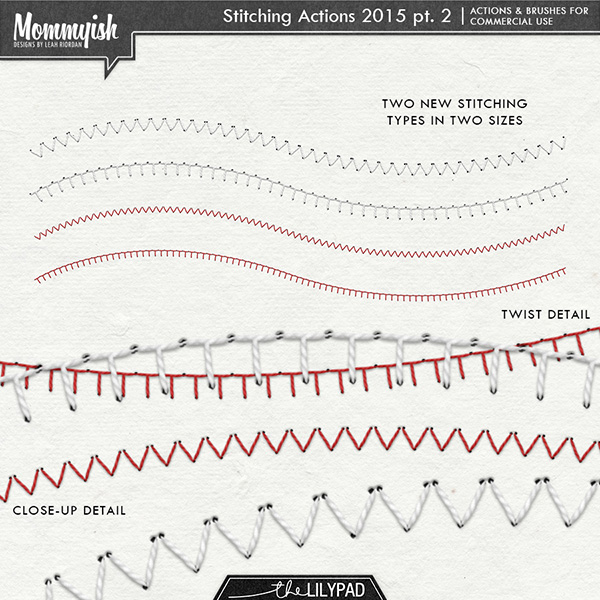
I know that Mommyish has a style for that.
folder-4292577038.jpg

folder-2317.jpg

folder-2318.jpg


Do an advanced store search for stitching styles by Mommyish.
Just because #enabler and you can add it to your wish list.
 
I know that Mommyish has a style for that.
folder-4292577038.jpg

folder-2317.jpg

folder-2318.jpg


Do an advanced store search for stitching styles by Mommyish.
Just because #enabler and you can add it to your wish list.
Added!!! Thank you!
 
I was looking for a tutorial on making my own digital stitches, and apparently I clicked too fast for a "human" and got identified as a 'bot! LMAO!!!!

So...how do I get UN-blocked?

And while I'm at it, does anyone know of a tutorial to make my own digital stitches? I need straight clean stitches for my layout and I don't have any, and my money is dried up for the month! LOL

I wrote a tutorial for making stitches around the edge of something once... let me see if I can find it....
 
I found it!!! Stroke a Path Tutorial

@Pachimac

just use a thin rectangle and space them out... there's a sample in the 2nd post for straight stitching. If you don't have a shape you want to go around, you can just click while holding shift and your brush will go in a straight line.
 
I was looking for a tutorial on making my own digital stitches, and apparently I clicked too fast for a "human" and got identified as a 'bot! LMAO!!!!

So...how do I get UN-blocked?

And while I'm at it, does anyone know of a tutorial to make my own digital stitches? I need straight clean stitches for my layout and I don't have any, and my money is dried up for the month! LOL
(Not sure what you mean re un-block.... sorry)

Re Stitch:
In PS:
you can do this a few ways... make a brush with an oval (or use the elipse tool filled with black)... make the oval long and thin like a piece of rice and then you would go to Edit>Define Brush Preset to save it as a brush.. then you can use the brush hold the shift button down and with your mouse move the brush to the right... you can always adjust the size and spacing with the brush panel.

another way to do it is with a font.. using the dash as your stitch

Let me know if you need additional help...

In PSE I would stick with the font as you cannot make your own brushes in PSE
 
Last edited:
I know that Mommyish has a style for that.
folder-4292577038.jpg

folder-2317.jpg

folder-2318.jpg


Do an advanced store search for stitching styles by Mommyish.
Just because #enabler and you can add it to your wish list.
I have Mommyish's action for this.. I will have to try it again. I bought this a long time ago.. I guess I use a lot of stitches already included in stuff :) Thaqnks for the reminder!
 
@Pachimac also another thought, go through some of your stash re templates... check the png files of them.. I know like Lynn Grieveson's templates they have straight stitches in them. You can always use those, just credit the template you got them from :)
 
@Pachimac also another thought, go through some of your stash re templates... check the png files of them.. I know like Lynn Grieveson's templates they have straight stitches in them. You can always use those, just credit the template you got them from :)
That's what I was going to sugguest. :) Also, you may find straight stitching in a kit you already own. Kristin Aagard has stitching in many of hers. (For example, I used a stitched grid from TV Time for my Grid page.)
 
Back
Top