
- Joined
- Nov 6, 2017
- Messages
- 10,063
Hello everyone, I hope you are having a great month and are enjoying our Art Journaling Muses on the theme of colour. Each week we are exploring different colour schemes, and this week our scheme is Monochromatic.
What is a Monochromatic (or Monotone for short) colour scheme?
Basically Monotone is defined as only using only one colour (or hue as we call it in colour theory). The monochromatic scale is created by adding black to get a darker colour (the tone) or adding white to get a lighter colour (the tint)
In digital scrapbooking the best way to visualise this is to look at the colour dialogue.
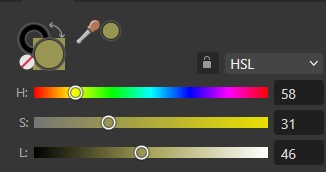
The colour in my colour picker is my main colour. Have the colour view option set to HSL mode.
Then look at the L slider - by moving that left or right we get the tones and tints for our monochromatic colour pallet.
Using Monotone
Here are 3 ways you could use monotone in your digital scrapbooking / digital art journaling.
1. Use papers and elements of the same colour (including light and dark versions)
The easiest way to do this is choose a large kit, or a collab with plenty of options.
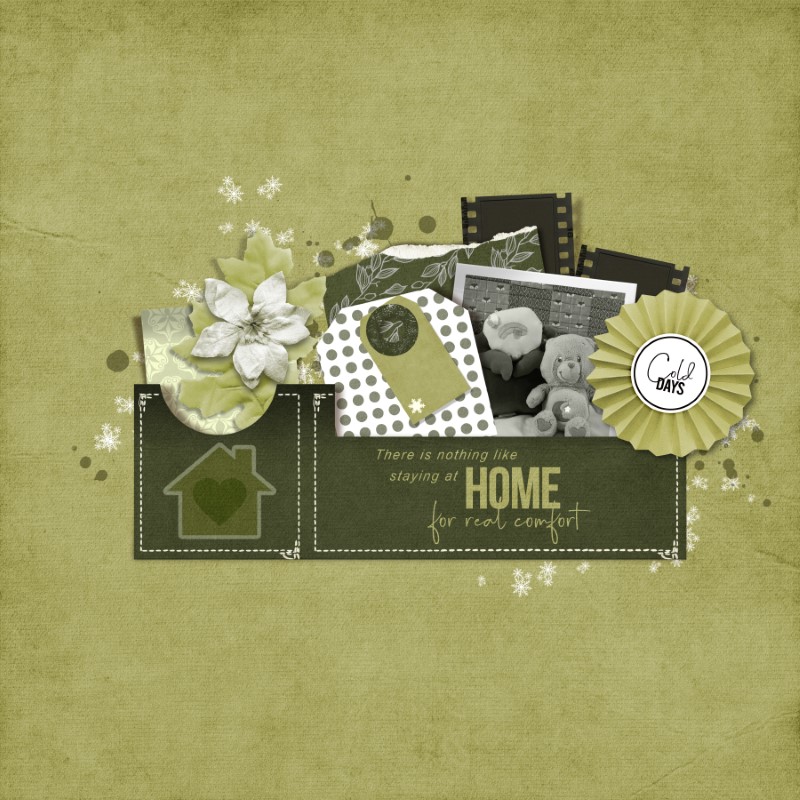
2. Choose a coloured paper, and paint on it with brushes and stamps etc. Use the colour picker to get the colour of your paper, and adjust that L slider to get the tones and tints.
3. Use whatever supplies you want to use. Then place a coloured solid paper in the top layer. Set the blending mode of that paper to hue.

Here I've picked an old page to demonstrate the effect. The kit used is Bloom Mega Kit by NBK Design.
Now it's Your Turn
Your challenge this week is to create a layout using one colour with it's tones and tints. You can add a little black or white if you need to, but keep it minimum - focus on your chosen colour. The topic/theme of your layout can be about anything you like.
Have fun.
You can create any style of page i.e. clean and simple, artsy, pocket style etc,. Your page can be all digital or hybrid. Wherever the inspiration takes you as long as you include TLP products on your page.
Please post your layout to the Art Journaling Gallery HERE prior to Midnight EST March 3 and then post it in this thread by copying the code (at the right of your gallery image) from the box under "Share BB Code".
We will draw a winner at the beginning of next month for a coupon. Every layout you create is equal to one entry in the random draw. So if you create 1 layout you are entered once, if you create 4 layouts you are entered 4 times.
Just a reminder to everyone that while there are four weekly challenges each month, you only need to complete one layout for the month to be eligible to go into the draw for the coupon prize. Your layout can be for one of the week's challenges or you can create one layout using all the week's inspirations, totally your choice!
You can use any products in the Lilypad store or retired products from current Lilypad designers, (just make sure you follow our gallery guidelines).
Another reminder: Ona has created a set of divided page templates that you are welcome to use for your page if you like:
https://www.dropbox.com/scl/fo/nx2ya9qtf9uqjwrfbv7vs/h?rlkey=ucikrkh36foim4szirsizq0rg&dl=0
What is a Monochromatic (or Monotone for short) colour scheme?
Basically Monotone is defined as only using only one colour (or hue as we call it in colour theory). The monochromatic scale is created by adding black to get a darker colour (the tone) or adding white to get a lighter colour (the tint)
In digital scrapbooking the best way to visualise this is to look at the colour dialogue.
The colour in my colour picker is my main colour. Have the colour view option set to HSL mode.
Then look at the L slider - by moving that left or right we get the tones and tints for our monochromatic colour pallet.
Using Monotone
Here are 3 ways you could use monotone in your digital scrapbooking / digital art journaling.
1. Use papers and elements of the same colour (including light and dark versions)
The easiest way to do this is choose a large kit, or a collab with plenty of options.
2. Choose a coloured paper, and paint on it with brushes and stamps etc. Use the colour picker to get the colour of your paper, and adjust that L slider to get the tones and tints.
3. Use whatever supplies you want to use. Then place a coloured solid paper in the top layer. Set the blending mode of that paper to hue.
Here I've picked an old page to demonstrate the effect. The kit used is Bloom Mega Kit by NBK Design.
Now it's Your Turn
Your challenge this week is to create a layout using one colour with it's tones and tints. You can add a little black or white if you need to, but keep it minimum - focus on your chosen colour. The topic/theme of your layout can be about anything you like.
Have fun.
You can create any style of page i.e. clean and simple, artsy, pocket style etc,. Your page can be all digital or hybrid. Wherever the inspiration takes you as long as you include TLP products on your page.
Please post your layout to the Art Journaling Gallery HERE prior to Midnight EST March 3 and then post it in this thread by copying the code (at the right of your gallery image) from the box under "Share BB Code".
We will draw a winner at the beginning of next month for a coupon. Every layout you create is equal to one entry in the random draw. So if you create 1 layout you are entered once, if you create 4 layouts you are entered 4 times.
Just a reminder to everyone that while there are four weekly challenges each month, you only need to complete one layout for the month to be eligible to go into the draw for the coupon prize. Your layout can be for one of the week's challenges or you can create one layout using all the week's inspirations, totally your choice!
You can use any products in the Lilypad store or retired products from current Lilypad designers, (just make sure you follow our gallery guidelines).
Another reminder: Ona has created a set of divided page templates that you are welcome to use for your page if you like:
https://www.dropbox.com/scl/fo/nx2ya9qtf9uqjwrfbv7vs/h?rlkey=ucikrkh36foim4szirsizq0rg&dl=0


