
- Joined
- Sep 26, 2011
- Messages
- 6,476
Week 2 - Squares and Rectangles
Hi everyone, hope you are all doing well in your part of the world!
Continuing on with the Muse's theme for February, this week we are looking at using the Basic Shapes of squares or rectangles as the primary design element in our layouts.
While circles may represent infiniteness with no start or end, they can also represent either free movement or restriction (confined within the circle). On the other hand rectangle and square shapes represent stability and security, in addition to other things.
I like using square or rectangle shapes in my layout when I want a more structured design, something that will give my layout it's "stable foundation". A pocket page type layout is a prime example of what I mean, like this one:
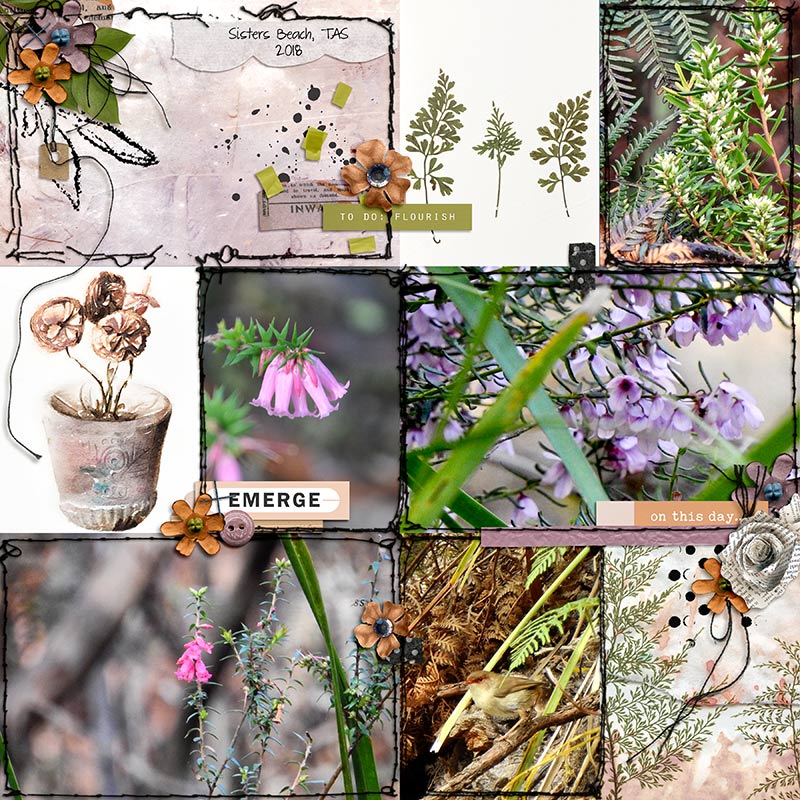
You can see that the most predominant shapes on this layout are rectangles of varying sizes which in turn adds some interest to the layout. The shapes give the page some equality as there isn't any ONE rectangle shape that is the SOLE focus of the page. Interspersed with the rectangular shapes there are softer rounded shapes to give the layout some balance as well.
When working with collage, squares and rectangles shapes can also be used in a variety of ways to ensure that they are the primary design element and remain the focus of the layout. In the example below you will note the majority of shapes are made up of squares and/or rectangles.
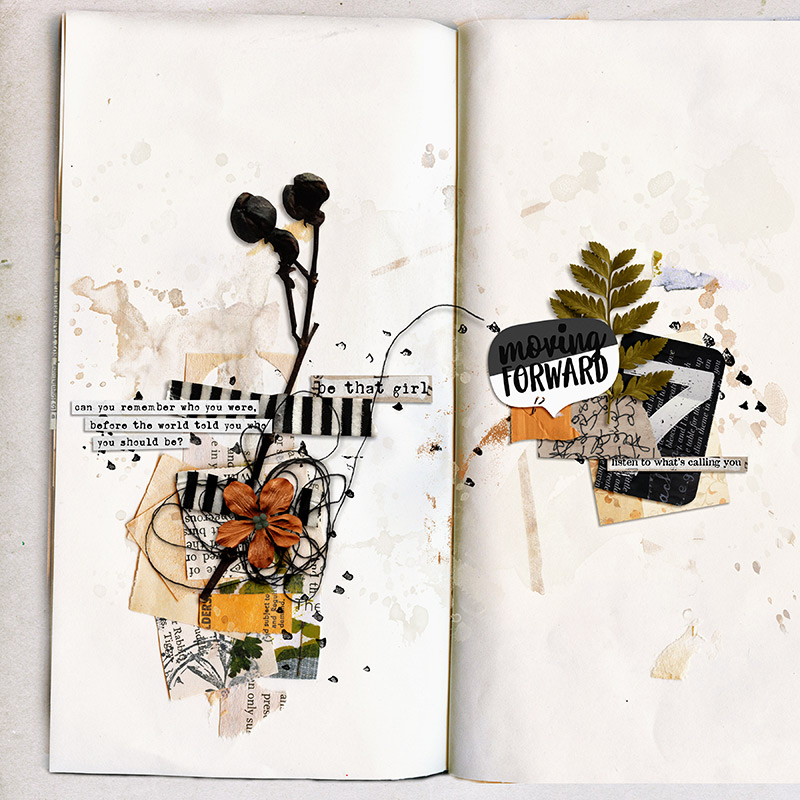
Totally different from the first page I discussed earlier, but noneless the squares and rectangles are the focus of the layout. From the outer boundaries of the rectangular shape of the notebook, to the smaller pieces of paper, tape and word art strips they are all share the same basic rectangular shape. The main thing that differs is the varying textures, patterns, colours. Note there are a couple of 'organic' type rectanglar shapes, notably the one that have been 'torn', like the piece of kraft paper with writing on it, on the right hand side of the page, under the fern leaf. The original regular rectangle shape has been altered by tearing off the end so it becomes more of an irregular shaped rectangle. Also, the piece of paper on the left had side, up the top, you can see a circle has been cut out but the outer shape is a square.
Again to bring some balance to the page, softer elements like foliage has been added as well as an oval shaped word art title. Note the black card with the number 7 on it, while it is rectangular in shape, two of the corners are rounded which also adds some softness and interest to the page as well.
So while it might sound a bit boring to create a page using rectangular or squared shapes as the prime focus, a lot of interest can be created by choosing shapes that are 'different' in their textures, colours and materials used to create the shape ie. paper, material etc. Mixing different types of these shapes together can add up to a very cohesive and appealing page.
Mark making:
Don't forget about adding some rectangular or squared shaped mark making to your page for added interest. You can either look through your stash to see if you have any styles, brushes, stamps or png files that you can use or create your own using the pencil, brush or shape tool in Photoshop (or Elements). In PSP there may be some tools that can be utilised as well if you use that program.
Below you will find an inspiration board I put together with images from Pinterest. While some of these creations have been done using RL techniques, there's plenty that you can do digitally to replicate the same thing on your own work. Take a look and see if it inspires you or take a scroll through the gallery to see if anything catches your interest there.

This my page:
I went with a collage styled page using square or rectangular shapes in varying sizes, colours, textures and materials such as paper, fabric, paint etc. The square looking black stamp behind the photo, on top of the greep paint, is a brush I created in Photoshop, just to add some irregular shapes.

Credits are in the gallery.
-----------------------------------------------------------------------------------------------
Challenge for Week 2:
You can use any products in the Lilypad store or retired products from current Lilypad designers, (just make sure you follow our gallery guidelines).
Can't wait to see what you guys come up with, but I know you will rock them!!!!
Hi everyone, hope you are all doing well in your part of the world!
Continuing on with the Muse's theme for February, this week we are looking at using the Basic Shapes of squares or rectangles as the primary design element in our layouts.
While circles may represent infiniteness with no start or end, they can also represent either free movement or restriction (confined within the circle). On the other hand rectangle and square shapes represent stability and security, in addition to other things.
I like using square or rectangle shapes in my layout when I want a more structured design, something that will give my layout it's "stable foundation". A pocket page type layout is a prime example of what I mean, like this one:
When working with collage, squares and rectangles shapes can also be used in a variety of ways to ensure that they are the primary design element and remain the focus of the layout. In the example below you will note the majority of shapes are made up of squares and/or rectangles.
Totally different from the first page I discussed earlier, but noneless the squares and rectangles are the focus of the layout. From the outer boundaries of the rectangular shape of the notebook, to the smaller pieces of paper, tape and word art strips they are all share the same basic rectangular shape. The main thing that differs is the varying textures, patterns, colours. Note there are a couple of 'organic' type rectanglar shapes, notably the one that have been 'torn', like the piece of kraft paper with writing on it, on the right hand side of the page, under the fern leaf. The original regular rectangle shape has been altered by tearing off the end so it becomes more of an irregular shaped rectangle. Also, the piece of paper on the left had side, up the top, you can see a circle has been cut out but the outer shape is a square.
Again to bring some balance to the page, softer elements like foliage has been added as well as an oval shaped word art title. Note the black card with the number 7 on it, while it is rectangular in shape, two of the corners are rounded which also adds some softness and interest to the page as well.
So while it might sound a bit boring to create a page using rectangular or squared shapes as the prime focus, a lot of interest can be created by choosing shapes that are 'different' in their textures, colours and materials used to create the shape ie. paper, material etc. Mixing different types of these shapes together can add up to a very cohesive and appealing page.
Mark making:
Don't forget about adding some rectangular or squared shaped mark making to your page for added interest. You can either look through your stash to see if you have any styles, brushes, stamps or png files that you can use or create your own using the pencil, brush or shape tool in Photoshop (or Elements). In PSP there may be some tools that can be utilised as well if you use that program.
Below you will find an inspiration board I put together with images from Pinterest. While some of these creations have been done using RL techniques, there's plenty that you can do digitally to replicate the same thing on your own work. Take a look and see if it inspires you or take a scroll through the gallery to see if anything catches your interest there.
This my page:
I went with a collage styled page using square or rectangular shapes in varying sizes, colours, textures and materials such as paper, fabric, paint etc. The square looking black stamp behind the photo, on top of the greep paint, is a brush I created in Photoshop, just to add some irregular shapes.
Credits are in the gallery.
-----------------------------------------------------------------------------------------------
Challenge for Week 2:
- This week I want you to create a layout where square and/or rectangular shapes are the prime focus of the page.
- Other shapes can be included, BUT the primary shapes should be square or rectangular (regular or irregular).
- You can create any type of page ie. clean and simple, artsy, pocket style etc.
- Remember this is for everyone, so have FUN and go where your inspiration takes you!
- Please post your layout to the Art Journaling Gallery HERE prior to Midnight EST March 6, 2023 and then post it in this thread by copying the code (at the right of your gallery image) from the box under "Share BB Code".
You can use any products in the Lilypad store or retired products from current Lilypad designers, (just make sure you follow our gallery guidelines).
Can't wait to see what you guys come up with, but I know you will rock them!!!!


 great to see you here! what a great layout, love those photos!


