Drop shadow on Valerie's Pockets?

AlliJ2008

Downsizing!
Joined
Aug 30, 2009
Messages
1,001
Drop shadow on Valerie's Pockets?

Hello! I bought Valerie's Pockets No. 2 & as I am finishing my LO I just can't get the shadow to look right on the top pocket layer. Maybe it doesn't need a shadow at all? I was wondering if anyone who has used them would mind sharing what they did? Shadow or no shadow! TIA!
 
on my last page I didn't use a shadow at all on the pocket itself and was happy with how it looked :)

10-things.jpg
 
i've done 2 different things... i think for me it depends on the color of the background.

1) i've used no shadow like crystal said

or

2) i've duplicated the pockets on another layer and nudged one down & one over, which darkens it just a bit without making it look crazy.
 
love that layout Crystal. It looks fabulous!

I did this one, and I think used a drop shadow style from a designer that I had in my stash, and then went in and changed it to "color burn" instead of multiply...and then played around with it. I've done them several different ways and just wanted to see what I liked. I don't know what Val uses, or what her thoughts are on them. I like the "hazy" look that Crystal's has with no drop shadow. It gives the perfect look for her beach photo...it was too hazy for my layout though...I wanted something a little bit more clear. I added elements on top too...not all are underneath.

IceCream_web.jpg
 
Last edited:
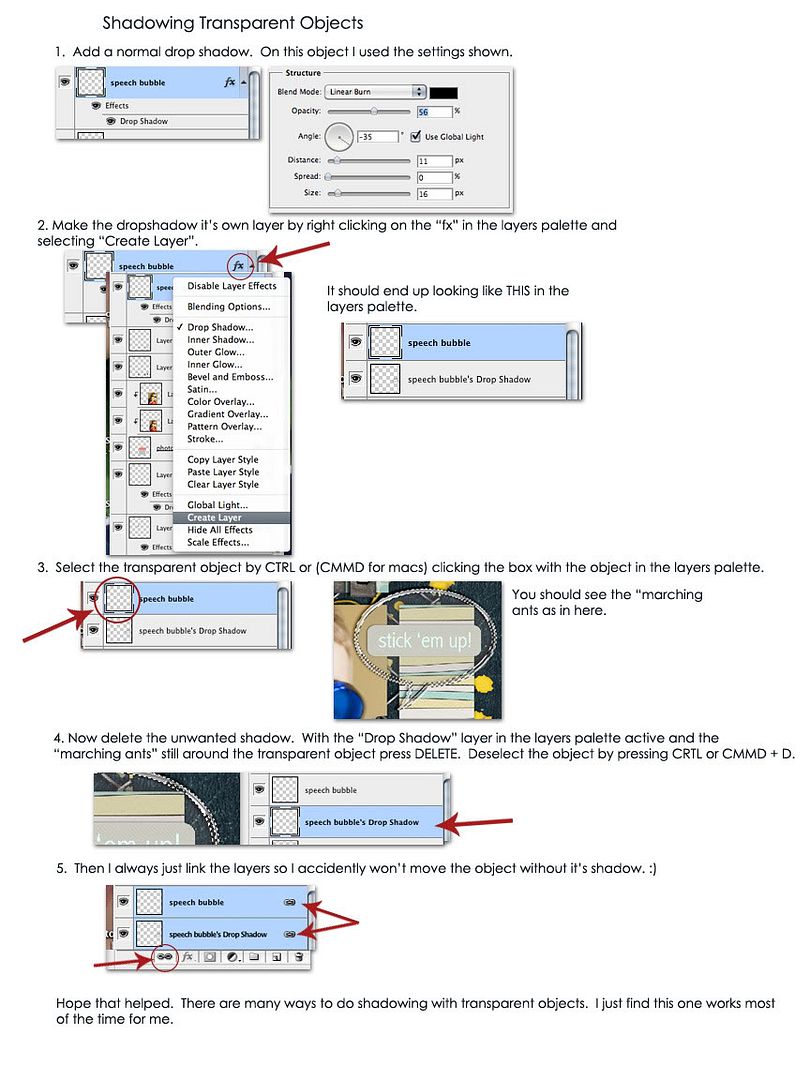
sometimes when I do a shadow with a transparent object I make a normal shadow with the setting on linear burn, then I make the shadow it's own layer. You do that by right clicking the "FX" on the right side of the layers with the shadow in the layers palette and selecting "create layer" option. That makes two layers: one the object and one just the shadow. Then I select the object (get the marching ants on it) and select the shadow layer and then hit delete.

Hopefully that doesn't sound too complicated... Let me see if I can find a tutorial somewhere...
 
It' interesting how we all do it differently. I change my setting to "pin light" when I am shadowing transparent items. That works pretty well. :)
 
I love how there are 734 different ways to accomplish things in Photoshop. ♥
 
Thanks SO much for all your great replies! Wow, Amber, thank you so much for even doing a quick tutorial! I will play around a little more tonight...I was thinking I liked it without a shadow but I am so used to putting a shadow on everything so I figured the easiest thing to do was ask! lol.
 
Back
Top