Creating Realistic Shadows - Coming Tomorrow!

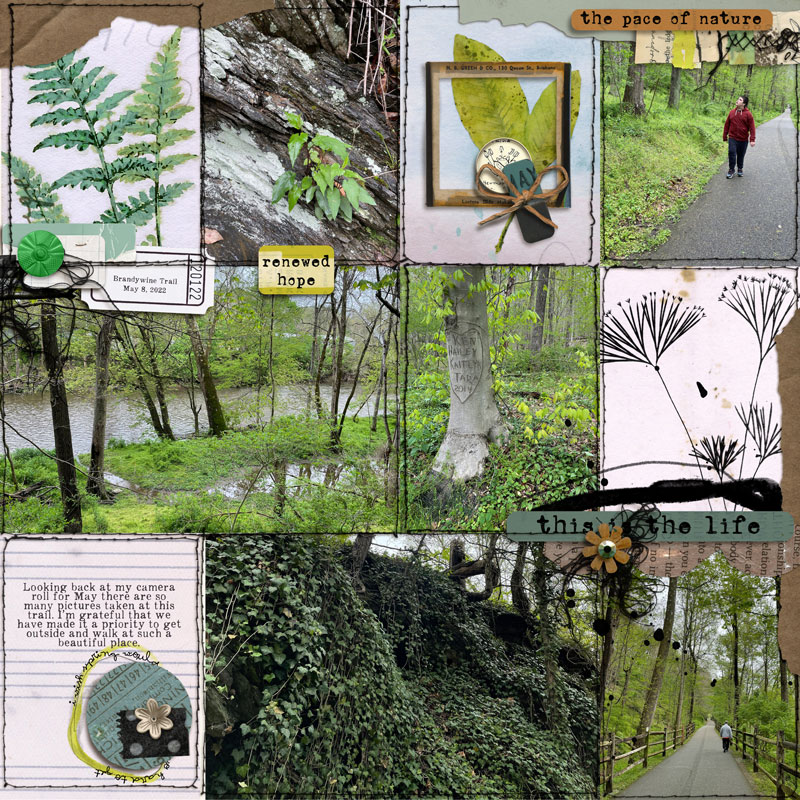
Here is my first layout using these shadows.

I used Left Shadow Light 1A for most of the paper strips and tags.
For the frame I used Left Shadow Light 1B
the white enamel pin Left Shadow 1F
the twine bow Left Shadow 1B + Add More Twist
the blue circle Left Shadow 1A

So fun - thank you Paula!
full
 
Has anyone tried if these work in an ooooold PSE?
what version do you have? I have PSE 15 (besides PSCC) and as long as you seperate the shadow in PSE it will work perfectly. In PSE you have to move the shadow out and away from the element- then simplfy the layer and then using the marquee or lasso tool put around the shadow and go to Layer > New Via Cut.. that will put the shadow on it's own layer.

PSE has always had to have a work around for seperating shadows.

In Paula's PDF with information there is a tutorial for the PSE Shadow seperation. Hope that helps!
 
what version do you have? I have PSE 15 (besides PSCC) and as long as you seperate the shadow in PSE it will work perfectly. In PSE you have to move the shadow out and away from the element- then simplfy the layer and then using the marquee or lasso tool put around the shadow and go to Layer > New Via Cut.. that will put the shadow on it's own layer.

PSE has always had to have a work around for seperating shadows.

In Paula's PDF with information there is a tutorial for the PSE Shadow seperation. Hope that helps!

I have PSE 11, almost antique. LOL

I have a no-shopping-allowed month now, but I've to try this next month. It looks amazing.
 
I spent some time playing with them this week in PS. It definitely helps to watch the videos, read the directions to see how it all works and understand the different versions of the twists. You have to install the shadow styles if you want to run the version with Paula's shadows; otherwise, running the action will just make your element wavy instead of the shadow. :D The actions run great in PS. I haven't tried the actions on an actual page yet but I'm super excited about the possibilities.
 
I use CS5 and also had to separate the shadow onto its own layer to make it not distort the element. But using it to distort washi sounds like something I need to try.
 
Is "separating a shadow to its own layer" the same thing as copying the layer, coloring it black, putting it underneath the original layer, then applying blurs to it?

I saw these twisty shadows when they came into the store and I'm super-intrigued, but I don't know how to use actions.
 
Is "separating a shadow to its own layer" the same thing as copying the layer, coloring it black, putting it underneath the original layer, then applying blurs to it?

I saw these twisty shadows when they came into the store and I'm super-intrigued, but I don't know how to use actions.
Nancy you can do it that way if you wish.. In Photoshop in the layer panel after applying a style you can right click with your mouse and "create layer" this is what will seperate the shadow automatically.

In PSE you have to do a work around as seperating the shadow style doesn't work, so it is probably easier your way to make the shadow in PSE before using the action.
 
Is "separating a shadow to its own layer" the same thing as copying the layer, coloring it black, putting it underneath the original layer, then applying blurs to it?

I saw these twisty shadows when they came into the store and I'm super-intrigued, but I don't know how to use actions.
You can watch these videos and read this tutorial!!!
Watch the videos below to learn how to use this Action on YouTube.


READ THIS TUTORIAL ON MY BLOG- Just click HERE!

I hope this help you!!!!
 
I spent some time playing with them this week in PS. It definitely helps to watch the videos, read the directions to see how it all works and understand the different versions of the twists. You have to install the shadow styles if you want to run the version with Paula's shadows; otherwise, running the action will just make your element wavy instead of the shadow. :D The actions run great in PS. I haven't tried the actions on an actual page yet but I'm super excited about the possibilities.
I use CS5 and also had to separate the shadow onto its own layer to make it not distort the element. But using it to distort washi sounds like something I need to try.


Yes! I really don't know why fr some people it distort the element instead the shadow...but you you do the separation of the shadow manually it will work!

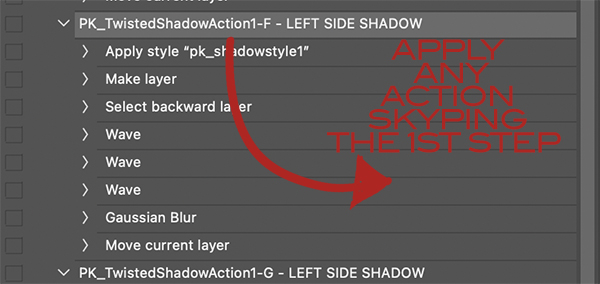
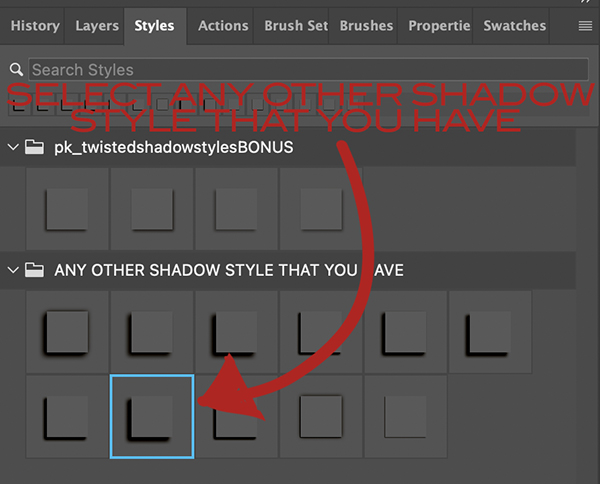
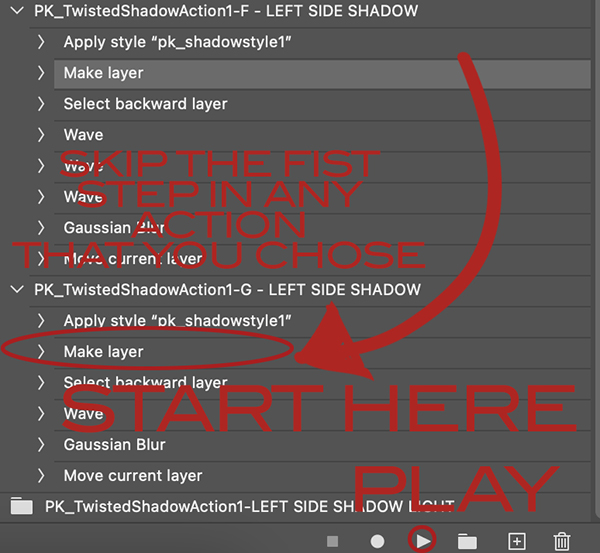
And @dawnmarch to use your own shadows before running play you must skip the first step.
READ THIS TUTORIAL ON MY BLOG- Just click HERE!

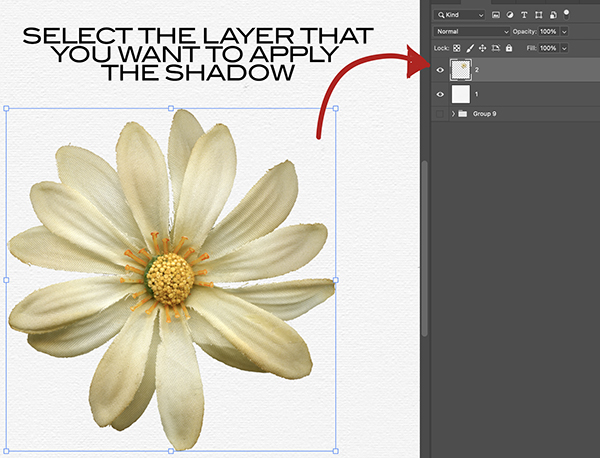
First you need to chose the element layer that you want to play.

SELECTTHELAYER.jpg


Then apply the shadow style of your choice.

SKIPTHE1ST.jpg


SELECTTHESHADOW.jpg


Then open the action pallet and choose the action of your choice to run.

SKIPTHE1ST.jpg


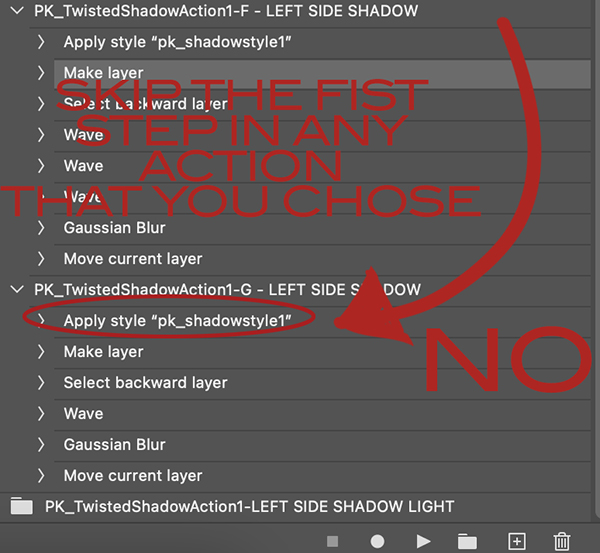
Before running play you must skip the first step.

NOTHIS.jpg


Starting selecting the second step and click on the PLAY button.

PLAY.jpg


And voilà!
 
Back
Top