How to Get your Layout RIGHT in the gallery and Forum

once you get it you will be the pro, helping people, it all works out!
full
the front pop up is what you are looking to change the size of your page,
 
Thank you for this info! I really appreciate it and downloaded the action (it's awesome!). But, I think I still need some help. My recently added layouts still look pretty fuzzy in the gallery (now that I've uploaded them at the correct size) and I'm not sure I have the unsharp mask settings right. Any settings you can recommend would really be appreciated @AnneofAlamo or anyone else who has some advise. :think:yup
 
I use Artisan, not PSE. I have changed my saved jpeg as 600X600 pixels. I am trying to edit my current layouts in my gallery, but the size under "information" doesn't seem to be changing....
 
@bbachand I just went and looked at your gallery and they look good to my bifocal wearing eyes. There is also another FREE action and some see a crisper results with it. I have not used it, but the woman who made it is pretty awesome:
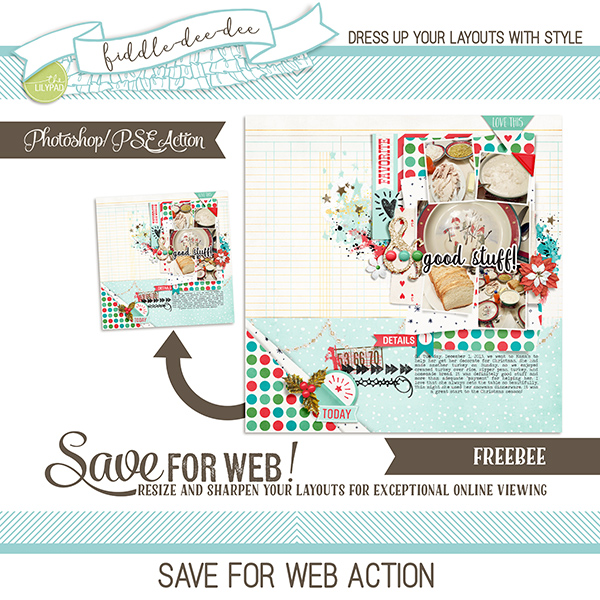
Save For Web Action
 
Hi guys, I'm having a problem with getting my layout from the gallery to the forum. When I want to copy the BB code, there is no BB code. Naamloos.jpg
How can I upload and directly link to the forum from the gallery?
I am logged in on both forum and gallery.
 
@Marjoleine - Here you go -- See the picture below. Click in the box I attempted to circle. It will highlight the whole line. Then do Ctrl-C (Cmd-C on Mac) to copy it. Go to the forum post and position the cursor where you want it. Then do a Ctrl-V (Cmd-V). Ta Da! It will paste both an image of your page and create a link from the image to your gallery entry.
Capture.JPG


p.s. since this screen capture is not in the gallery, I used the Upload a File feature on a post.
 
@BevG Thank you! But as you can see in my thumbnail photo there is nothing under "Share This Layout" so I cannot copy any BB code lol

Edit: Found the problem. Adblock Plus was blocking the code. So switching off adblockers works :byay
 
Last edited:
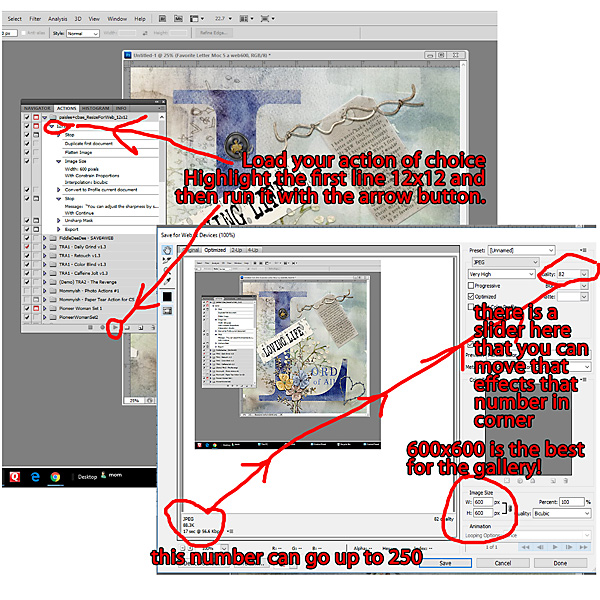
FILE > EXPORT > SAVE FOR WEB and I've started doing it that way instead, just changing the the width/height.
I 1st use a free action from Speed Scraps which takes the PSD and gives you a 3600dpi and a 600dpi (which I make 700dpi) jpeg. In PSE, I take the 6/700dpi image I and do what @michelepixels does...but I do not have to change the height or width. There is a tiny Drop Down area at the top right. Use that.. N.b. This is defaulting to MY chosen size of 700x700 but TLP allows up to 800x800. Just a FYI.
cvw.png


Because I'm on a new iMac, I find that if I add sharpening my layouts look over sharpened. I prefer to do that on photos in Lightroom before I scrap.
 
I 1st use a free action from Speed Scraps which takes the PSD and gives you a 3600dpi and a 600dpi (which I make 700dpi) jpeg. In PSE, I take the 6/700dpi image I and do what @michelepixels does...but I do not have to change the height or width. There is a tiny Drop Down area at the top right. Use that.. N.b. This is defaulting to MY chosen size of 700x700 but TLP allows up to 800x800. Just a FYI.
View attachment 314388

Because I'm on a new iMac, I find that if I add sharpening my layouts look over sharpened. I prefer to do that on photos in Lightroom before I scrap.
I agree @cookingmylife mine are looking too sharpened, so I am changing my process to this as well.
 
Last edited:
Question for our experts - @AnneofAlamo and @Karen - I have tried every action. I usually think my layouts look to sharp. So I recently switched back to PSCC legacy funtion - save for the web. I love how my layouts look BUT I think my photos look a little soft. I will attach an example. Any suggestions? I am pretty sure I am completely OVERTHINKING this! LOL! :groan

 
I am definitely NOT an expert! :giggle I think your layout and your photo look great... at least on my screen. ???
 
Back
Top