January 4: Blending Photo Technique

I hope my photo strip is okay! :) Let me know if not & I can take it off!


Edited- I never saw an answer to my specific question- but there was one similar- so I took the photo strip off just in case:
 
Last edited:
Christa would you mind providing me with some detail on step 12. I know how to do the drop shadows but I am unsure about the white stroke in relation to your frame.
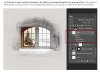
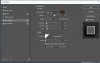
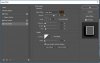
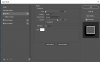
Tracy in the screen shot for step 12 if you look at the layer pallet, you will see I am clipping my photo to the filled in rectangle. If you look at the filled in rectangle layer in the layer pallet there is a style attached to the filled in rectangle. I have added a white stroke to it and then added a shadow. I am using PS CC soI am adding the styles a double shadow but you can do that in PS if you have a prior version or in PSE too by setting your stroke and shadow then group your layer and then do another shadow to the group.

My workspace is 600X600 so my style settings are here:
in the thumb nails. I hope this helps.

shadowing.JPG stylesshadow1.JPG stylesshadow2.JPG stylestroke.JPG

Let me know if that helps. If it doesn't and you need further assistance Tracy, please PM me :)
 
@cfile /Christa-

Would it be ok to use another photo on the page as well as the blended black and white and the "popped up' framed color portion of the b&w photo?

Kelly - I am sorry. It is only one photo. I know someone else used a double frame to the color portion of the photo and while it looks like 2 photos it is really one, so I let that go, as it did not deviate from the instructions. I am sorry. Perhaps you can submit it for the challenge the one photo page posting, and then add the additional photo to your page for personal use to print.

Thank you for understanding that the challenge is for one photo only.
 
Last edited:
Awesome challenge, Christa!! I used a panoramic picture in my and tried to highlight our cruiseship:
 
My kind of challenge!!!! Question... Does the top (color) image have to be rectangular or can it be another shape?
 
My kind of challenge!!!! Question... Does the top (color) image have to be rectangular or can it be another shape?
Christa wrote this at the bottom of Step 10:

[Note: If you choose to use a custom shape that is fine too. You can use whatever shape you want as long as it is over the b/w photo and framed.]
 
Back
Top