

Su_ReverseLayerMasks-600
- Description
- For: Why It Works
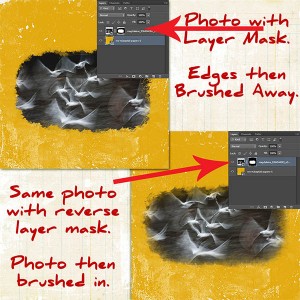
A guide on using a 'Reverse Layer Mask', as opposed to a regular Layer Mask, when blending photos onto a page.
A Reverse layer Mask is created when you click and hold ctrl/cmd, then, click on the 'Mask' icon.
Photo: Magdeleine
Papers from M3: Nancie Rowe Janitz (Sept'16) & Lynn-Marie(Aug'16)
