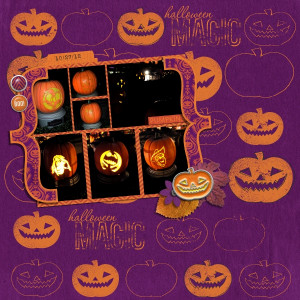

Hub Pumpkins
- Description
- MOC 2021 - Day 19 Create A Stamped Background
For the stamped background, I chose a solid purple paper from the Project Mouse Halloween Collection. Using my SBC4 program, I selected 3 flat stamp like pumpkin elements and added them with the option in my program "rubber stamp this image" in orange. I chose multiple versions of the rubber stamp - changing the threshold, coverage and pattern to get different looks of the stamp. I also chose a black for some outline pumpkin stamps. I also selected one of the Word Arts that is already stamp-like and stamped it, changing it's coverage and threshold.
Next, I added some items from Scrapping with Liz's template - Template Revisited 6 (retired) to use for my photo spots and cluster. I used Project Mouse - Halloween
