
What's new
Created for the November 2025 Journaling Challenge
Description
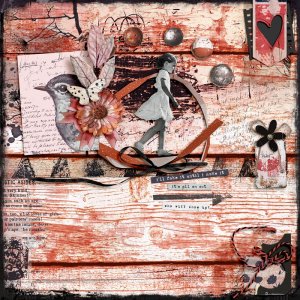
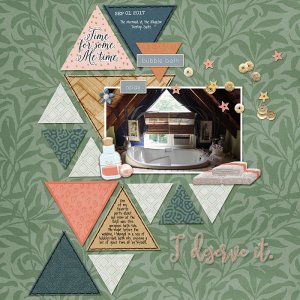
The challenge for November was to create a photoless page with journaling that tells a story or captures a memory. I used a technique that Lynn Grieveson shared in her newsletter. I used Fresco on my iPad to handwrite my journaling and then used it on my page. It's sort of hidden since it's personal, but I like the effect.

Confession: My son had gotten me the Pen to use with my iPad (since he works for Apple), but this was the first time I'd really used it, because I didn't know what Fresco was. I'm not an artist (like, I don't draw or paint), but I think I can figure out some cool ways to use this app. I pay for the Premium Adobe subscription, so it integrates right into Photoshop since it saves my projects to the Cloud. I could immediately see the saved journaling as a document to open in PS. And I can access anything I have in my Libraries...which now makes me want to go update that tool.

All that to say...I love technology!

CREDITS: Hear My Voice Collaborative Collection No. 28-Balancing from Rachel Jefferies and Lynn Grieveson; Studio Flergs Distressed Edge Overlay
  • Like
Reactions: cfile
Oh how cool! I love that you were able to use your Apple Pencil (Yay for your son's gift!) and hand wrote your journaling and then added it on your layout! That is such a cool personal touch to your page! I love that sweet little girl inside the circle of ribbon!
 
Oh how cool! I love that you were able to use your Apple Pencil (Yay for your son's gift!) and hand wrote your journaling and then added it on your layout! That is such a cool personal touch to your page! I love that sweet little girl inside the circle of ribbon!
Thanks! It's killing me that I didn't know I had access to this app all along! I don't know 1/4 of what PSCC has!
 
I'm happy that you could use your new pen. Your page is stunning, love the monochromatic design. Thanks for sharing.
 
So cool that you tried Fresco and used it for your journaling. I took a look at a YouTube video on it and found it interesting, but I have so many things and I don't draw much so to me I don't want to play around with something new, but love the effect. I also will write on white paper and then scan in my writing and then use a blend mode of multiply or linear burn to do basically the same thing :) How fun though and I love your page. I am glad that you did your journaling and then blended and hid it. wonderfuL!
 
So cool that you tried Fresco and used it for your journaling. I took a look at a YouTube video on it and found it interesting, but I have so many things and I don't draw much so to me I don't want to play around with something new, but love the effect. I also will write on white paper and then scan in my writing and then use a blend mode of multiply or linear burn to do basically the same thing :) How fun though and I love your page. I am glad that you did your journaling and then blended and hid it. wonderfuL!
I wish I could draw. I can't even stay in the lines to do a digital coloring page! LOL That's a good idea to just write journaling out on white paper and scan it in! Why didn't I think of that? LOL
 

Media information

Media category
Member Galleries
Added by
scrapchyck
Date added
View count
113
Comment count
5
Rating
0.00 star(s) 0 ratings

Image metadata

Filename
Faking-It.jpg
File size
245.4 KB
Dimensions
800px x 800px

Share this media

Back
Top