What's new
cfile

Light

  • Media owner cfile
  • Date added
Description
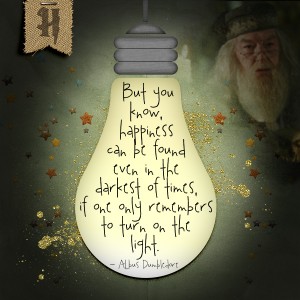
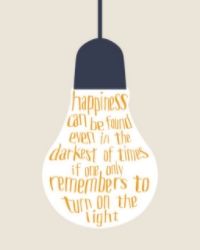
I had seen something like this on Pinterest and wanted to do one myself. The idea of quotes from the AJ Feb Week 1 really got me to play with this.. I love the text and I used a lightbulb shape and just had fun playing with gradients, making a vignette to produce the "light" glow and mask blending. TFL

my Inspiration:

Credits:
Etc by Danyale & Little Butterfly Wings | I Solemnly Sware Collab Kit
Mommyish | Stylin' #63 - Journal Card (texture I used for silver bulb end)
font: 2 Peas Ditzy
Photo of Dumbledore from internet (I brush masked underneath to have him painted into the bg)
Love Love Love!!
I also like that you blended in Dumbledore! Thank you for explaining how you created this!
 
@Sokee Thanks Barbara.. I showed my husband and turned off the vignette layer and whoa the difference was unbelieveable. It definitely needed the vignette!
Here is without:
20180207wovignette_zpsm2zql2tl.jpg
 
I hate to say this. But it was Dumbledore who drew me to your LO. :giggle:giggle:giggle

And I was not surprised to see that it's from you, Christa. Your style is so distinctive.

Using vignette to create that glow is an excellent idea! Gonna put that in my digital tricks book. Thanks for sharing!
 
wow you are on a roll ! This is so scrumptious ! No other word fits , I love it to bits. so clever with the vignette ,and I love the gold paint scatter in the light. @purlz76 you got a digital tricks book ?, sigh... now I have to start one of those !
 
It really feels like the light is on. That is amazing! Great fitting of the words into the bulb, too. I definitely can't do this yet.
 
@redplaid3 Oh Thanks Linda.. I didn't start out that way either with the vignette... once I put the gradient in the shape, I had white as the background... once I started adding the bg paper (before everything else) I said, hmmm I wonder if a vignette would make it glow? So I did it and then I lessened the opacity of the vignette layer and did exactly as I was envisioning :) I just played., then added the rest of the elements and mask brushed Dumbledore into the corner :) Re fitting the word into the bulb.. just make a selection and then on a new layer go to path and click to make the shape a working path and then type your quote into the path and arrange with sizing of text and spacing. It looks harder than it is.
 
This is cool!! I like it both way, but WOW it really stands out with the vignette!!!
 

Media information

Media category
Art Journaling
Added by
cfile
Date added
View count
1,577
Comment count
11
Rating
0.00 star(s) 0 ratings

Image metadata

Filename
20180207AJcard.jpg
File size
236 KB
Date taken
Thu, 08 February 2018 6:10 AM
Dimensions
600px x 600px

Share this media

Back
Top