What's new
scrapchyck

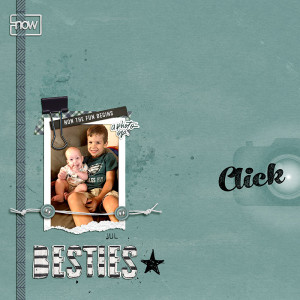
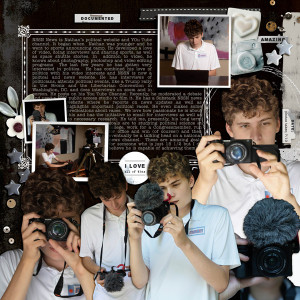
Besties

Description
For the July 2024 Inspiration Challenge. I was inspired by the color of the boy's t-shirt!

CREDITS: Elif Sahin Designs Zest for Life (background); Kim Jensen Emerson (paint-blended, tape, white twine, buttons, patterned paper); Rachel Jefferies (mixed media stamp); A Whimsical Adventure Frames No. 2; Lynn Grieveson Summer Freedom (word strip); Elif Sahin Designs Mediterranean (photo op word art); MPM-July 2024 Hullabaloo (Allison Pennington JUL stamp, Rachel Jefferies stamped alpha); NBK Design Art Crush 75 (black clip); Nini Goes Digi Catch the Moments (pocket card-blended; Flare Brushes by Karl 52; Anita Designs Reflections (click word art); Kim Jensen Currently Cliptastic (white "now")
  • Like
Reactions: LynnG
Love it! I want to learn how to clip a paper clip to my layouts like you did here. Someday I’ll take the time to struggle through it for the first time (and second, third and fourth ) and it will become something I know.
 
@BLKinOR I use Photoshop, so these tips are specific to that app. I duplicated the paper layer and put it on top of the clip, rasterized it, erased enough to expose the clip where it would be on top of the paper, then used the dodge and burn tools along where the clip would be under the paper to get the bulge-y effect. I put the drop shadow for the paper strip on the bottom layer that isn't modified. I know some people would use a mask, but I'm not that concerned about preserving "the original state" of the layer. Sometimes I still have to think about which item in a layering situation I need to duplicate, because I like to run string and ribbon through letters and stuff like that, but once I get it, then it's a pretty quick technique with great wow factor sometimes. I really like how this one turned out, so thanks for noticing!
 
@Angela Toucan, that is a wonderful tutorial. Thank you for sharing it. I’ll give it a try next week when I’m back home where I can keep the tutorial open on my iMac while I work on my iPad. It seems straight forward enough to easily change to Affinity Photo. @scrapchyck, thank you for your alternate technique, I’ll give that one a try also. I’m not sure why I’ve delayed learning this.
 

Media information

Media category
Inspiration Challenge
Added by
scrapchyck
Date added
View count
202
Comment count
6
Rating
0.00 star(s) 0 ratings

Image metadata

Filename
Besties.jpg
File size
253.4 KB
Dimensions
800px x 800px

Share this media

Back
Top