
What's new
cfile

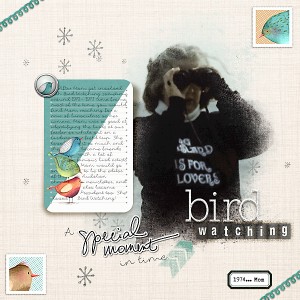
A Special Moment in time.. Bird watching (Slow Scrap 12/20)

  • Media owner cfile
  • Date added
Description
CVW_SupplyTracker
font: the Bold Beauty by HJoyce
font: Fox in the snow
Birds_stacked by Lis Glanz
KH-doodledlinesbg 3
SBasic_HisAndHers_s01
prd_downtown_alpha “watching”
prd_dreams_arrows_plastic
prd_thesparklyseason_brad_bird
prd_thesparklyseason_label_black
prd_thesparklyseason_poststamp_bird_gold
prd_thesparklyseason_poststamp_bird_white
prd_thesparklyseason_pp_07A
prd_thesparklyseason_ribbon_loops
prd_thesparklyseason_snowstar_stamp
prd_thesparklyseason_snowwhite_balpha “bird”
prd_thesparklyseason_wa_specialmoment_sticker

I wrote a quick tutorial for PSE users on how I did the shadow on the journaling card. If interested you can see that here: https://the-lilypad.com/forum/threads/pse-realistic-shadowing-of-a-journal-card.46126/#post-813616
  • Like
Reactions: MrsPeel
That makes much more sense!!!! Separate and wave. Seems simple enough. I have PSE 12, but I'm sure I watched Cheryl do this in a tutorial. She also used Nudge tool I think. Or smudge or something. I will go find it. I know I have and have read the wave action. I only remember that for layered paper!
 
@klee73010 well let me know if you have issues.. if so I can try it in PSE15 and help you out with it.

Re Cheryl when she does her PSE watch her scrap, she will go and take the shadow and move it off to the side of the image so then she can use the lasso and then put that shadow on a seperate later.. I will look to see if there is a wave or something in PSE but that is how you seperate shadows in PSE you move the shadow way out to the side of the object and then lasso and cut to put on a seperate layer.
 

Media information

Media category
Speed Scraps
Added by
cfile
Date added
View count
1,103
Comment count
13
Rating
0.00 star(s) 0 ratings

Image metadata

Filename
20161220birdwatching.jpg
File size
236.3 KB
Dimensions
600px x 600px

Share this media

Back
Top