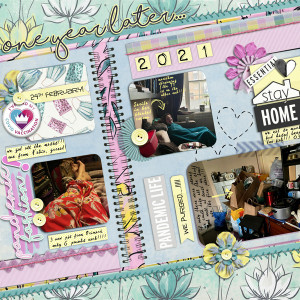
If you know me, you know I am a fan of pages made with spiral notebook background, or any notebook really, but the spirals are easier for me to make on my own, but a template is a blessing... now I didn't realize Gina's here didn't have PNGs, my program flattens psd, but I was so determined to scrap this... I found a way around it. If you scrap on Craft Artist, scroll down after the credits, I ll explain you what to do

with these awesome
NEW RELEASES ON SALE this weekend
Gina Miller : One Year Later Template Duo
https://the-lilypad.com/store/One-Year-Later-Template-Duo.html
One Year Later Kit
https://the-lilypad.com/store/One-Year-Later.html
& One Year Later Tiny Cards
https://the-lilypad.com/store/One-Year-Later-Tiny-Notecards.html
all on sale this weekend!
to use the template on Craft Artist : I put the PSD in the Photos area on the left hand side.
Then on top of it, I tried with blending modes to see which paper would blend still showing the spiral, once I was happy (the pinkish patterned), I cut the paper to fit the part of the notebook fist I got rid of the two little triangular pieces ion top & bottom, then cut the pieces on top of the two pages of the notebook, getting rid of that part, then placed another paper (the light blue ) to make the two pages -cut one square and then the other- by clicking on the scissors tool and eliminating what paper was around each page.
then I cut all the pieces needed - the photo I used the shape maker so I could make the rounded corners, and clipped my shapes to the photos, then the borders, the journaling bits, used one of the Tiny cards on the right hand side, and cut a piece from another (the bit with "pandemic life") added the elements and title...voila!!!
TFL!!!