Found It!

bestcee

In love with places I've never been to
Joined
Dec 18, 2013
Messages
19,337
Sigh. Do you ever lose that one kit or element that you know you have, you know what it looks like, but can't find it? And it drives you batty?
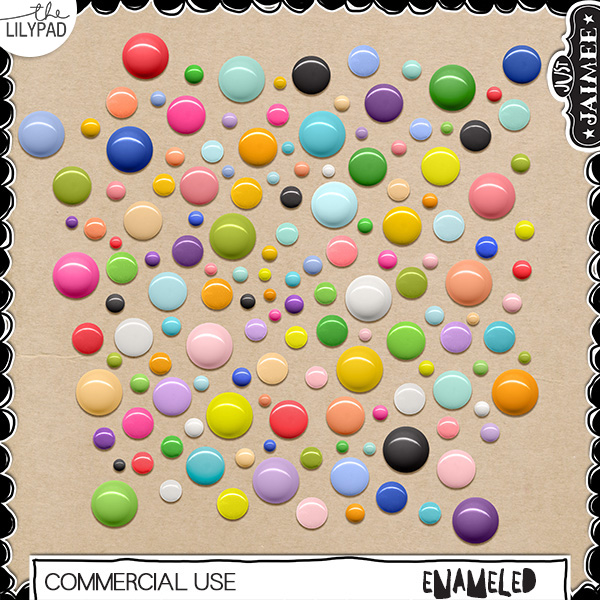
I knew with a passion that I had a set of enamel dots. I was pretty sure they were by Jaimee, but I couldn't find it.

And then I searched my other EHD. #ScrapGirlProblems. And now I know one of my goals needs to be organize my digi stuff onto 1 EHD. I thought I was organized. But apparently I forgot about the other EHD, and I just spotted a 3rd one. Whoops! I guess I should stop buying new ones when I run out of space. :giggle Please tell me I'm not the only one!

Look how pretty they are!
 
Ugh... I so feel your pain. I had a project once that I really wanted a specific paper for, I knew I had one just like it and I spent HOURS looking for that paper. I never did find it though and I never delete anything so I'm not sure if I just remembered it from seeing it in the store and I never actually purchased it or what. So frustrating! Lol! Glad you found your dots! They are so fun! I might have to go play with 'em!
 
I'm with you Courtney @bestcee, I really need to get organized and purge files. I have 11 years of digi stuff. 5 EHDs, 1 desktop, and 3 laptops that have various digi stuff on them - oy!. I always start out with good intentions to get organized, but then life happens and the organizing doesn't. I moved the files over that I use regularly to my new laptop, but haven't tackled anything else. I need to delete crazily like Anne @AnneofAlamo does and put it all on one drive like Michele @michelepixels.
 
Consider your priorities on disk space. I like all my stash to be available at all times, so I have it on my laptop. However, that means that all my pictures have to be on an EHD. It also means that all my completed projects are stored on an EHD. Only current projects will fit on the laptop.

But yes, organizing all this and then being able to find it again is challenging. There have been several threads posted with ideas on how to organize, but for the biggest challenge is making myself do it! One thing that does work for me is if I have trouble finding something, when I do find it, I then take the time to tag the elements in that kit, so next time it is less work to find it.
 
i have found, i don't unzip all the zips, or even the kit itself. wonder how much i am missing
 
I hate when I want a product I know I have but can't remember what it's called, so I can do a search for it. I try to remember to tag certain things I know I'll want to use a lot but I'm so bad at remembering to do that. So yes....I too have spent way too much time searching for something that would have been just moments to find had I tagged it.
 
Those dots look so much like English Smarties that I'm thinking about chocolate now!

I have had this happen to me also and once in a while I have to go back to the sku code because about 6 months into scrapping I started saving all my zips because I was losing supplies without good organization. Now all my supplies are in one place and mostly sorted the way I want and tagged. MPM and BYOC have been my stumbling blocks but as i buy less I have time to organize and find. I don't purge supplies as much as i purge photos.
 
I lose kits and templates all the time. It's gotten so bad, that I now make sure I really look in the trash before emptying it. And even then, I still miss things. Sometimes I can find what I'm looking for on my EHD or even my Time Machine backup, but sometimes they are just completely gone.
 
Okay, I NEED those enamel dots! And I need @justjaimee to make a glittered variety, too, pretty please!!! :)

I know I sound like a Lightroom evangelist or something, but it will actually catalog everything on your EHDs and let you browse/search those items whether the hard drive is connected or not! Of course, to use the items you'll have to hook the drive up, but it'll also show you which drive it is on. :)
 
Love the dots too!!

I cannot imagine deleting old(er) kits though!! I have kits from 2006 that I'll never open again but I just can't part with them! (And I'm pretty OCD when it comes to clutter - lol - they are all neatly filed away)!!
 
This is me. There is constant turnover of my supplies. :)
There is in my house too. The problem is I purge to an Ehd. Lol. I need to get delete happy, but I'm afraid too!
@michelepixels I thought my stash minus retired designers was on 1 ehd, and backed up on a second. Then I remembered the horrible period when my USB ports were dying, so I thought the ehd was dead, but it's not. So I just need to see what's on it.
 
I know I sound like a Lightroom evangelist or something, but it will actually catalog everything on your EHDs and let you browse/search those items whether the hard drive is connected or not! Of course, to use the items you'll have to hook the drive up, but it'll also show you which drive it is on.

One thing at a time! Lol. I chose photos this year as my Lightroom project. I'm thinking supplies will be next year's. I just have to decide how I want it to work for me.
 
All my supplies are on my EHD, along with my photos, BUT since I lost my entire ACDSee catalog recently, I'm struggling to find things, especially since I've not been able to dedicate time to tagging again.

I have an older version of ACDSEE (12 I think it is) and I had tagged and lost everything when my system crashed. I never got it to load properly after that. I gave up b/c the support people weren't any help. It is visually very nice and has a great tagging system but who has time for that? Tagging just one kit takes forever.
 
I have an older version of ACDSEE (12 I think it is) and I had tagged and lost everything when my system crashed. I never got it to load properly after that. I gave up b/c the support people weren't any help. It is visually very nice and has a great tagging system but who has time for that? Tagging just one kit takes forever.

I never tagged too specifically until the very end.

Most of my tagging was by store, designer, or by kit name if there was a collection, like BYOC or something, that I wanted to see all at once without unpacking every single folder.

That's all I'm doing now . . . tagging by designer, store, and then theme, with a few supplies tagged if there is something that I reach for frequently. It's a waste of time for me to do more, as I usually don't mix kits on a routine basis.
 
@gonewiththewind What version do you have? I would imagine it has changed in newer versions. I wonder if it is any easier now, although I guess any tagging is time consuming. Also there must be a way to save your tagging in case of computer crashes. I never found out so not sure.
 
Back
Top