
- Joined
- Nov 28, 2009
- Messages
- 15,789
Welcome to your 5th MOC Challenge of 2016! I hope you are enjoying the fun and excitement as much as I am! 
This is a photography challenge. You must include at least one "imperfect" photo in your project. The photos can be old or new. They may be taken by you or by a friend or family member, but you cannot use stock photos.
This challenge is all about taking those photos that might not be technically perfect and scrapping them in a way that captures that moment. The photos might be blurry, or have ugly colors or a distracting background or an uncooperative subject, but they can still have meaning to us, spark a memory, or just make us smile.
There are unlimited ways to handle these imperfect treasures. For example, if a photo is blurry you can experiment with sharpening techniques. You can blow it up and blend it into the background for a more artsy feel. You can make it smaller on the page to minimize the impact of the blur. If the colors are distracting, you can convert it to black and white, or add filters to change the mood. If the background is messy, you can play with cropping, or clone out stray objects or people, or creatively arrange elements over the offending items. Any method you choose to rock that photo is perfectly ok!
Or you can just fully embrace the imperfection and use the photo "as is". The imperfection can be part of the story. Journal about why Johnny is making that awful face, or how you only had a split-second to capture that shot of Jane halfway out the door as she headed out on her grand adventure, or how all the pictures from your beautiful vacation came out blurry because you didn't know how to use your new camera, or how the chaotic sea of laundry and spilled cereal behind your perfect little angel tells a bigger story.
You may use any technique you like and create any style of page or project you like. When you post your page in your layouts thread, you must include a short explanation of why the photo was imperfect (how you interpreted the challenge). (E.g., "I converted to black and white due to distracting colors", or "I cropped out the tree sticking out of Sally's head", or "I used this photo with my thumb half-blocking the lens in all its original imperfect glory".) While not required, if you altered the photo, I would also love to see the original unaltered version included either here in this thread or in your gallery description.
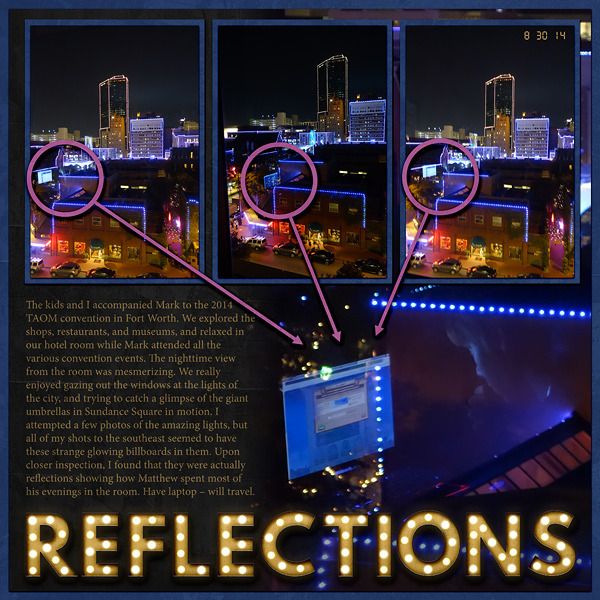
Here's my imperfect inspiration. My photos of the city at night were “ruined” by odd reflections of my son using his laptop near the window. Since the laptop in the hotel room thing is pretty typical of any of our trips, I decided to embrace the reflections and include this aspect as part of the story. I enlarged one of the photos where you could most clearly see the reflection of his face as well as the laptop, and then used callouts to link in the reflections in the other shots. The journaling tells the story of why I took the photos, as well as explaining the reflections.
Requirements:
1. Your page/project must include at least one "imperfect" photo. No stock photos.
2. You must state why the photo was imperfect in your individual layouts thread. (This is important for Julie's final verification check.)
Your page must be a new page in order to count for the Month of Challenges. Please post your page in your page thread you created in this forum. You should have one post per completed challenge page. If you complete all 31 challenges, your thread should contain 31 posts. Please do not comment in the participants’ page threads so we can keep them clean. You should also post your page here in this thread, and people can comment here if they wish. Pages should contain at least 75% current Lilypad product (currently for sale in the store from either permanent designers or guest designers).
Go forth and embrace imperfection!
This is a photography challenge. You must include at least one "imperfect" photo in your project. The photos can be old or new. They may be taken by you or by a friend or family member, but you cannot use stock photos.
This challenge is all about taking those photos that might not be technically perfect and scrapping them in a way that captures that moment. The photos might be blurry, or have ugly colors or a distracting background or an uncooperative subject, but they can still have meaning to us, spark a memory, or just make us smile.
There are unlimited ways to handle these imperfect treasures. For example, if a photo is blurry you can experiment with sharpening techniques. You can blow it up and blend it into the background for a more artsy feel. You can make it smaller on the page to minimize the impact of the blur. If the colors are distracting, you can convert it to black and white, or add filters to change the mood. If the background is messy, you can play with cropping, or clone out stray objects or people, or creatively arrange elements over the offending items. Any method you choose to rock that photo is perfectly ok!
Or you can just fully embrace the imperfection and use the photo "as is". The imperfection can be part of the story. Journal about why Johnny is making that awful face, or how you only had a split-second to capture that shot of Jane halfway out the door as she headed out on her grand adventure, or how all the pictures from your beautiful vacation came out blurry because you didn't know how to use your new camera, or how the chaotic sea of laundry and spilled cereal behind your perfect little angel tells a bigger story.
You may use any technique you like and create any style of page or project you like. When you post your page in your layouts thread, you must include a short explanation of why the photo was imperfect (how you interpreted the challenge). (E.g., "I converted to black and white due to distracting colors", or "I cropped out the tree sticking out of Sally's head", or "I used this photo with my thumb half-blocking the lens in all its original imperfect glory".) While not required, if you altered the photo, I would also love to see the original unaltered version included either here in this thread or in your gallery description.
Here's my imperfect inspiration. My photos of the city at night were “ruined” by odd reflections of my son using his laptop near the window. Since the laptop in the hotel room thing is pretty typical of any of our trips, I decided to embrace the reflections and include this aspect as part of the story. I enlarged one of the photos where you could most clearly see the reflection of his face as well as the laptop, and then used callouts to link in the reflections in the other shots. The journaling tells the story of why I took the photos, as well as explaining the reflections.
Requirements:
1. Your page/project must include at least one "imperfect" photo. No stock photos.
2. You must state why the photo was imperfect in your individual layouts thread. (This is important for Julie's final verification check.)
Your page must be a new page in order to count for the Month of Challenges. Please post your page in your page thread you created in this forum. You should have one post per completed challenge page. If you complete all 31 challenges, your thread should contain 31 posts. Please do not comment in the participants’ page threads so we can keep them clean. You should also post your page here in this thread, and people can comment here if they wish. Pages should contain at least 75% current Lilypad product (currently for sale in the store from either permanent designers or guest designers).
Go forth and embrace imperfection!
Last edited:


 Love this challenge Kim!


